A React visual editor lets you change a React interface with design controls instead of editing JSX by hand. You select an element and set its layout, spacing, color or copy. The tools that use the name do one of three things with your code. Some edit the components in your repository and hand engineers a diff or a pull request. Some place your registered components on pages that live in their own CMS. Some generate their own code or a new app, which someone then moves into the product. Find out which one a tool is before you compare features.
Fast answers:
- Edit the React app you already ship: Builder Code, Onlook, Cursor Design Mode, Subframe or Modeinspect.
- Let a content team build pages from your components: Builder Content, Plasmic or Makeswift.
- Build a page editor into your own product: Puck or Craft.js, which are libraries.
- Develop and document components in isolation: Storybook. It is a workshop, not an editor.
Key takeaways
- "React visual editor" names three different things. Some tools edit the components in your repo and hand engineers a pull request. Some arrange your registered components into pages that live in their CMS. Some generate their own code or a new app. Decide which one you need before comparing features.
- What a tool can see of your code decides what you get out of it. An editor that reads your repo can reuse your Button and your tokens. One that cannot see it recreates them, and the copies drift.
- Test it with one small change on your own codebase and read the diff. It should touch the lines that changed and nothing else, use your theme's classes instead of pixel values, and land where your team already reviews.
- Check which way changes sync. Code keeps moving after the design session, and a tool with its own source of truth can overwrite engineers' edits or fall behind them.
- Scope is where most tools stop: a specific framework, a styling system, a local setup an engineer has to run. Match that to who will use the tool day to day.
What is a React visual editor?
Definition
A React visual editor changes a React interface through direct manipulation (selecting, dragging, setting properties in a panel) and turns those changes into code or content. What it produces depends on how much of your codebase it can see.
The term covers two jobs. One is editing your own product: a designer or engineer changes the running app, and the change lands in the repo. The other is building pages from parts: developers register components, and a marketing or content team arranges them into pages without a deploy. Search results mix the two, so one article's "visual editor for React" is a page-builder library and the next one's is a design tool.
Two nearby phrases mean something else again. A "WYSIWYG React editor" is usually a rich-text component for formatted text in a form or a CMS. A "visual editor for code" can mean a code editor such as VS Code, or a tool like Onlook that edits the code of a running app. Only the second edits the interface visually.
This page is mostly about the first job, editing the product you ship. That is the design in code route in the four routes from a design to a pull request. The deciding question is the same there: how much of the real codebase does the tool see before it writes anything?
What a visual React editor sees of your code
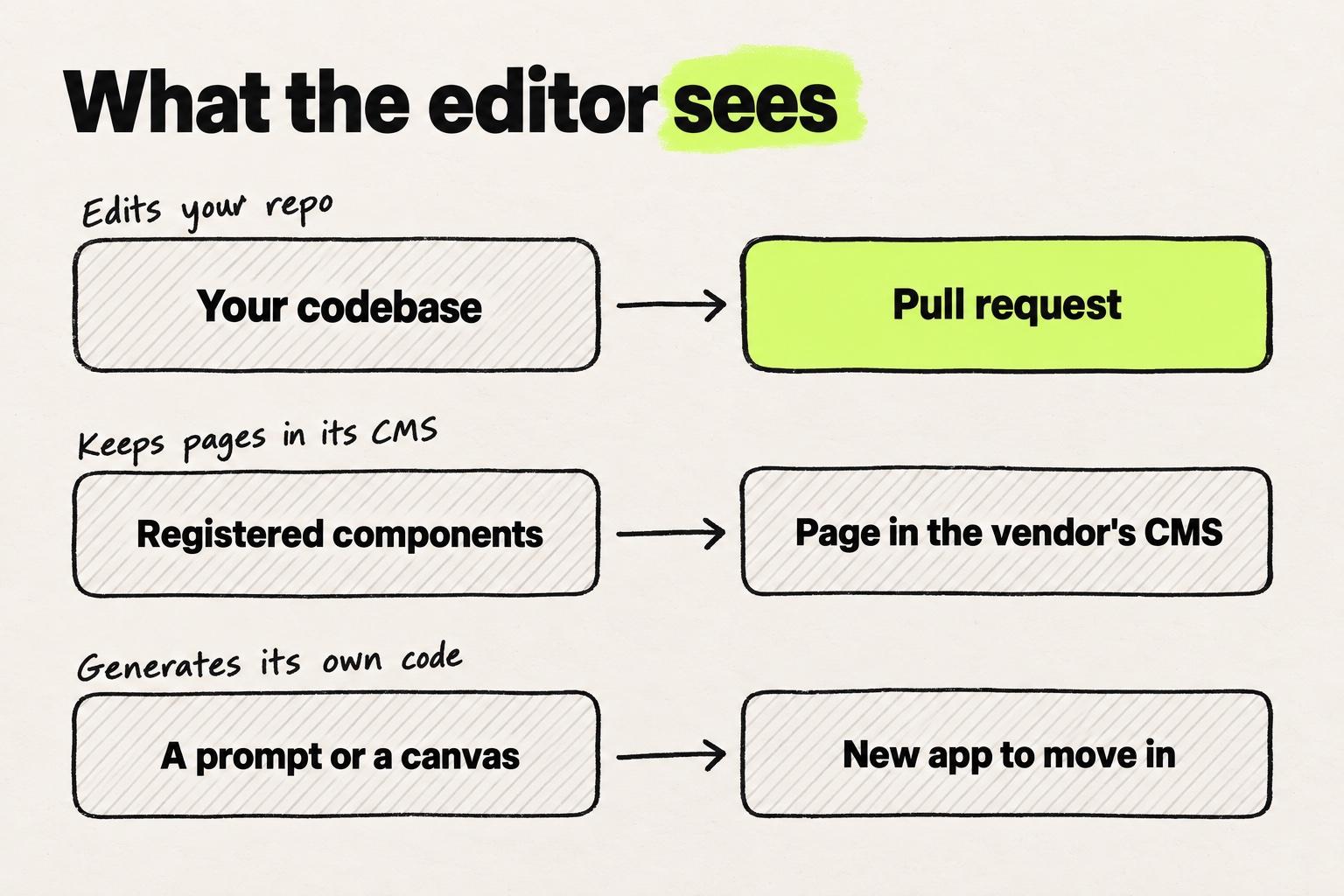
Sort the tools by what they can see, and the rest of the comparison follows. There are three groups, plus libraries you build into your own app.
It edits the components in your repo
These editors open your codebase, render the running app and write each change back to the source files. The output is a diff, a commit or a pull request that engineers review.
- Builder Code, called Fusion until September 2026, says it uses "your components, tokens, and usage patterns" and packages work "into branches and pull requests" (Builder Code). It supports React, Next.js, Vue, Svelte and Angular (Builder Code), with GitHub, GitLab, Azure DevOps and Bitbucket (Builder.io docs).
- Onlook reads a Next.js project's routes, components, Tailwind config and theme tokens. It "writes the underlying TypeScript directly back to your code", and the team reviews the diff in git (Onlook). Its repo says it focuses on "Next.js and TailwindCSS for now" (GitHub).
- Cursor Design Mode lets you "click an element, draw on the page, or describe a change by voice", and Cursor's agent edits the code (Cursor docs). Since August 2026 it also works in a cloud agent's environment (Cursor changelog).
- Subframe calls itself "a design tool for your codebase, and a coding agent with a canvas". Its macOS app "reads and writes local files" (Subframe), with first-class support for React and Tailwind (Subframe docs).
- Modeinspect opens a connected codebase as a design canvas in a private cloud environment, so there is no local setup. It uses your components one to one, reads tokens from the repo, and a change leaves as a pull request with specs and preview links. It supports Next.js React codebases that use Tailwind. A new project can also start in it and become a GitHub repository.
Paper sits next to this group. Its canvas is HTML and CSS, and your coding agent syncs "design tokens, styles, and components between your codebase and your canvas" over MCP. The code change comes from your agent, not from Paper (Paper).
It renders your registered components from its own CMS
Here a developer registers a set of components with the tool, and a content team arranges them into pages. Builder and Plasmic store the pages, and Makeswift publishes them from its hosted builder, so publishing a page does not need a pull request.
- Builder Content, formerly Publish, serves its pages into your site through a package your developers install, and developers register the components editors can use (Builder.io docs). Builder's Next.js guide says a published page is served "on the next request", with "No PR, no build trigger" (Builder.io).
- Plasmic has two modes. With the Headless API, "No Plasmic-generated code is checked into your git repo", and Plasmic recommends it for most projects. With codegen, Plasmic's command-line tool pulls generated React code into your repo (Plasmic docs). Your own code components need a host page in your app (Plasmic docs).
- Makeswift, part of BigCommerce, is a visual builder for Next.js, and registering your components "Adds your components to the Makeswift builder" (Makeswift docs).
This model suits marketing pages, landing pages and content that a non-engineer should change without a release. It does not change the product's own components. The Button stays whatever its code says, and the CMS only changes where it appears and which props it gets.
It generates its own code or a new app
These tools start from a prompt, a canvas or their own component set. The code they produce has to be merged or moved into your product.
- v0 Design Mode lets you "select any element in the live preview" and tweak its styles in a visual panel, and it detects Tailwind (v0 docs). v0 can also import an existing GitHub repo and open a pull request (v0 docs), which moves it toward the first group.
- Subframe's own components are generated as React and Tailwind and synced into your repo. That sync "is one-way from Subframe to your codebase", and local edits to synced files are overwritten (Subframe docs).
- Lovable builds a new app, and "You can only export from Lovable to GitHub, not the other way around" (Lovable docs).
Plasmic's codegen mode fits here too. The AI tools in this group are compared in AI tools for designers, sorted by where the output lands. For prototypes and new projects, generated code is fine. For a product that exists, it is a second set of components that someone has to reconcile with the first. Figma to React, method by method covers the same problem from the Figma side.
It is a library you embed in your own app
Some results for "react visual editor" are libraries. You use them to build a page editor into your product, for your customers or your content team. Puck is "The agentic visual editor for React", MIT licensed, and stores its output as JSON in your own backend (Puck). Craft.js is "A React Framework for building extensible drag and drop page editors", MIT licensed, with no release since February 2025 (GitHub). Both are developer tools. Neither edits the app you ship.
React visual editors compared
| Tool (checked 5 October 2026) | What it sees of your code | Where a change lands | Framework and styling | Free plan and starting paid price |
|---|---|---|---|---|
| Builder Code | Your repo | Branch and pull request, or a direct commit | React, Next.js, Vue, Svelte, Angular | Free, Pro $24 per user a month billed annually, $30 monthly |
| Onlook | Your repo | Code written back to your files, reviewed in git | Next.js and Tailwind | Free self-hosted, hosted closed beta with custom pricing |
| Cursor Design Mode | Your repo, open in Cursor | Agent edit in the open repo | Not stated | Pro $20 a month |
| Subframe | Your local repo, plus its own components | Local file edits, one-way component sync | React and Tailwind | Free for one project, Pro $20 per editor a month |
| Modeinspect | Your repo, in a private cloud environment | Pull request | Next.js React with Tailwind | Free Hobby, Pro $20 a month per person |
| Paper | Its own HTML and CSS canvas, your code through your agent | Code written by your coding agent | No requirement stated | Free with 100 MCP calls a week, Pro $16 per editor a month billed yearly |
| Builder Content | Registered components | Page in Builder's CMS | Next.js and other frameworks | Same plans as Builder Code |
| Plasmic | Registered code components | Page in Plasmic, or generated code you commit | React, Next.js App and Pages Router | Free, Starter $39 a month billed yearly |
| Makeswift | Registered components | Page published from Makeswift's builder | Next.js | Basic free, Growth $39 a month |
| v0 Design Mode | A v0 project, or a repo through Git Import | New chat version, or a pull request with Git Import | Detects Tailwind | Free, Plus $30 per user a month |
| Puck | Components you pass to it | JSON in your database | React | Free, MIT licensed library |
| Storybook | Components in isolation | Story files | React and other frameworks | Free, open source |
Prices come from Builder.io, Onlook, Cursor, Subframe, Modeinspect, Paper, Plasmic, Makeswift and v0.
Read down the second and third columns. The repo editors put a design change into the product's own code, where engineers review it. The CMS builders change pages without touching code, and the generators produce code that still has to be moved in. Converters, editors and coding agents get a wider comparison in design to code tools compared.
What to look for in a React visual editor
Six questions separate a good demo from a tool your team keeps using. Ask them on your own codebase, with a real component, before you commit.
1. Does it use your components, or copies of them?
Open a screen and change a button. A repo editor should show your Button, with its props, and change the file it lives in. A tool that recreates it has made a look-alike, and two Buttons will drift apart. Also check what an edit reaches. Designers we talk to keep asking two things. Does this change one usage of the component or every usage? And how do I know nothing else in the app changed?
2. Does it use your tokens and your styling system?
A spacing change should come out as your theme's value, such as a Tailwind class from your config. An arbitrary pixel value or an inline style looks right today and drifts the day the palette changes. How design tokens travel from Figma into code covers the token side.
3. Would an engineer merge the diff?
Make a small change and read the diff. It should touch the lines that changed and nothing else, with no reformatted file, reshuffled imports or new wrapper components. When the diff is bigger than the change, review slows down and the team stops trusting the tool. A walkthrough of a designer's first pull request shows what a reviewable change looks like.
4. Where does the output land?
A pull request goes through code review. A direct commit skips it unless the repo requires a review first. A page in a vendor's CMS ships when someone presses publish, and a new app has to be moved in by hand. Each one puts the change with a different owner, so pick the one that matches who should approve it.
5. What happens when an engineer changes the code?
Code keeps moving after the design session, so check which way changes sync. A repo editor works from the code in the repo. A tool with its own source of truth can fall behind. Subframe's synced components, for example, overwrite local edits on the next sync (Subframe docs). We have seen a team whose designers shipped to production from a design tool, with developers reviewing. Then the developers changed the code, and those changes never made it back into the tool.
6. What framework, styling and setup does it need?
Scope is where most of these tools stop. Onlook focuses on Next.js and Tailwind. Subframe's desktop app is macOS only for now (Subframe docs). Plasmic needs a host page in your app before it can use your components. Cursor Design Mode runs the app in Cursor's browser, on your machine or in a cloud agent. Ask who sets the tool up and who keeps it running. Running the app on your own machine is routine for engineers. We have seen designers stop at this step, without access to the repo or to settings only an engineer can supply.
Is there a Next.js visual editor?
Yes, of both kinds. To edit a Next.js app's own code, Onlook is built around Next.js with Tailwind, Builder Code lists Next.js among its frameworks, and Subframe has a Next.js guide. Modeinspect works on Next.js React codebases that use Tailwind. Cursor Design Mode states no framework requirement.
To let a content team build pages, Builder Content, Plasmic and Makeswift each serve their pages inside a Next.js site (Builder.io, Plasmic docs, Makeswift docs). Developers set that up once. After that, pages change in the builder without a release, and the components stay as the code defines them.
Is Storybook a visual editor?
No. Storybook is a "frontend workshop for building UI components and pages in isolation" (Storybook). Its Controls panel lets you change a component's props "without needing to code", and you can save a control's value back to the story file (Storybook docs). It does not edit a component's layout, styles or source, and it never touches your product's screens.
It still matters when you pick an editor. If your components are documented in Storybook, the editor should change the components production uses, not a Storybook version that has drifted from them. One five-person design team told us their drift came mainly from components in Storybook that no longer matched production.
Which React visual editor fits your team
- Designers change the product, and engineers review. Pick a repo editor: Builder Code, Onlook, Cursor Design Mode, Subframe or Modeinspect. Your framework and the choice between a local and a hosted setup narrow it down. If your team already runs Cursor, the Figma to code workflow in Cursor pairs with Design Mode. The design engineer's tool stack lays out three starter stacks, by where you work today.
- Marketing owns pages, and engineering owns components. Builder Content, Plasmic or Makeswift.
- You need a prototype or a new project. v0 or Lovable, and expect to move the code in later. More options are in prototyping tools for product teams.
- You are building a page editor for your users. Puck, or Craft.js if its release pace is acceptable.
- Your designers also want to leave Figma. That is a separate decision, covered in Figma alternatives for product teams that ship code.
Frequently asked questions
Can designers edit React components visually without writing code?
Yes, within each tool's scope. Repo editors such as Builder Code, Onlook, Cursor Design Mode, Subframe and Modeinspect give designers layout and style controls on the running app. The tool or its agent writes the code. Engineers still review the change. Check that your framework and styling system are supported before you start.
Is there an open-source React visual editor?
Yes. Onlook is Apache 2.0 and free to self-host. Puck and Craft.js are MIT licensed libraries for building page editors. Plasmic is MIT licensed except its platform code, which is AGPL (GitHub). GrapesJS is BSD-3 licensed and not specific to React (GitHub).
What happened to Codux?
Codux, Wix's visual editor for React projects, has wound down. Its last release was in February 2025, and its versions repository was archived in September 2025 (GitHub). The Codux site now says "The Codux journey may be over" and points to a new product called DAZL (Codux).
Do React visual editors work with Tailwind?
Several do. Onlook and Modeinspect work on Next.js codebases that use Tailwind, Subframe generates React with Tailwind, and v0 Design Mode detects Tailwind in your app. The test is whether edits use your theme's classes or arbitrary values, so read the diff after a spacing change.
Is a WYSIWYG React editor the same as a visual editor?
Usually not. "WYSIWYG React editor" mostly refers to rich-text components for writing formatted text inside an app or a CMS. A React visual editor changes the interface itself: its layout, components and styles.