The best Claude Design alternative depends on where the design has to go next. Claude Design makes polished screens and prototypes, and then the work leaves it. Pick the alternative by where it has to land:
- Back into Figma: the Figma agent, Figma Make and Figma's MCP server.
- Another prompt-to-UI canvas: Google Stitch.
- A new working app: v0 or Lovable.
- A change to the product you ship: a canvas on your real codebase, such as Onlook or Cursor Design Mode, or a coding agent such as Claude Code.
Claude Design and eleven alternatives sit side by side, with starting prices, in the comparison table. The wider field is in AI tools for designers, sorted by where the output lands.
Swapping Claude Design for another generator keeps the step where a coding agent rebuilds the design in your repo, which is where designs drift.
Key takeaways
- Pick a Claude Design alternative by where the design has to land: a Figma file, a new app or the product your team ships.
- Another prompt-to-UI tool keeps the rebuild. A coding agent still turns the design into code, and that is where components get recreated and values hardcoded.
- Claude Design now draws from the same usage limits as the rest of Claude, including Claude Code. A long design session spends the headroom your coding agent needs.
- Claude Design is still a strong pick for exploring directions, for decks and one-pagers, and for designers who already hand off to Claude Code.
What Claude Design does well
Anthropic launched Claude Design as "a new Anthropic Labs product" that "lets you collaborate with Claude to create polished visual work like designs, prototypes, slides, one-pagers, and more" (Anthropic). You can "start from a text prompt, upload images and documents (DOCX, PPTX, XLSX), or point Claude at your codebase."
You refine designs visually. You can "comment inline on specific elements, edit text directly, or use adjustment knobs to tweak spacing, color, and layout live" (Anthropic). Since June, you can also "drag, resize, and align elements" (Claude blog).
The June update also rebuilt the design system work. Anthropic says "Claude builds with your components, checks its output against your design system, and makes corrections before you see it" (Claude blog). You build the system from Figma files, decks, uploads and connected apps, or run /design-sync in Claude Code when it already exists as React components (Claude Help Center).
Finished work leaves as a copy or a handoff. Files go out as a .zip, PDF, PPTX, Google Slides or standalone HTML. Designs go to Canva, Adobe, Gamma, Miro, Lovable, v0, Replit, Vercel, Wix and others. Code goes to Claude Code, locally or on the web (Claude Help Center). None of them is Figma.
Every exit from Claude Design is a copy or a handoff, and none of them is Figma.
- FilesA copy of the design
.zipPDFPPTXGoogle SlidesStandalone HTML - Other appsA copy in another tool
CanvaAdobeGammaMiroLovablev0ReplitVercelWixand more - Claude CodeA coding agent builds it in your repo
Send to local coding agentSend to Claude Code Web - FigmaNot on the export list
- Anthropic lists no Figma export. Figma's MCP server lets an agent such as Claude Code draw a design again as Figma layers.
Claude Design is on every Claude plan, Free included, and "it's on by default" (Claude Help Center). It is also moving into Claude itself as artifacts, and the standalone site at claude.ai/design closes on 14 December (Claude Help Center).
Nate Parrott, the product designer who built Claude Design, draws its limit himself on Anthropic's blog: "And if you're shipping production software, stick with Claude Code."
Why designers look for a Claude Design alternative
You are probably the designer on a product team who tried Claude Design on a real feature, not a deck. The screens looked right until an engineer, or Claude Code, had to build them.
Claude Design usage limits
At launch in April, Claude Design had its own weekly allowance. On Hacker News, mickdarling wrote: "Then I looked at the usage and it said I had used 95% of my Claude design usage for the week!" Another commenter, qingcharles, wrote: "It produced great results for me, in 10 mins, and then my usage was blown and now I have to wait a week."
Anthropic has since moved Claude Design onto shared limits. Design work "draws from the same pool as the rest of your work with Claude, including Claude Code" (Claude Help Center). When you hit the limit, Claude Design "is unavailable until your limits reset," unless you have turned on usage credits. Anthropic expects "much more headroom" for most people (Claude blog).
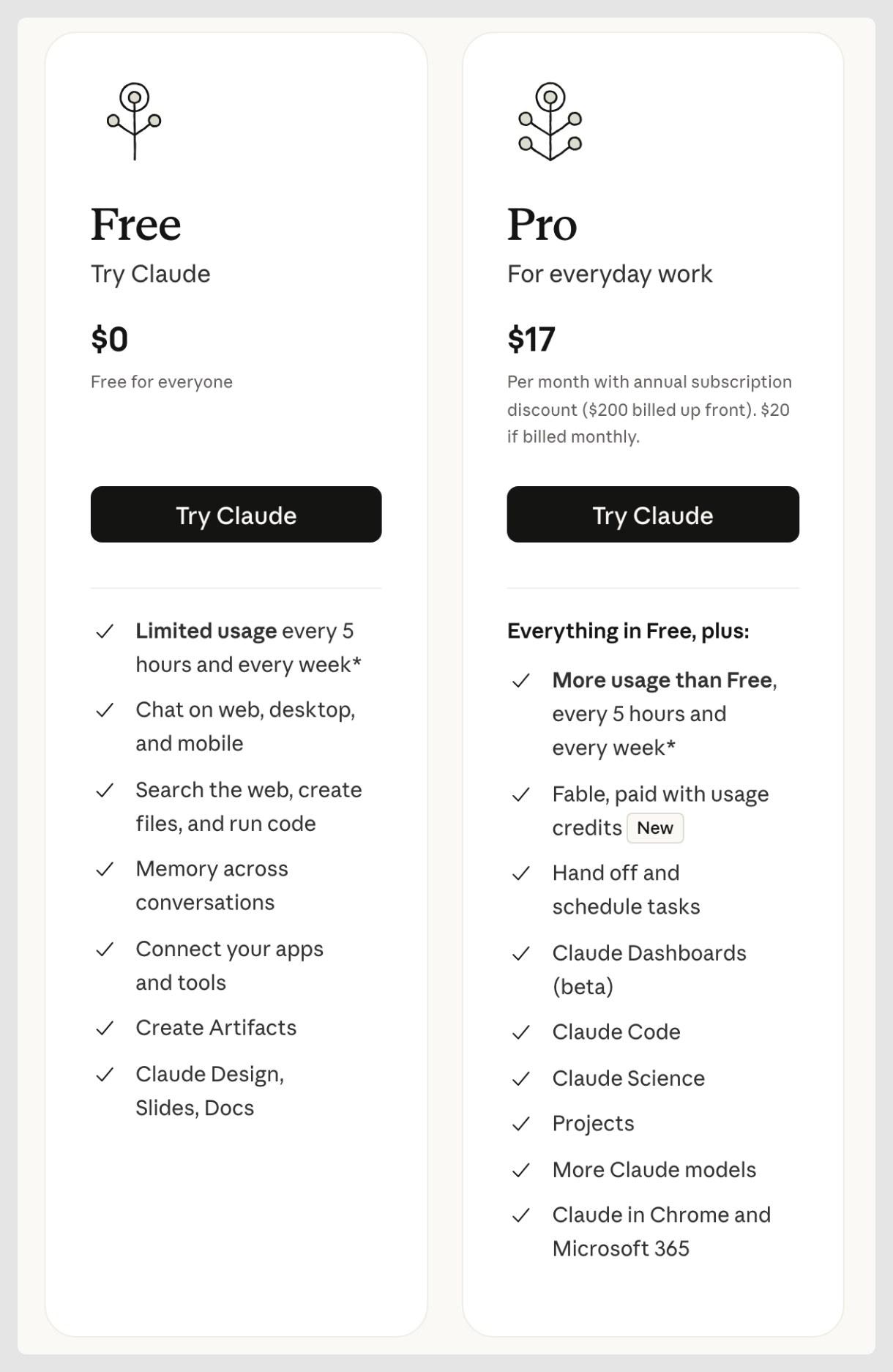
Claude's pricing page puts Claude Design on the Free plan, with limited usage.
The design system gets approximated
We hear the same thing on our calls with customers: designers complain most about the visual and code fidelity of Claude Design and Cursor. Components get recreated, values get hardcoded instead of tokens, and engineers push back on the code in review.
Most of these complaints predate Anthropic's June rebuild of the design system work and the move to shared limits. Anthropic now says Claude "checks its output against your design system." The Claude Help Center still says "To validate it, create a test project and check whether the output matches your brand." It adds that "Design system import is only as good as its source." Whether the rebuild closed the gap is open. More in AI and design systems.
No direct route to Figma or to your repo
No export goes to Figma, and code reaches your repo through the Claude Code handoff, where an agent builds it again. "Claude Design doesn't have version history yet," and editing with two or more people at once "is still basic" (Claude Help Center).
Claude Design alternatives, by where the design lands
Claude Design's main competitors fall into five groups, one for each place the design can land next.
Back to Figma: the Figma agent, Make, Code Layers and the MCP server
The Figma agent works on the canvas of a Figma file. You steer it by "choosing a specific library and @ mentioning specific tokens, variables, and components" (Figma). For engineers, Dev Mode's Code Connect is there to "Map design components to real production components" (Figma).
Figma Make is the prompt route inside Figma: "Generate a functional prototype or web app via prompt" (Figma pricing). You can copy a Make preview into Figma as layers, but "The layers aren't automatically tied to your design system" (Figma Help Center). Make in your local codebase, which edits an existing repo and opens a pull request, is a closed beta in Figma's beta desktop app for Mac (Figma Help Center).
Figma's MCP server is the closest documented route from a Claude Design handoff back into Figma (setup and limits by plan). Claude Code can use it to "Create and modify native Figma content" (Figma Help Center). Writing outside drafts needs a Full seat. Figma says the feature is "free during the beta period and will eventually become a usage-based paid feature." The agent redraws the design as layers rather than importing a file.
A code layer is "an interactive prototype backed by running code that sits directly on the canvas." Code Layers clone a GitHub repo, and you can "create pull requests to merge your improvements back into the original repository" (Figma Help Center). Code Layers are in open beta, and since 5 November code layer tasks use AI credits.
Where it stops: the design still lives in Figma, and Figma frames Code Layers as a prototype.
Price: a Professional Full seat is $16 a month billed annually or $20 billed monthly, with 3,000 AI credits, and it includes Figma Make (Figma pricing).
Another prompt-to-UI canvas: Google Stitch
Google calls Stitch "an AI-native software design canvas," with an infinite canvas, a design agent and voice input (Google). It adds DESIGN.md, "an agent-friendly markdown file." Designs leave as an export to AI Studio or Antigravity, or through its MCP server and SDK.
Where it stops: where Claude Design does, at an export to another tool.
Price: Google does not publish a pricing page for Stitch.
A new working app: v0 and Lovable
Claude Design already sends designs to v0 and Lovable. v0 can import a GitHub repo and open a pull request (v0 docs). Lovable builds a new full-stack app from a prompt.
Where it stops: v0 works through prompts, previews and Design Mode edits (v0 docs), not a free-form canvas. Lovable's docs say "Git sync always creates a new repository" (Lovable docs).
Price: v0 Plus is $30 per user a month (v0 pricing). Lovable Pro is $25 a month with 100 credits (Lovable plans).
Both get a longer look in v0 alternatives for teams that ship code and Lovable alternatives for teams with a real codebase.
A design canvas on your real codebase
These tools put the canvas on the code your product ships from. More canvases, including ones without code, are in our roundup of UI design tools.
Take one primary button. Rebuilt from a mockup, it often arrives as a new element with bg-[#2563eb], px-[18px] and rounded-[10px]. From the team's library, it is <Button variant="primary">, with color, padding and radius read from theme tokens.
Only the diff that reuses the team's Button follows the theme.
+<button+className="rounded-[10px] bg-[#2563eb]+px-[18px] py-[9px] text-[15px] text-white"+>+Save changes+</button>
+import { Button } from "@/components/ui/button"+<Button variant="primary">+Save changes+</Button>
Color, padding and radius come from bg-primary, px-4 and rounded-md inside Button.
- A second button. Its color, padding, radius and type are raw values, so a theme change never reaches it.
Onlook. Its README says Onlook "will run on any Next.js + TailwindCSS project," and visual edits go into your source files (Onlook on GitHub). It stops at that stack. It is free to self-host, and team pricing is custom (Onlook pricing).
Subframe. Subframe calls itself "a design tool for your codebase, and a coding agent with a canvas" (Subframe). Its pricing page says it can "use your Claude or Codex subscription" (Subframe pricing). It reads and writes your local files and works best with React (Subframe), so it stops at a local checkout of your repo. Pro is $20 per editor a month.
Paper. Paper's canvas is HTML and CSS, so a design exports as code, and agents sync your tokens, styles and components over MCP (Paper). Your coding agent brings it into your repo. Pro is $16 per editor a month billed yearly (Paper pricing).
Cursor Design Mode. Cursor says "Design Mode lets you direct agents by leaving notes on your running app" (Cursor docs). Its agent then edits the code in your repo, and each change is a note to the agent, then a diff to read. Plus is $8 a month with Grok models only, and Premium is $30 (Cursor pricing).
Modeinspect. Modeinspect puts a design canvas on Next.js React codebases that use Tailwind. You place running pages of your app on the canvas, edit them in a design panel and drag in the team's React components. The panel offers tokens from your Tailwind theme but does not enforce them. A new project can start from a draft or a pasted Figma frame, become Next.js code and be published to GitHub on a personal account. Hobby is free, and Pro is $20 a month (Modeinspect pricing).
A coding agent: Claude Code and Cursor
Claude Code is where a Claude Design handoff already goes. It works in your repo and opens pull requests (Claude Code docs), and it needs Pro or above. Its /design skill, a research preview, "brings Claude Design's artboard workflow into the CLI and Claude Code Desktop" (Claude Code docs). It spends the same usage limits as Claude Design.
Cursor's agent does the same job inside Cursor.
Where it stops: each visual change is a request to the agent, then a diff to read.
Price: Claude Code comes with Claude Pro, $17 a month billed annually or $20 billed monthly (Claude pricing).
For setup and first steps, see how designers start with Claude Code and the Figma and Claude Code workflow. For Cursor, see how Cursor compares with a design-first canvas.
Claude Design alternatives compared
| Tool | Where the output lands | Works in an existing repo | Uses your components and tokens | Design controls | Starting paid price (November 2026) |
|---|---|---|---|---|---|
| Claude Design | Files, other apps, or a handoff to Claude Code | Reads a linked repo, code through Claude Code | Builds a design system, checks output against it | Comments, direct edits, adjustment knobs, drag, resize, align | Included in Free, Pro $17 a month billed annually, $20 monthly |
| Figma Make | Make prototype or app, copied into Figma as layers | Closed beta on Mac, opens a pull request | Copied layers not tied to your design system | Prompts, plus point and edit | Full seat, $16 a month billed annually, $20 monthly |
| Figma Code Layers | Code layer on the canvas, pull request to the original repo | Yes, clones a GitHub repo, open beta | Not documented | Code layer on the Figma canvas | Uses AI credits on paid plans |
| Google Stitch | Export to AI Studio or Antigravity, MCP server, SDK | Takes code as context only | DESIGN.md | Infinite canvas, design agent, voice | No published pricing |
| v0 | Pull request on an imported repo, or a new app | Yes, Git import | From the imported repo | Prompts, plus Design Mode edits | Plus $30 per user a month |
| Lovable | New app | No, syncs only to a new repo | Design systems on Pro and up | Prompts, plus visual edits | Pro $25 a month |
| Onlook | Source files in your project | Yes, Next.js with Tailwind | From the repo | Visual editor on the running app | Free to self-host, teams custom |
| Subframe | Your local codebase | Yes, React first | From your codebase | Canvas with a coding agent | Pro $20 per editor a month |
| Paper | HTML and CSS export, into your repo through your coding agent | Through your coding agent over MCP | Tokens, styles and components synced over MCP | HTML and CSS canvas | Pro $16 per editor a month billed yearly |
| Cursor Design Mode | Code in your repo | Yes | From the repo and rules files | Notes on the running app | Plus $8 a month with Grok models only, Premium $30 |
| Claude Code | Branch and pull request | Yes | From the repo and CLAUDE.md | Prompts, /design artboards in research preview | Claude Pro, $17 a month billed annually, $20 monthly |
| Modeinspect | Pull request with an "Open Preview" link | Yes, Next.js React codebases that use Tailwind | Real React components, Tailwind theme tokens offered but not enforced | Design panel and on-canvas handles on the running app | Hobby free, Pro $20 a month |
Modeinspect vs Claude Design: which gets UI changes merged?
Both routes end with an engineer reviewing a pull request. They differ in how the design becomes code.
With Claude Design, you design on its canvas and hand a bundle to Claude Code. Anthropic says Claude Code then "continues from your existing work instead of starting over from a screenshot" (Claude blog). It builds the design in your repo, and someone reads the diff for what it reused and recreated.
With Modeinspect, the canvas is the running app. You restyle real elements and drop in the team's components, and the coding agent writes the change, following the repo's CLAUDE.md, AGENTS.md and rule files. Each change is type-checked, and errors go back to the agent. One click opens a pull request with an "Open Preview" link in its description.
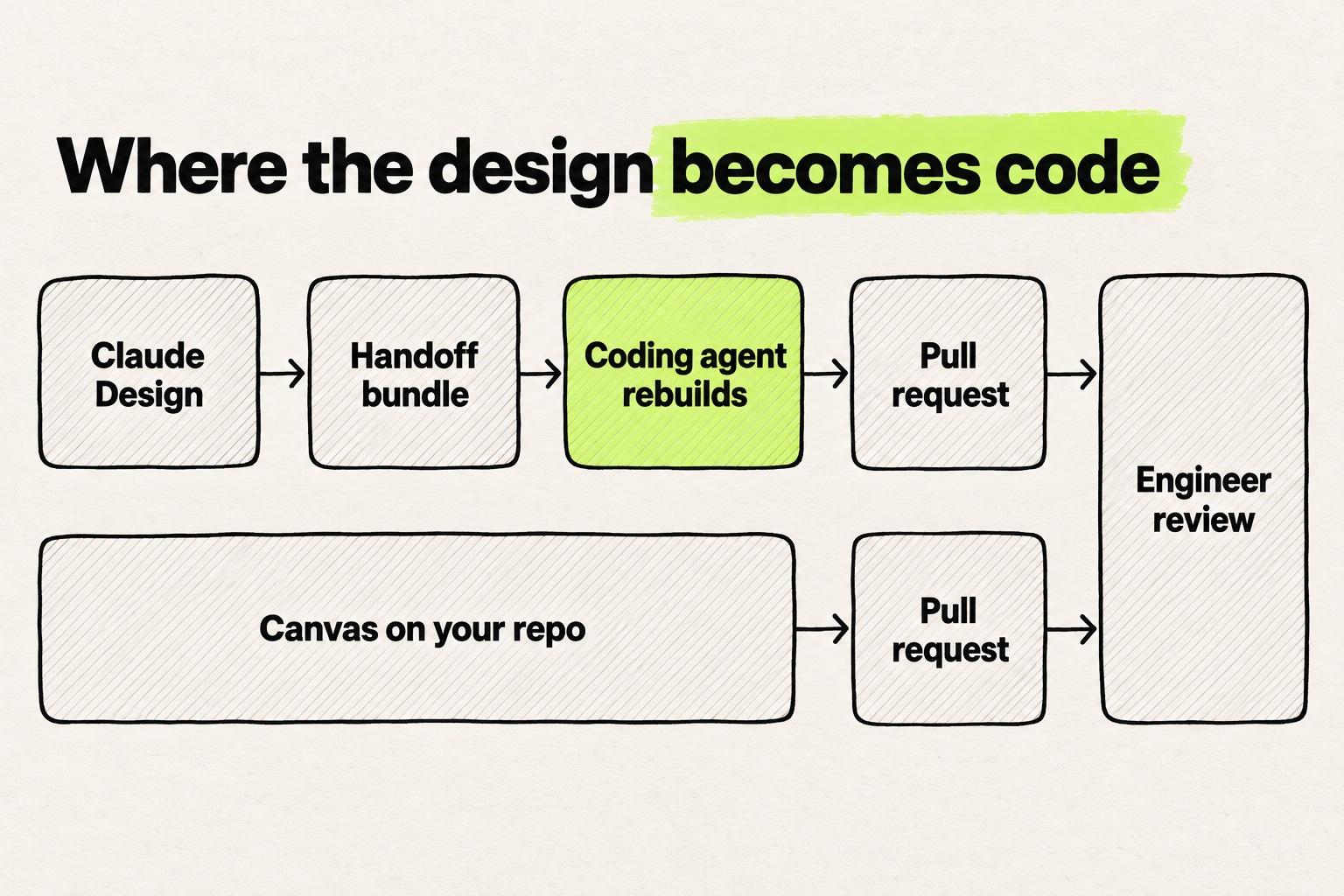
The step that decides whether a design merges is the move into the codebase. A better generator does not shorten that step. Designing on the codebase removes the rebuild, and engineer review stays.
Prelude works this way, and its time from idea to merged pull request went from about 31 days to about 13 (Prelude case study).
Modeinspect has limits of its own. It covers Next.js React codebases that use Tailwind. Its panel offers tokens without enforcing them, and Figma variables do not become tokens. Pasted Figma component instances arrive as plain layers, not linked to your code components.
When Claude Design is still the better pick
- You are exploring many directions. Prompting several looks side by side needs no repo and no setup.
- The output is a deck or a one-pager. Claude Design exports to PPTX, Google Slides and PDF.
- Your product is not built in React. Onlook targets Next.js with Tailwind, and Subframe works best with React.
- You are on the Free plan. Claude Design is included, and Claude Code is not.
- You already work in Claude Code. The handoff bundle passes to Claude Code "with a single instruction" (Anthropic).
A solo UX designer on one of our customer calls told us Claude Design understands his instructions better and is nicer to talk to. When the design is ready, he flips it into Claude Code.
Which Claude Design alternative to try first
- Your team designs in Figma: the Figma agent and Make, with the MCP server to bring a handoff back as layers.
- You want a different generator: Google Stitch, with the same handoff after it.
- You need a new working app: v0 or Lovable.
- You change a product your team already ships: a canvas on the codebase, or Claude Code or Cursor if you read diffs comfortably.
- Only the usage limit hurts: turn on usage credits in Claude before you switch tools.
Then take one real ticket through your current route and through one alternative. Count the hardcoded values in each diff, and send both pull requests to the engineer who reviews your area. Keep the route whose pull request they approve.
Frequently asked questions
Is Claude Design free, and how much does it cost?
Yes. The Claude Help Center says Claude Design "is available on Free, Pro, Max, Ultra, Team, and Enterprise plans, and it's on by default." The Free plan has "Limited usage every 5 hours and every week" (Claude pricing). Design systems are in beta on paid plans only, and Claude Code, where the handoff goes, needs Pro or above. Pro is $17 a month billed annually or $20 billed monthly.
What are Claude Design's usage limits?
Claude Design shares one usage pool with the rest of Claude, including Claude Code. The Claude Help Center says "Complex projects with large codebases or many iterations consume more usage." When you reach the limit, Claude Design "is unavailable until your limits reset." With usage credits turned on, you can keep working past the included limits. Before the move to shared limits, Claude Design had its own weekly allowance, which is the one Hacker News users ran out of in April.
Claude Design vs Figma: which should a designer use?
Use Figma when the design has to live in a Figma file your team maintains, with its library and variables. Use Claude Design for fast exploration, decks and a handoff to Claude Code. Claude Design has no Figma export. Inside Figma, you steer the Figma agent with a chosen library and the tokens, variables and components you @-mention, and Figma Make turns a prompt into a prototype.
Can you export Claude Design to Figma?
Not directly. The Claude Help Center lists exports to .zip, PDF, PPTX, Google Slides and standalone HTML, plus apps such as Canva, Miro, v0 and Lovable. Figma is not on the list. The closest documented route is Claude Code with Figma's remote MCP server, which can "Create and modify native Figma content from your MCP client" (Figma Help Center). Writing outside drafts needs a Full seat, and the agent redraws the design as Figma layers.
Does Claude Design use my design system?
It can. Claude Design builds a design system from Figma files, decks, uploads and connected apps, or from React components through /design-sync in Claude Code. Since June, Anthropic says Claude "checks its output against your design system, and makes corrections before you see it" (Claude blog). The Claude Help Center still recommends a test project to check the output. It also says "Design system import is only as good as its source."
Claude Design vs Figma Make?
Both turn a prompt into a prototype. Figma Make lives in Figma and comes with a Full seat. You can copy a Make preview into a file as layers, but Figma says "The layers aren't automatically tied to your design system." Anthropic says Claude Design checks its output against your design system, and it exports files and hands off to Claude Code. Make in your local codebase, a closed beta on Mac, edits an existing repo and opens a pull request.
Claude Design vs Google Stitch?
Both are prompt-to-UI canvases, and both end at an export or a handoff. Stitch, from Google Labs, has an infinite canvas, a design agent, voice input and DESIGN.md (Google). Its designs leave through exports to AI Studio and Antigravity, or its MCP server and SDK. Claude Design exports files, sends to apps such as Canva and v0, and hands off to Claude Code. Google does not publish a pricing page for Stitch, and Claude Design is on every Claude plan, including Free.
Cursor Design Mode vs Claude Design?
They work in different places. Claude Design is a separate canvas that hands a bundle to Claude Code, which builds it in your repo. Cursor's docs say "Design Mode lets you direct agents by leaving notes on your running app." You work on the product itself, and Cursor's agent edits the code. Cursor Plus is $8 a month with Grok models only, and Premium is $30 a month. Claude Design is on every Claude plan.