There is no single best AI for designers. The right one depends on the job, and on where the output has to end up: on a canvas, in a new app, or in your team's codebase.
Pick by job:
- Explore in the design tool you already use: the Figma agent and Figma Make.
- Generate UI screens from a prompt: Google Stitch, Magic Patterns, Claude Design.
- Build a new working app: v0, Lovable, Bolt.
- Change the product you already ship: Cursor Design Mode, Claude Code, Onlook, Modeinspect.
- Speed up research and accessibility checks: Dovetail, Maze, Stark.
For the rest of the design process, see where AI helps and hurts in the product design workflow.
Key takeaways
- Almost every designer now uses AI every week, usually across several tools. The biggest complaint is still unreliable output (AI in Design Report 2026).
- Nielsen Norman Group's tests of AI prototyping tools found poor hierarchy, contrast and spacing, and generic aesthetics. Every test started from a new page or flow (NN/g).
- v0 can import an existing GitHub repo and open a pull request (v0 docs). Lovable can only export to GitHub (Lovable docs).
- Figma trains on content by default on Starter and Professional plans (Figma Help Center). Lovable does on Free and Pro unless you opt out (Lovable plans).
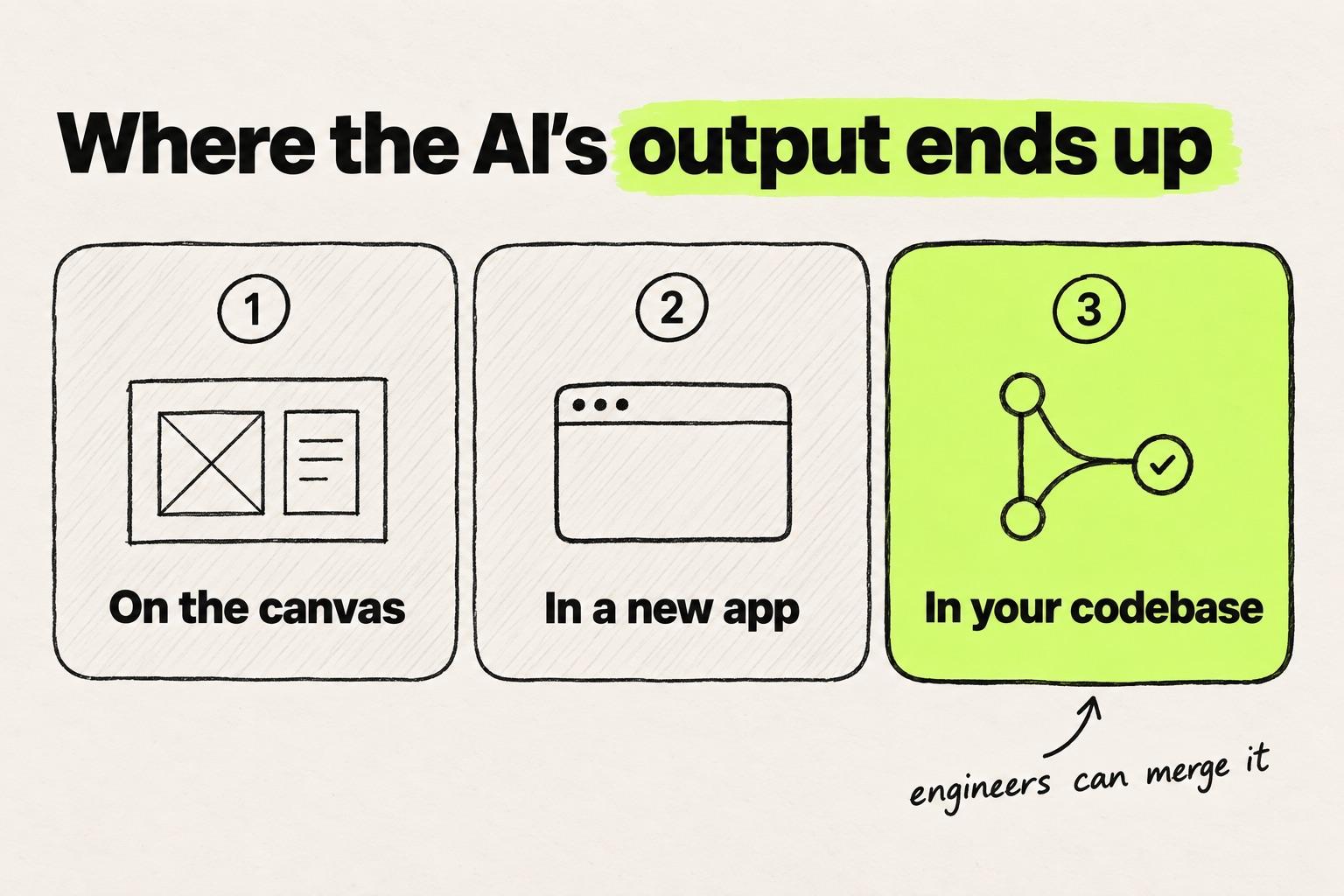
How the tools were chosen
This list covers the best AI tools for UX designers and product designers: tools for the screens, flows and components of a software product, plus research. Image generators, logo makers, video tools and marketing-site builders are out of scope.
Five questions decide which tool fits:
- Does it use your design system? A look-alike button is a second button someone has to reconcile. More in how AI tools handle a design system.
- Does it work on your existing codebase, or start a new project?
- Can engineers merge the output? A pull request can be reviewed. A zip file or a new repo has to be rebuilt.
- Does it train on your work by default?
- How much setup does it need, and can a teammate build on the work?
AI inside the design tool: Figma agent, Make, Code Layers and MCP
If you work in Figma, you have four AI entry points in 2026, all starting from the Figma file. Make and Code Layers can work on your codebase, both in closed beta. The MCP server reaches it through a coding agent.
Figma agent (open beta)
The Figma agent is an AI design agent on the canvas. It generates UI, edits layouts and instances, and makes bulk edits. You can @-mention library components, variables and styles so it uses them (Figma).
Where it stops: the output is Figma layers, so the handoff to code is still ahead of you.
Price: free during the open beta. Editing needs a Full seat, $16 a month on Professional (Figma Help Center, pricing).
Figma Make
Figma Make turns a prompt into a functional prototype or app, and Make kits bring in npm packages and your library's styles (Figma Make). Make in your local codebase is in closed beta, Mac only (Figma Help Center).
Where it stops: outside that beta, the result is a new Make file with its own code, which has to be rebuilt in your product.
Price: a Full seat on a paid plan. A Professional Full seat is $16 a month with 3,000 AI credits (pricing).
Figma Code Layers (closed beta)
Code Layers put interactive code on the canvas as a layer. Figma's announcement describes importing a GitHub repo or local folder and pushing changes back to it (Figma).
Where it stops: it is a closed beta with a waitlist, and the announcement describes a push, not a pull request.
Price: not priced yet.
Figma MCP server
The Figma MCP server gives coding agents such as Claude Code, Codex, Cursor and Copilot design context from your file (Figma docs). Its use_figma tool, in beta and set to become paid, lets agents write to the canvas (Figma).
Where it stops: Figma's docs say the server provides design context and is not designed to return production-ready code. The agent writes the code.
Price: included with Figma seats, with calls capped by seat. The caps are listed in the four routes from a design to a pull request.
AI UI design tools: prompt to UI and prototypes
These AI tools for UI designers turn a prompt, a screenshot or a document into screens. The output still has to be moved into your product by a person or a coding agent. The wider field, canvas and code tools alike, is in our roundup of UI design tools.
Google Stitch
Stitch is Google Labs' prompt-to-UI tool, and Galileo AI now lives inside it.
Stitch generates UI on an infinite canvas with a design agent, voice input and a Play mode (Google). It can also take an existing codebase and design files as input (Google).
Where it stops: designs leave as an export to AI Studio, Antigravity or Netlify, or through its MCP server and SDK. The change to your product happens elsewhere.
Price: Google does not publish a pricing page for Stitch.
Uizard
Uizard, owned by Miro since 2024, turns text or a screenshot into multi-screen mockups (Uizard).
Where it stops: the output is mockups plus CSS or React code to hand off.
Price: free for 3 generations. Pro is $12 a month, billed annually (pricing).
Visily
Visily turns text, screenshots or diagrams into wireframes and UI, and it is aimed at PMs and non-designers too (Visily).
Where it stops: the output is designs with a Figma export, plus code export on Pro and up.
Price: free with 300 credits. Pro is $14 per editor a month.
Magic Patterns
Magic Patterns turns a prompt or a PRD into a high-fidelity prototype. It can import screenshots, components and design system rules to match your styling (Magic Patterns).
Where it stops: the output is a prototype in Magic Patterns, not a change to your repo.
Price: free, with Starter at $20 per seat.
Claude Design (beta)
Claude Design, from Anthropic Labs, makes designs, interactive prototypes and slides (Anthropic). A June update added design system import from GitHub, files or a local codebase, and checks output against that system (VentureBeat).
Where it stops: the build happens after a handoff to Claude Code. Its help doc says there is no version history yet (Claude Help Center).
Price: included in paid Claude plans, not Free. Pro is $20 a month (pricing).
Prompt to app: v0, Lovable and Bolt
App builders go a step further: the output is a running full-stack app. Whether it can become part of your product depends on how each one treats an existing repo. They are compared as prototyping tools for product teams, and the way of working behind them is covered in what vibe design means on a real product.
v0
v0, from Vercel, builds Next.js, React, Tailwind and shadcn apps from a prompt. Its Git Import works on an existing GitHub repo on its own branch and creates a pull request (v0 docs).
Where it stops: it builds on its own stack, and you work through prompts, previews and its Design Mode rather than a free-form canvas.
Price: free with $5 of credits. Plus is $30 per user a month (pricing).
Lovable
Lovable builds full-stack React apps from natural language, with design systems on Pro and up (Lovable plans).
Where it stops: its docs list importing an existing GitHub repository as unsupported: "You can only export from Lovable to GitHub" (Lovable docs).
Price: Pro from $25 a month, with 100 credits.
Bolt
Bolt, from StackBlitz, builds full-stack apps from a prompt. Its Teams plan adds design system knowledge (pricing).
Where it stops: an imported repo becomes a new Bolt project, so the work still has to move into your codebase.
Price: Pro is $25 a month. Teams is $30 per member a month.
AI on your real codebase
These tools work on the repo your product ships from, so the output is a code change engineers can review. The design engineer's tool stack compares them in depth, and a walkthrough of a designer's first pull request shows the first change end to end.
Cursor Design Mode
Design Mode lets you click, draw on or speak about an element in a running app, and Cursor's agent edits the code (Cursor).
Where it stops: the app has to run locally and every visual change is an agent edit, a trade-off covered in how Cursor compares with Modeinspect, a design-first tool.
Price: Hobby is free and Pro is $20 a month (pricing).
Claude Code
Claude Code is Anthropic's agentic coding tool. It works in your repo, uses MCP servers such as Figma's, and opens pull requests (Claude Code docs).
Where it stops: there is no canvas, so small visual changes go through prompts and diffs.
Price: included in Claude Pro, $20 a month (pricing).
Onlook
Onlook is an open-source visual editor (Apache 2.0) that imports a React codebase and syncs visual edits to the source files and GitHub (GitHub).
Where it stops: React apps with Tailwind, Next.js first.
Price: free to self-host. The hosted version is a closed beta with custom pricing (pricing).
Paper
Paper is an HTML and CSS canvas whose agents sync your tokens and components over MCP (Paper).
Where it stops: a separate coding agent writes the code.
Price: free with 100 MCP calls a week. Pro is $20 per editor a month (pricing).
pen.dev
pen.dev, formerly Pencil, keeps .pen design files in your repo and connects over MCP to Claude Code, Codex and Cursor (pen.dev).
Where it stops: as with Paper, the code comes from your own coding agent.
Price: currently free (pricing).
Modeinspect
Modeinspect is a design canvas on your connected codebase, running in a private cloud environment. A canvas agent explores options with your real components and tokens, and a coding agent builds the change. Changes leave as a pull request with context, specs and preview links. With no codebase yet, you can start a new project and turn it into a GitHub repository when it is ready.
Where it stops: it supports Next.js React codebases that use Tailwind CSS. A designer already fluent in Claude Code or Cursor gets less from it.
Price: Hobby is free and Pro is $20 a month per person (pricing).
AI for UX research and accessibility
Not every AI UX design tool generates screens. These three cover research analysis, testing and accessibility. How AI fits UX work more broadly is in how AI is changing UX design work.
Dovetail AI
Dovetail applies AI to research analysis: chat over your data, summaries, clustering and agents.
Price: a Free plan, then Enterprise at custom pricing (pricing).
Maze AI
Maze offers an AI moderator for running studies. It tests designs and flows rather than generating them.
Price: Maze AI is part of the Enterprise plan (pricing).
Stark
Stark detects and fixes accessibility issues in Figma and in code, with WCAG scans that run on repos and in CI.
Price: Premium is $198 per user a year, with a three-seat minimum (pricing).
AI tools for designers compared
| Tool | Category | Uses your design system | Works on an existing codebase | Output | Starting paid price (checked 23 September 2026) |
|---|---|---|---|---|---|
| Figma agent | Design tool | Library components, variables, styles | No | Figma layers | Free in open beta, Full seat ($16/month) to edit |
| Figma Make | Design tool | Through Make kits | Closed beta, Mac only | Code-backed prototype | Full seat, $16/month |
| Figma Code Layers | Design tool | Not documented | Yes, in closed beta | Code layer, pushed to the repo | Not priced |
| Figma MCP server | Design tool | Passes Figma context to an agent | Through your coding agent | Design context | Included with Figma seats |
| Google Stitch | Prompt to UI | Codebase and design files as input | As input only | Screens, exports, MCP | No published pricing |
| Uizard | Prompt to UI | Not documented | No | Mockups, CSS or React export | $12/month, billed annually |
| Visily | Prompt to UI | Not documented | No | Designs, Figma and code export | $14/editor/month |
| Magic Patterns | Prompt to UI | Imports components and rules | No | Prototype | $20/seat |
| Claude Design | Prompt to UI | Imports it, checks output against it | Reads it for the design system | Prototype, then handoff | Claude Pro, $20/month |
| v0 | Prompt to app | Your repo, via Git Import | Yes, via Git Import | Pull request on its own branch | $30/user/month |
| Lovable | Prompt to app | Design systems on Pro and up | No, export only | New repo | $25/month |
| Bolt | Prompt to app | Design system knowledge on Teams | No, an import becomes a new project | Bolt project | $25/month |
| Cursor Design Mode | Real codebase | From the repo and rules files | Yes, local repo | Code diff or pull request | $20/month |
| Claude Code | Real codebase | From the repo | Yes | Pull request | Claude Pro, $20/month |
| Onlook | Real codebase | From the repo | Yes, React with Tailwind | Source files, GitHub | Free self-hosted, hosted custom |
| Paper | Real codebase | Tokens and components over MCP | Through MCP and an agent | Canvas synced by an agent | $20/editor/month |
| pen.dev | Real codebase | Through MCP and your agent | Through an agent, files in the repo | .pen files, code by your agent | Free |
| Modeinspect | Real codebase | Components one to one, tokens from the repo | Yes, Next.js React with Tailwind | Pull request | $20/month per person |
| Dovetail AI | Research | Not applicable | Not applicable | Research insights | Enterprise, custom |
| Maze AI | Research | Not applicable | Not applicable | Test results | Enterprise plan |
| Stark | Accessibility | Not applicable | Scans repos and CI | Issues and fixes | $198/user/year, 3 seats minimum |
Only the tools that edit an existing repo produce a change engineers can review against the product. The rest produce a new artifact that someone moves into the codebase later, and that move is where the design drifts. The code-producing tools get a longer comparison in the guide to design-to-code converters, editors and agents.
What designers say about AI tools in 2026
Designers use AI every week, across several tools, and still do not trust the output.
In the Designer Fund and Foundation Capital AI in Design Report 2026, weekly AI use went from about half of designers to almost all of them, and the number of tools each designer uses more than doubled. Half have shipped AI-generated code to production, more often at early-stage companies than at public ones. The top challenge is "unreliable or inconsistent output quality".
Figma's 2026 AI report found that the share of designers taking part in development nearly doubled in a year. Taking part is broader than writing code, and it still puts more designers next to the codebase.
NN/g's tests covered tools including v0, Lovable, Figma Make and Stitch. Adding sketches or Figma frames to the prompt improved the fit (NN/g).
What we have seen in interviews
Three patterns keep coming up in our interviews and usability sessions with designers, and on our sales calls:
- The design system gets ignored. The complaint we hear most about Cursor and Claude Design output is recreated components and hardcoded values where tokens should be.
- Prompting for small changes wears designers down. They tell us the agent agrees with everything, and they would rather adjust spacing visually than describe it.
- AI mandates mostly mean prototyping. At 500 to 5,000 person companies we have seen a strong top-down push to use AI. So far it mostly produces prototypes, not shipped changes.
Not everyone lands in the same place. One solo UX designer prefers Claude Design because it understands his instructions better.
Data training defaults: which tools train on your work
Whether an AI design tool trains on your files often depends on the plan. Check the setting before you connect a private repo or a client's product.
| Tool | Default for AI training on your content |
|---|---|
| Figma | On for Starter and Professional teams, off on Organization and Enterprise (Figma Help Center) |
| Lovable | On for Free and Pro unless you opt out, off by default on Business and Enterprise (Lovable plans) |
| v0 | Off by default on Business, $100 per user a month (v0 pricing) |
| Cursor | No training with privacy mode on (Cursor pricing) |
| Modeinspect | No training: its model providers, Anthropic and OpenAI, run under commercial terms that exclude your data (security) |
For the other tools here, look for an AI training or data-use setting before you connect anything private.
The best AI for designers, by situation
Start from your role, then ask where the output has to end up.
- You own the design system. Many design system practitioners do not use AI at all, and AI design generation is their top worry (zeroheight). Favour tools that read your system rather than imitate it. Claude Design imports your system and checks output against it. Repo-based tools such as Claude Code, Cursor and Modeinspect work with the real components. Whether the output reuses them is the test: build a component-heavy screen and count the hardcoded values.
- You are a PM or not a designer. Visily is aimed at PMs and non-designers, and Uizard turns text or a screenshot into mockups. If the idea needs real behaviour, v0 or Lovable build a working app. The steps are in a step-by-step guide to creating a software prototype.
- Your role is research-heavy. Dovetail for analysis, Maze for moderated studies, Stark for accessibility.
- You are a designer on an existing product. The choice is between the Figma agent with the MCP server, a coding agent, or a canvas on the codebase. If you work mostly in Figma, a canvas on the codebase replaces prompting with visual controls. If you are comfortable in a repo, a coding agent with a rules file is enough. The starter stacks for design engineers cover each setup in detail.
Whatever you pick, ask one question before the first prompt: where does this output have to end up? A mockup that answers a concept question is a good result. A change to the product you ship only counts once it is in your codebase and an engineer has reviewed it.
Frequently asked questions
Is there a free AI for designers?
Yes. Uizard, Visily, v0, Cursor, Paper, Modeinspect and Dovetail all have free plans, pen.dev is currently free, and Onlook is free to self-host. Some free plans train on your work by default, including Figma Starter and Lovable Free, so check the setting first.
Will AI replace UX designers?
No, the job is changing instead. In Figma's 2026 AI report, most designers said design matters at least as much as before AI, and far more of them now take part in development. The top challenge designers name is unreliable AI output, and judging and fixing that output is design work.
Can ChatGPT design a UI?
ChatGPT can draft UI code, suggest layouts and critique a screenshot. NN/g included it in its tests of AI prototyping tools and found poor hierarchy, contrast and spacing across the tools tested. Most designers in the AI in Design Report 2026 use it.
What AI do product designers use most?
Claude, ChatGPT and Gemini, in that order, in the AI in Design Report 2026. Anthropic is one of the report's partners. Most designers in the same report have also used an AI coding tool, most often Claude Code.
What is the best AI tool for UX research?
It depends on the bottleneck. Dovetail AI summarises and clusters interview notes and answers questions over your research data. Maze has an AI moderator for running studies. Stark checks designs and code against WCAG.