
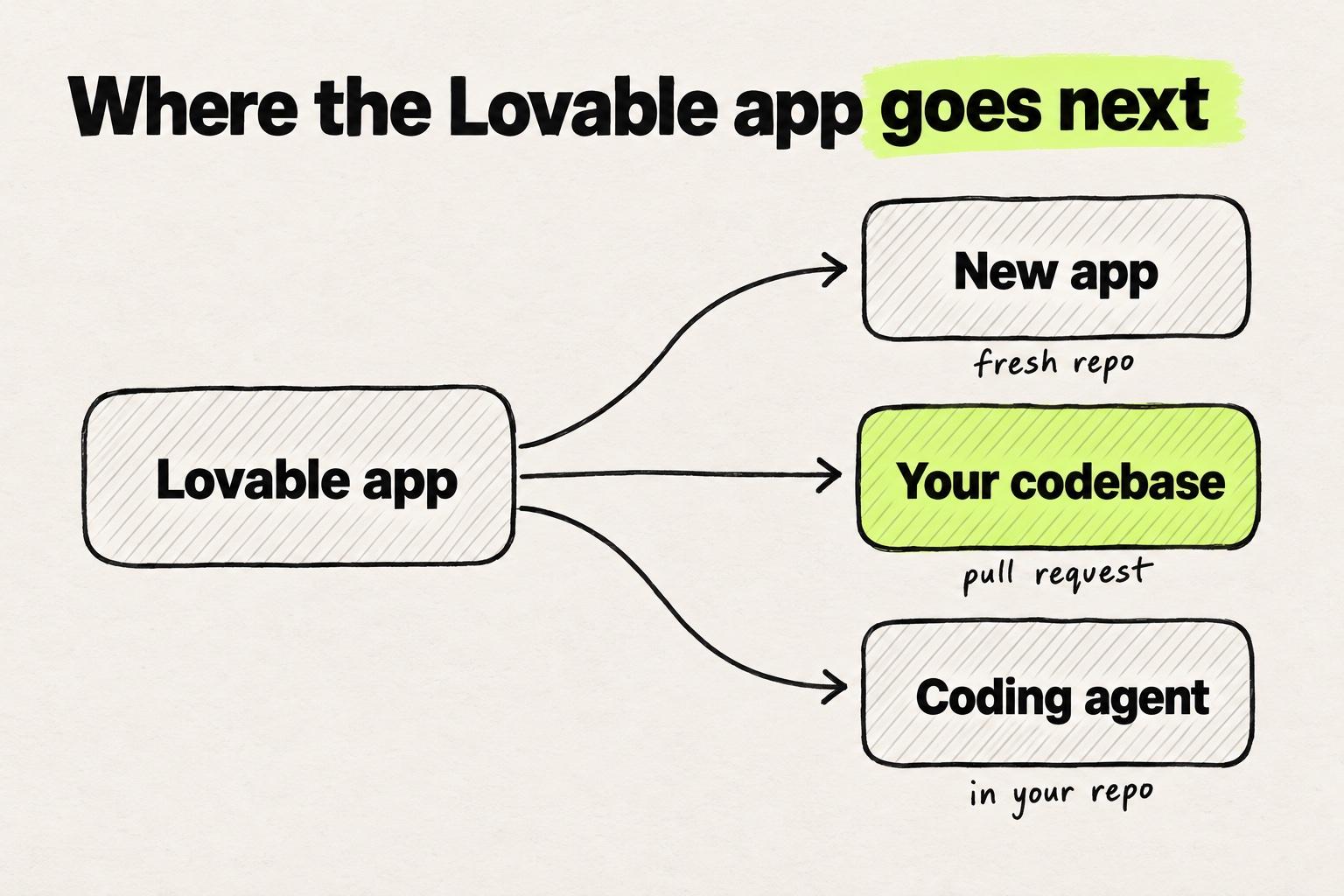
The best Lovable alternative depends on where the work has to end up next. For another new app, Bolt, Replit and Base44 are the closest swaps. For the codebase your team already ships, Builder Code, Onlook and Subframe work on that repo. If engineers take it from here, a coding agent such as Cursor or Claude Code works in the repo directly.
The destination matters because Lovable's Git sync cannot connect to a repository that already exists. It always creates a new one. Prices and repo support for all eleven tools are in the comparison table, and the wider set of prototyping tools covers the rest of the category.
Key takeaways
- Pick a Lovable alternative by where you keep working: in a builder's workspace, on the codebase you already ship, or with a coding agent in that repo.
- Lovable cannot sync into an existing repository. Its design-systems feature copies your React components into the project, so the result is a second app someone moves into yours.
- Another app builder mostly changes the price or the features. A tool that designs with your own components in the repo you ship changes where the work lands.
- Lovable is still the better pick for a new product that needs a backend and sign-in on day one, and for a demo nobody will ship.
What Lovable does well
Describe a flow in plain words, and Lovable returns a running app with sign-in that a stakeholder can click through. Its docs say it generates "a working application that includes frontend, backend, database, authentication, and integrations, all backed by editable code" (Lovable docs).
The backend is Lovable Cloud, built on Supabase's open-source foundation (Lovable Cloud docs).
On Pro and up, a project can connect to a design system (design systems docs). The Figma plugin exports designs from Figma straight into a Lovable workspace. In the preview, you can point at elements and ask for a change in plain language (visual edits docs).
Price: free to start. Pro is $25 a month with 100 credits, or $21 a month billed yearly. Business is $50 a month (plans).
Can you use Lovable on an existing React product?
Not as the place where the work happens. Lovable's GitHub docs list it under limitations: "Connecting a project to a repository that already exists. Git sync always creates a new repository." The Git sync overview is shorter: "Export only."
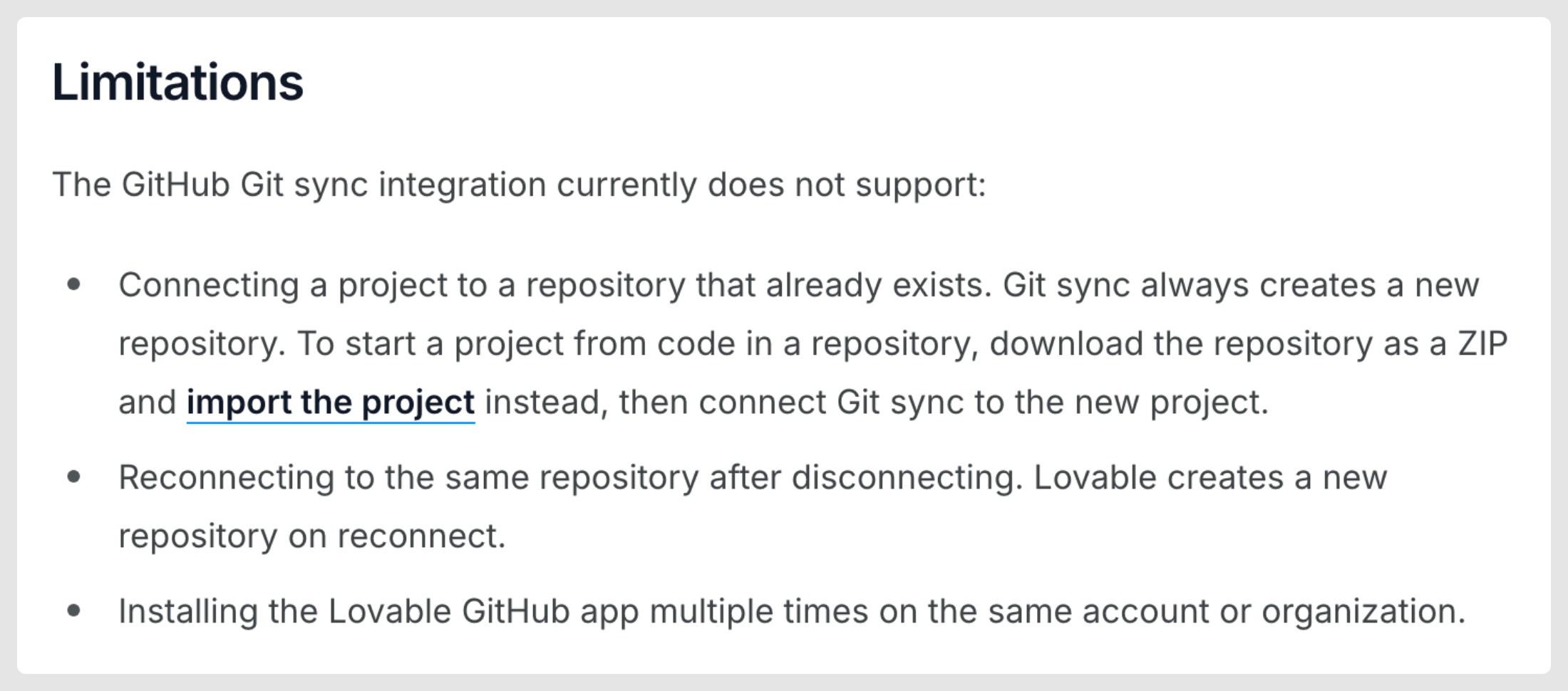
Lovable can import your code as a ZIP file instead. Then "Lovable rebuilds it as a Lovable project and moves the database and the app's users to the built-in backend" (import docs).
New Lovable projects are TanStack Start apps, and older ones are React with Vite (hosting docs). If your product is a Next.js app, a new Lovable project is not the same kind of app.
Your design system comes in as copies. Lovable calls it a "file-copy attach". In its words, "The design system's React components are copied into the connected project at src/design-system/<design-system-slug>/." Design systems are supported for React, and a project connects to one at most. A public Git repo can be the source, and a private one has to be uploaded (design systems docs).
Why teams look elsewhere
You may be the one designer or PM who built the flow in Lovable. The demo landed. You exported it to GitHub, and an engineer asked which of your components it uses and which stack it runs on. The answers are copies at best, and Lovable's stack rather than yours.
On Hacker News, x0x0 describes a colleague's Lovable app where later changes regularly broke earlier work, and Lovable did not support the unit tests that would catch it. Of the codebase, x0x0 wrote: "I don't want to own it" (comment).
Another commenter, redhale, puts Lovable on the side of "a prototype-level app", the kind they would not want inside an enterprise codebase. On the other side is Claude Code, in the hands of skilled practitioners working in enterprise production codebases (comment).
One freelancer sells the fix. In a Who wants to be hired thread, jensrusi pitches anyone whose Lovable, v0 or Cursor app works but "looks and behaves like the AI default". The offer is a real design system in code, in the client's repo (post).
We hear the same thing on our calls with customers: the AI output drifts from the design system, and designers cannot read the code well enough to catch it.
On Hacker News, vunderba suggests syncing the Lovable app to GitHub and refining it in Cursor (comment), still in the repo Lovable created.
Sort Lovable alternatives by where the work ends up
The ranking pages from Replit, Zite and Dyad put their own builder first, and Replit's and Zite's mix app builders with coding agents. None sorts the tools by where the work has to end up.
- A builder. You keep prompting in Bolt, v0, Replit or Base44, in the vendor's workspace or sandbox. Each can bring in a repo, and v0 and Base Code open pull requests on it.
- Your codebase. The tool works on the repo you ship, and the change arrives as a diff, branch or pull request that engineers review.
- A coding agent. Cursor or Claude Code edits that repo directly, from a prompt or a note on the running app.
The codebase tools and coding agents work in the repo you ship, with your own components, and that beats a better mockup. Engineers still review the change before it merges. If what you need next is a design rather than an app, start with the alternatives to Claude Design.
Keep prompting in a builder: Bolt, v0, Replit and Base44
These four keep you prompting in the vendor's own workspace, and each can bring in an existing repo.
Bolt, v0, Replit and Base44 can each bring in a repo you already have. Lovable's Git sync cannot.
- LovableGit sync cannot. A ZIP upload is rebuilt as a Lovable projectA new repo Lovable creates
- BoltImports it as a new Bolt projectCommits, merged in GitHub
- v0Git import, no copyWorking branch and pull request
- ReplitGuided import, public or privateCommits pushed from its Git pane
- Base44Only through Base CodeBranch and pull request, in Base Code
yes partly noFrom each tool’s Git and import docs.
Bolt
Point Bolt at an existing GitHub repo, and "Bolt loads your repository as a new Bolt project". You create branches in Bolt, and merging happens in GitHub (Bolt docs). Its Select tool makes visual edits in the preview (visual edits docs), and the Teams plan adds "Design System knowledge with per-package prompts" (pricing). Bolt vs Lovable comes down to that first step. Bolt stays connected to the repo you have. Lovable rebuilds a ZIP of it as a new project with a new repo.
Where it stops: your repo becomes a new Bolt project, and the merge happens outside Bolt.
Price: Pro is $25 a month billed monthly. Teams is $30 per member a month (pricing).
v0
v0 imports a GitHub repo without copying it: "The import does not make another copy of a repository you can write to." Your first change creates a working branch with a preview, and pull requests target the base branch (v0 docs). Its Design Mode lets you select elements and tweak their styles visually (Design Mode docs). How v0 compares with Lovable is covered in v0 alternatives for an existing app.
Where it stops: v0 does not push to the base branch, so each change waits in a working branch for a pull request. The work runs in a Vercel Sandbox (v0 docs).
Price: Plus is $30 per user a month (pricing).
Replit
Replit Agent "turns your ideas into apps ... all from plain language" (Replit docs). Its guided import "supports public and private repositories" (import docs), and its Visual Editor changes text, colors, layout and images by clicking (Visual Editor docs).
Where it stops: the work happens in Replit's workspace, and it reaches your repo when you push from its Git pane (Git docs).
Price: Core is $20 a month, or $18 billed annually (pricing).
Base44
An app you build in Base44 goes to GitHub as a fresh repo: connecting it "creates a new repository for it" (GitHub docs). For a repo you already have, Base Code "gives your team a shared cloud environment", with each change on its own branch and pull request (Base Code docs).
Where it stops: "Base Code provides a development preview, not production hosting" (Base Code docs).
Price: Starter is $20 a month, or $16 billed annually. GitHub integration starts on Base44's Builder plan, at $50 a month or $40 billed annually (pricing).
Move the work into your codebase and keep designing on it
These tools start from the repo you ship, with the team's own components, and engineers review the change as a diff, a branch or a pull request. Why that matters for prototypes is in what AI prototyping is actually solving.
What an engineer receives differs. A Lovable export with a design system called acme is a new TanStack Start repo, with your button copied to src/design-system/acme/button.tsx. A codebase tool edits app/settings/page.tsx in your repo and imports the <Button> you already have.
A Lovable export is a second app with a copy of your button. A codebase tool changes the app you ship.
- acme-settings-prototype/
- package.json@tanstack/react-start
- src/
- design-system/
- acme/
- button.tsxA
- routes/
- settings.tsxA
- A copy of your Button, inside the Lovable project.
- The page someone rebuilds in your repo before it can ship.
- acme-web/
- app/
- settings/
- page.tsxM
- components/
- ui/
- button.tsxunchanged
import { Button } from "@/components/ui/button";<form className="grid gap-2">+<form className="grid gap-4"><Button variant="primary">Save</Button>
Example repos. Lovable copies an attached design system into src/design-system/<slug>/.
Source: Lovable design systems docs
Builder Code
Builder Code, formerly Fusion, builds with "your components, tokens, and usage patterns" and packages the work "into branches and pull requests" (Builder). It connects to GitHub, GitLab, Azure DevOps and Bitbucket, and "Projects currently supports React, Vue, Svelte, and Angular" (Builder docs). It fits a team with more than one framework, or a Git host other than GitHub.
Where it stops: usage runs on credits. Pro includes 500 a month, and more cost $25 per 500 (pricing).
Price: Pro is $24 per user a month billed annually, or $30 monthly. Team is $40, or $50 monthly (pricing).
Onlook
A team on Next.js and Tailwind can self-host Onlook, which is open source under Apache 2.0. Its README says it "will run on any Next.js + TailwindCSS project" (GitHub).
Where it stops: it runs only on Next.js with Tailwind, and the hosted product is in early access through a waitlist (GitHub).
Price: free to self-host. Teams get custom pricing (pricing).
Subframe
In Subframe's desktop app, you "Select a local repository so the agent can read and edit its files", then connect a Claude Code or Codex subscription (Subframe docs). It calls itself "a design tool for your codebase", with first-class React and Tailwind (Subframe docs).
Where it stops: the repo has to be a local checkout on your machine.
Price: free for one project. Pro is $20 per editor a month (pricing).
Modeinspect
Modeinspect opens your connected codebase as a design canvas in a cloud environment, so nothing runs on your machine. Your React components are found after setup, and the design panel offers tokens from your Tailwind theme. The coding agent follows the repo's CLAUDE.md, AGENTS.md and rule files, and one click opens a pull request with a preview link.
Where it stops: Next.js React codebases that use Tailwind, on GitHub only. Tokens are offered, not enforced.
Price: Hobby is free, and Pro is $20 a month (pricing).
Hand it to a coding agent: Cursor or Claude Code
The Lovable prototype becomes the brief, and the agent works in your repo.
Cursor's Design Mode "lets you direct agents by leaving notes on your running app" (Cursor docs). In Lovable vs Cursor, the split is ownership: Lovable creates its own repo, and Cursor works in yours. For a designer's view of that trade, see how Cursor compares with a design-first tool.
Price: free plan. Plus is $8 a month with Grok models only, and Premium is $30 a month (pricing).
In Claude Code, you describe the screen from the Lovable prototype in words, and the agent builds it in your repo. Its docs call it "an agentic coding tool that reads your codebase, edits files, runs commands, and integrates with your development tools" (Claude Code docs). There is no canvas.
For Lovable vs Claude Code, prototyping in Lovable and switching later means rebuilding in your repo what Lovable built in its own. Starting in Claude Code skips that step, and you give up Lovable's hosted backend.
Price: included in Claude Pro, at $20 billed monthly (pricing).
Lovable alternatives compared
| Tool | Where the output lands | Works in an existing repo | Uses your components and tokens | Design controls | Starting paid price (November 2026) |
|---|---|---|---|---|---|
| Lovable (baseline) | A new repo it creates, or a Lovable project rebuilt from a ZIP | No, Git sync always creates a new repo | Copies of your React components (Pro and up) | Prompts, visual edits by pointing at elements, Figma plugin | Pro $25 a month, $21 a month billed yearly |
| Bolt | A Bolt project, merged in GitHub | Imports it as a new Bolt project | Design System knowledge on Teams | Prompts, Select tool for visual edits | Pro $25 a month, Teams $30 per member a month |
| v0 | A working branch and a pull request to the base branch | Yes, Git import | Your repo's code, via Git import | Prompts, Design Mode | Plus $30 per user a month |
| Replit | Replit's workspace, pushed from its Git pane | Guided import, public and private repos | Your imported code | Prompts to Replit Agent, Visual Editor | Core $20 a month, $18 billed annually |
| Base44 | A new repo, or a branch and pull request with Base Code | Base Code only | Base Code works in your codebase | Prompts, visual editor | Starter $20 a month, GitHub integration on the Builder plan $50 a month |
| Builder Code | Branches and pull requests | Yes, GitHub, GitLab, Azure DevOps or Bitbucket | Yes, components, tokens and usage patterns | Visual IDE | Pro $24 per user a month billed annually, $30 monthly |
| Onlook | Code in your repo | Yes, Next.js with Tailwind | Your Next.js code and Tailwind styles | Visual editor for Tailwind styles | Free self-hosted, hosted custom |
| Subframe | Your local repo | Yes, a local checkout | First-class React and Tailwind | Design tool with an agent | Free for 1 project, Pro $20 per editor a month |
| Modeinspect | A pull request with a preview link | Yes, Next.js React with Tailwind, on GitHub | Your React components, Tailwind theme tokens offered | Canvas and design panel on the live app | Free Hobby, Pro $20 a month |
| Cursor | Your repo, edited by the agent | Yes | From the repo and its rules files | Design Mode notes on the running app | Free, Plus $8 a month (Grok models only), Premium $30 a month |
| Claude Code | Your repo, edited by the agent | Yes | From the repo | Prompts, no canvas | In Claude Pro, $20 billed monthly |
Modeinspect vs Lovable
Lovable starts a new app and gives it a backend, a database and sign-in. Modeinspect puts a design canvas on the codebase you already have, and each change leaves as a pull request with a preview link. It supports Next.js React codebases that use Tailwind.
Both can start a new product. In Lovable, the app comes with Lovable Cloud behind it. In Modeinspect, a draft or a pasted Figma frame becomes Next.js code, published to GitHub on a personal account, and later changes are pull requests.
On a product that already exists, Lovable's work arrives as a second repo with copies of your components. Modeinspect uses the React components it finds in your repo, and its coding agent follows that repo's CLAUDE.md, AGENTS.md and rule files.
Check its limits before you switch. Tokens from your Tailwind theme are offered in the design panel, not enforced. Figma variables do not become tokens, and pasted Figma component instances arrive as plain layers, not linked to your code components.
Prelude went from idea to merged pull request in about 13 days, down from about 31 (Prelude case study).
When Lovable is still the better pick
- A new product that needs a backend and sign-in now. Lovable generates the database and authentication along with the app, on Lovable Cloud.
- A demo nobody will ship. If the prototype exists for one meeting, a second repo costs nothing.
- No engineer to review a pull request. The codebase tools end in review. Lovable builds and deploys the app itself.
You can also run both: Lovable for new ideas that need a backend, and a codebase tool for the product your team ships.
Which Lovable alternative to pick
- You want another builder. Bolt, Replit or Base44, each of which can bring in a repo.
- Your product is a repo engineers review. A codebase tool: Builder Code for several frameworks and Git hosts, Onlook or Subframe for React with Tailwind.
- Engineers will build it. Cursor or Claude Code, with the Lovable prototype as the brief.
- You need a new app with a backend this week. Stay on Lovable.
Take the next Lovable prototype that has to ship, and ask an engineer whether they will review a pull request from a designer. If yes, pick from the codebase group, and let package.json, the file that lists what your product is built on, narrow it. Next.js with Tailwind fits Onlook, React with Tailwind fits Subframe, and other frameworks fit Builder Code. If no engineer will review it, stay with a builder. Then rebuild that one prototype in the tool you picked, with the steps for building a software prototype.
Frequently asked questions
What is the best Lovable alternative?
The best Lovable AI alternative depends on where the work goes next. For another new app, Bolt, Replit and Base44 are the closest swaps. For a product your team already ships, pick a tool that works on your repo, such as Builder Code, Onlook or Subframe. If engineers will build it, use Cursor or Claude Code.
Can I import an existing GitHub repo into Lovable?
Not through Git sync. Lovable's docs say Git sync "always creates a new repository for a project" (Lovable docs). You can upload your code as a ZIP instead, and Lovable rebuilds it as a Lovable project on its own backend. Git sync then creates a new repo for that project, separate from the one you started with.
Lovable vs Cursor: which should I use?
Use Lovable to build a new app with a hosted backend from a prompt. Use Cursor when the code already lives in a repo you own. Its agent edits that codebase, and Design Mode lets you leave notes on the running app. Cursor has a free plan, so you can try it on your own repo first.
Lovable vs Claude Code: should I prototype in Lovable and switch?
Only if the prototype is meant to be thrown away. Lovable builds in its own repo and stack, so switching means rebuilding the feature in yours. If the feature has to ship in an existing codebase, starting in Claude Code, or in a design tool that works on that repo, skips the rebuild.
Is Bolt better than Lovable?
For repo import, yes. Bolt loads an existing GitHub repository as a new Bolt project, and Lovable's Git sync cannot connect to one. Both host the app, and both start at $25 a month on Pro. Pick Bolt if the work has to start from code you already have.
How do I get a Figma design into Lovable, or into my own codebase?
Lovable has three routes. Its Figma plugin needs at least a Dev seat, and the Figma MCP route needs the Lovable desktop app. A .fig upload "does not import interactive designs or components" (Lovable Figma docs). For your own codebase, Modeinspect works on Next.js React codebases that use Tailwind. Paste Figma layers or a frame link onto its canvas, drop the frame onto a live page, and the coding agent builds it into the code. Component instances arrive as plain layers, and Figma variables do not become tokens.
Who are Lovable's main competitors?
The ranking pages for Lovable alternatives mostly list other app builders, and Bolt, v0, Replit and Cursor show up on most of them. Most of those pages come from vendors that rank themselves first, including Replit, Zite, Dyad and WeWeb. For a team with a product, Builder Code, Onlook and Subframe compete on a different job: changing the repo you already ship.