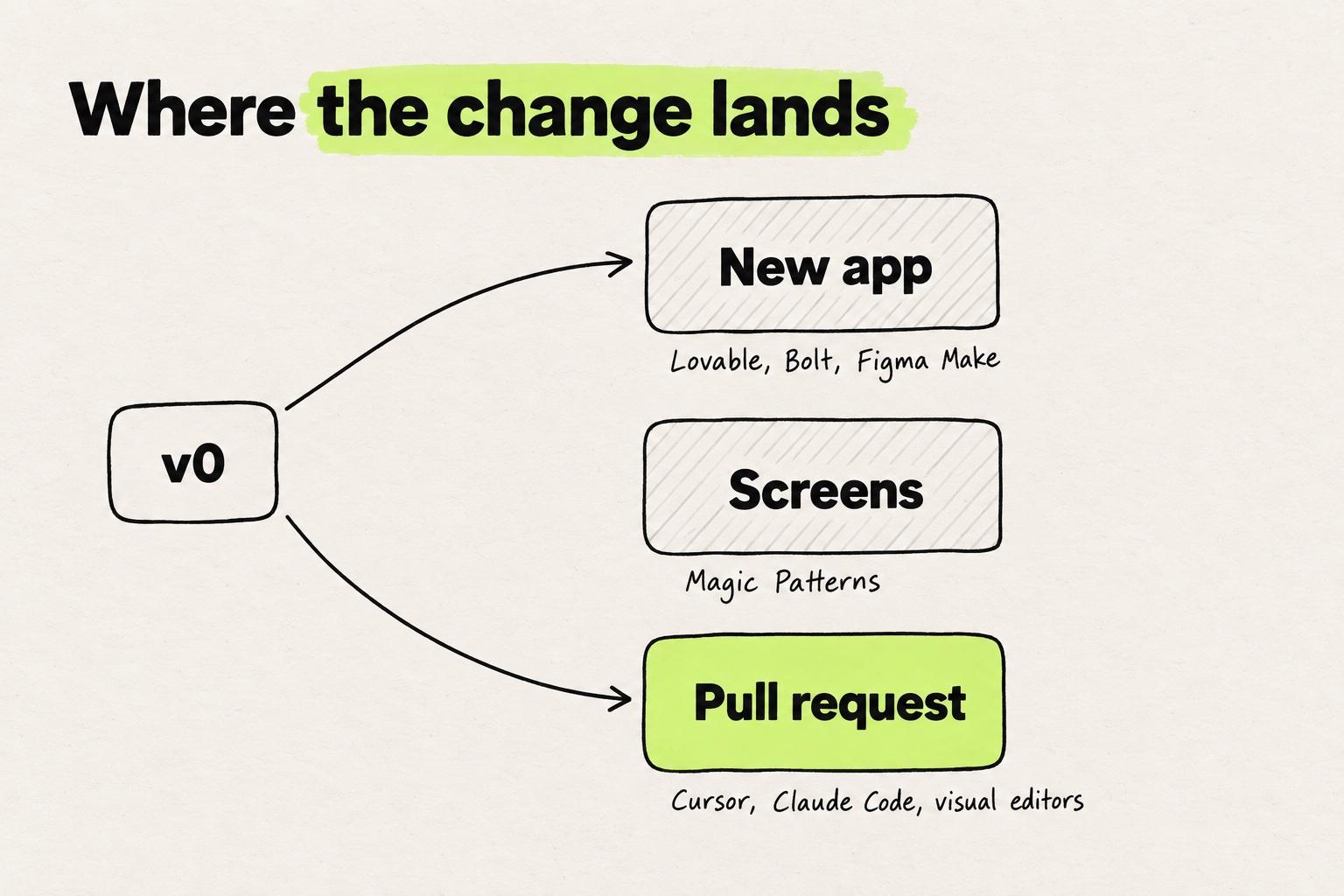
The best v0 alternative depends on where the change has to land. For a new app, look at Lovable, Bolt or Figma Make. For screens to explore, Magic Patterns. For a pull request in the repo you already have, look at Cursor, Claude Code, and visual editors on the codebase such as Subframe, Onlook, Builder Code and Modeinspect.
Most lists of v0 alternatives, Replit's and Balsamiq's among them, recommend Bolt and Lovable. For an existing Next.js app, that is a step back, because v0 itself now opens your repo. What separates the tools is how a change reaches your engineers. Ten of them and v0, with prices, sit in the comparison table. The wider field is in prototyping tools for product teams.
Key takeaways
- Pick a v0 alternative by where the change has to land: a new app, screens to explore, or a pull request in the repo you already have.
- For an existing Next.js app, another prompt-to-app builder is a step back, because v0 already opens your repo. Compare the tools that end in a reviewed pull request.
- v0's Publish merges its own pull request into your base branch unless branch protection blocks it. If you keep v0, require reviews first.
- v0 is still the better pick for a new app or component on shadcn, for teams on Vercel, and for visual editing on repos outside Next.js and Tailwind.
What v0 does well
Ask v0 for a settings page and you get Next.js code on shadcn. Vercel's FAQ lists the stack: "v0 uses Next.js, React, TypeScript, Tailwind CSS, and shadcn/ui" (v0 docs).
Since January 2026, v0 also works on code you already have (v0 changelog). Git Import takes public and private repos you can access, including monorepos, and runs them in Vercel Sandbox (v0 docs). The sandbox detects Next.js, Vite and generic Node.js projects (v0 docs). Each working branch gets its own Vercel preview deployment (v0 docs).
Design Mode lets you "select any element in the live preview, tweak its styles with a visual panel", and it is on the Free plan (v0 docs). Design Systems 2.0 lets you "teach v0 your design system once", so chats build with your components and tokens. It learns from GitHub repos, Figma frames, Storybook and installable packages (v0 docs).
Prototypes can call real services through access keys stored as environment variables (v0 docs). Vercel's launch post names the problem the new v0 targets: "Prototypes fail because they live outside real codebases, require rewrites before production" (Vercel).
Why people look elsewhere
You might be the designer or front-end developer on a product team with a Next.js and Tailwind app. v0 gave you a clean settings page on shadcn, and then an engineer rebuilt it with the team's own components. You have probably also prompted v0 for small visual fixes, a gap or a font weight, and paid credits for every round.
Since May 2025, v0 meters usage "on input and output tokens which convert to credits" (Vercel). In January 2026, one user on Vercel's forum worked out roughly $1.10 per prompt and code change (Vercel Community).
Two weeks after Git Import launched, one user reported the import screen hanging. Vercel staff suggested GitHub incidents that week as a possible cause (Vercel Community). One user's thread from May 2026 says v0 claimed to have moved a GitHub-connected Next.js project to Astro. The repo was still Next.js, and v0 had rewritten working code and broken the mobile layout (Vercel Community).
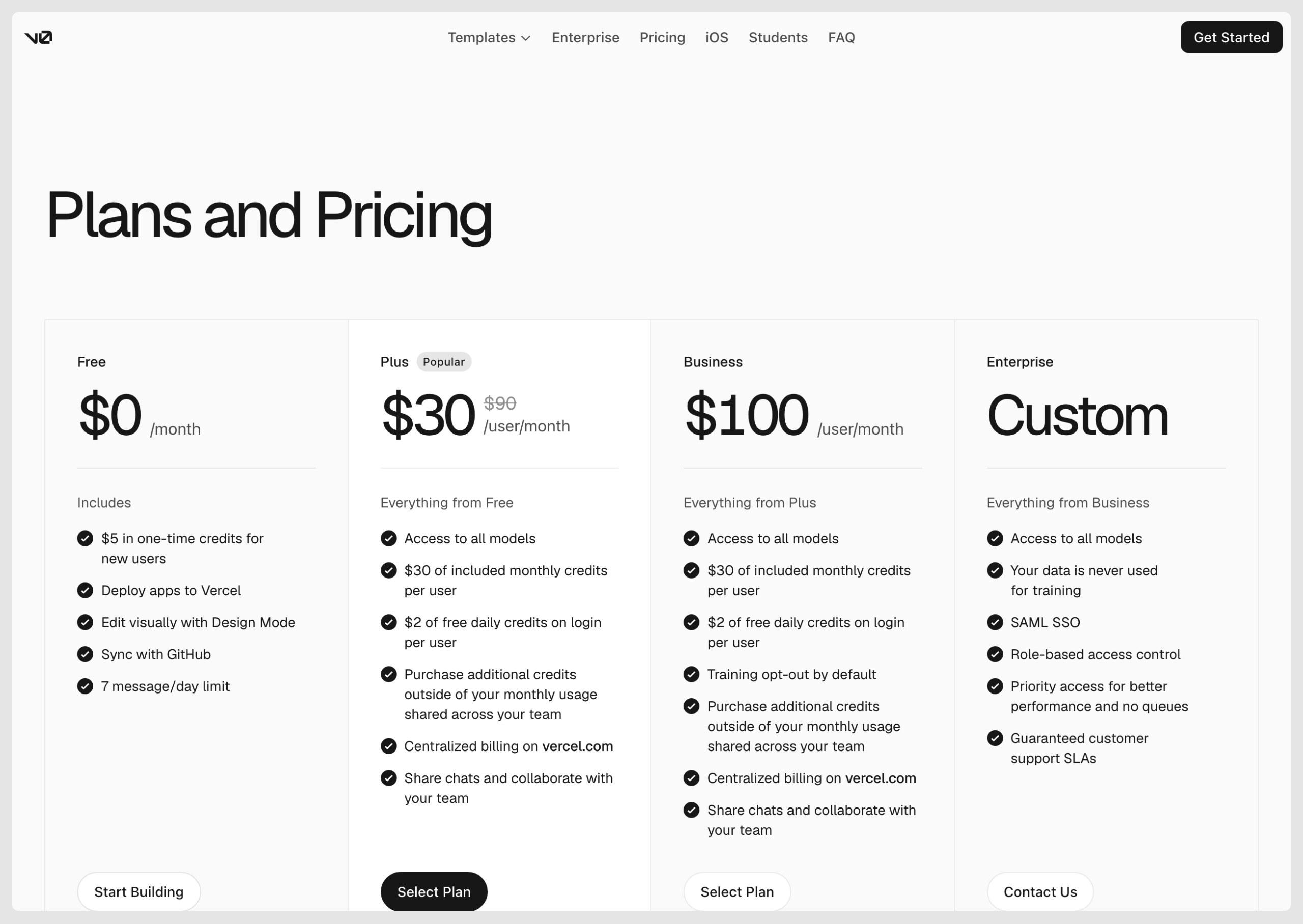
The Free plan gives 7 messages a day, and new users get a one-time $5 credit. Plus is $30 per user a month with $30 of credits each. Unused credits roll over and expire after 65 days, and when credits run out, generation pauses (v0 docs). The older Premium plan is closed to new users.
We hear the same thing on our calls with customers: designers hate prompting for small visual changes, and they want full adherence to their design system and tokens.
Where v0 stops on an existing Next.js app
Lovable cannot connect an existing repo, only import a ZIP copy into a new project, and Bolt loads it as a Bolt project. v0 imports it, runs it and works on a branch. So ask every tool a different question: how does a change reach your engineers?
In v0, importing "creates a chat at the selected base branch", and "the first code change creates its working branch." The branch menu can create a pull request. Publish goes further. v0 "creates a pull request if the branch does not have one, or reuses its existing pull request. It then merges the pull request into the base branch and waits for the production deployment." Required checks, required reviews and other branch protections can block that merge. Then v0 "keeps the pull request open, explains what needs attention, and links to the pull request on GitHub" (v0 docs).
In v0, Publish creates the pull request, merges it and waits for the production deployment, unless branch protection blocks the merge.
- Git ImportYour repo runs in Vercel Sandbox, and the chat starts on the base branch.
- First code changev0 creates a working branch, then commits and pushes each change to it.
- PreviewThe working branch gets its own Vercel preview deployment.
- Publishv0 creates the pull request, or reuses the one the branch already has.
v0 merges the pull request into the base branch and waits for the production deployment.
v0 keeps the pull request open, explains what needs attention and links to it on GitHub.
The branch menu can also create the pull request without publishing.
Source: v0 docs, GitHub
On a solo project, merging on Publish saves a step. On a product team without required reviews, one click merges a designer's change into the base branch before an engineer reads it.
Your design system reaches v0 as a skill saved in your scope, grounded in the sources you give it (v0 docs). Design Mode surfaces "Tailwind-compatible values where appropriate", and coverage "depends on what's defined in your project" (v0 docs). Vercel's own comparison page says "Each v0 chat session is its own context" (Vercel). A sandbox runs for at most 24 hours (v0 docs).
If you keep v0 on a product repo, require a review on the base branch in GitHub before anyone clicks Publish.
v0 alternatives compared
Each row shows where the change lands and how the tool gets your design system. The price is the cheapest paid plan that does what the row describes, which for Cursor's cloud agents means Premium.
| Tool | Where the change lands | Works in your existing repo | Uses your components and tokens | Design controls | Starting paid price (November 2026) |
|---|---|---|---|---|---|
| v0 | Branch, Publish merges unless branch protection blocks it | Yes, Git Import | Learned as a skill | Design Mode, prompt | Plus $30 per user a month |
| Lovable | New repo via Git sync | No | Design system project, paid plans | Visual edits, prompt | Pro $25 a month |
| Bolt | Commits in a Bolt project, merge in GitHub | Loads it as a Bolt project | Design System Knowledge on Teams | Visual edits, prompt | Pro $25 a month, Teams $30 per member a month for Design System Knowledge |
| Figma Make | New repo it creates | Closed beta only | Make kits from npm | Properties panel, prompt | Professional Full seat $16 a month billed annually |
| Magic Patterns | New repo, or export to an agent | No | Imported from GitHub, npm or Figma | Canvas, prompt | Starter $20 per seat a month |
| Cursor | Local edits, or a cloud agent pull request | Yes | Read from the repo | Design Mode on the running app | Premium $30 a month, for cloud agents |
| Claude Code | Branch and pull request | Yes | Read from the repo | Prompt only | Claude Pro $20 a month |
| Subframe | Local files | Yes, local checkout | Synced from the codebase | Canvas, browser, agent | Pro $20 per editor a month |
| Onlook | Code in your repo | Yes, Next.js and Tailwind | Read from the repo | Visual editor | Free self-hosted, hosted not generally available |
| Builder Code | Pull request | Yes | Connected design system | Visual Editor | Pro from $24 per user a month |
| Modeinspect | Pull request | Yes, Next.js React with Tailwind | Real components, theme tokens offered | Design panel on the running app | Pro $20 a month |
Alternatives for a new app: Lovable, Bolt and Figma Make
All three start a new app well. On a repo you already have, each is a step back from v0.
Lovable
Lovable's GitHub docs say "Git sync always creates a new repository." To bring in an existing one, you "download the repository as a ZIP and import the project instead" (Lovable docs). A design system is a dedicated Lovable project, and its components are copied into each connected app, on all paid plans (Lovable docs). Pro is $25 a month per workspace, with unlimited members (plans).
v0 vs Lovable. For an existing repo, pick v0, because Lovable syncs only to a repo it creates. For a new app, both work. Teams leaving Lovable can compare Lovable alternatives.
Bolt
"Bolt loads your repository as a new Bolt project", and "Every time you make a change that doesn't break the project, Bolt creates a commit for you." It "doesn't support merging branches in-app" (Bolt docs). Visual edits come with every plan. Design System Knowledge needs Teams, at $30 per member a month, and Pro is $25 a month (pricing).
v0 vs Bolt. Both import a repo and commit to it. Bolt leaves every merge to GitHub, where your review rules apply. v0 can merge on Publish, unless the same rules block it.
Figma Make
"Figma Make only pushes to repositories it creates" (Figma). Make in your local codebase is "currently available to try for free in closed beta for a limited number of users" (Figma). Make kits bring in a design system as npm packages, with private packages on paid plans (Figma). New Make files have a properties panel, and its changes use AI credits (Figma). A Professional Full seat is $16 a month billed annually (pricing).
Figma's Code Layers, an open beta on all plans, can "Clone a connected GitHub repo to build on top of an existing frontend codebase." Since 4 November, its tasks use AI credits (Figma).
v0 vs Figma Make. A designer who lives in Figma and needs a clickable new app can stay in Make. For a change to an existing Next.js repo, v0 opens it today.
Alternative for screens: Magic Patterns
Magic Patterns suits screens you want to compare before anyone writes production code. Its GitHub sync "creates a new repository in your selected organization" (Magic Patterns docs). Designs leave through an integration skill for AI agents, a zip or Figma (docs). Design systems come in from GitHub, npm or Figma (docs). Starter is $20 per seat a month (billing).
Magic Patterns or v0 for design to code. Pick Magic Patterns for screens you will hand to Cursor or Claude Code. Pick v0 when the code has to land on a branch of your repo.
Alternatives that work in your existing repo
Cursor, Claude Code and visual editors on the codebase can end where a product team wants v0 to end: a pull request built from the components already in the repo. They work in the repo the change lands in, so your components and theme are there from the start.
The prompt-to-app builders get a design system through a setup step. v0 saves it as a skill, and Lovable keeps a design system project. Bolt needs Teams for Design System Knowledge, Figma Make installs a kit from npm, and Magic Patterns imports one.
Prompt-to-app builders learn your design system in a setup step. Repo tools start from the components already in the repo.
- v0A skill learned from repos, packages, Figma frames and docs
- LovableA design system project, copied into each connected appPaid plans
- BoltDesign System Knowledge, compiled from your component library and docsTeams, $30 per member a month
- Figma MakeA Make kit installed from npmPrivate packages on paid plans
- Magic PatternsImported from GitHub, a folder, npm or Figma
- CursorIndexes the repo, and Design Mode passes the component name and stack
- Claude CodeReads the repo and its CLAUDE.md
- SubframeComponents synced with the design system in your codebase
- OnlookEdits the code of a Next.js and Tailwind project
- Builder CodeWorks in your repo, with your design system repo added as context
- ModeinspectYour React components after setup, tokens offered from your Tailwind theme
On an imported repo, v0 also has your components, and the skill tells it which to use.
Cursor
Vercel's own comparison page says "Cursor builds a project-wide index automatically, so any prompt has cross-file references on hand." It describes starting the UI in v0, then moving to Cursor "for backend code, refactors, and production polish" (Vercel). Cursor's cloud agents "work on a separate branch" and "produce merge-ready PRs" (Cursor docs). In React, Cursor's own Design Mode details "include the component name and component stack" (Cursor docs).
v0 vs Cursor. For an existing app, Cursor keeps the whole repo in view. Cloud agents start at Premium, $30 a month. Cursor Plus, at $8 a month, runs Grok models only and has no cloud agents (pricing).
Claude Code
Claude Code "stages changes, writes commit messages, creates branches, and opens pull requests." It reads CLAUDE.md "at the start of every session", so the repo's conventions shape every change (Claude Code docs). You describe each change in words, with no design panel. Claude Pro is $20 a month billed monthly (pricing).
Visual editors on the codebase: Subframe, Onlook, Builder Code
Choosing between v0 and a visual editor for an existing Next.js app comes down to where you work. v0 is prompt-first, and Design Mode is a styling panel on a preview inside a chat. A visual editor on the codebase puts design controls on the running app and writes the change into the repo. v0 fits someone describing new screens in words. A visual editor fits a designer fixing screens that already ship. What to check in a React visual editor covers the choice.
- Subframe "reads and writes local files", keeps components "synced with the design system in your codebase", and "works best when used with React". Pro is $20 per editor a month (Subframe, pricing).
- Onlook "will run on any Next.js + TailwindCSS project". It is open source under Apache-2.0 and free to self-host, and the hosted app has a waitlist (GitHub).
- Builder Code, formerly Fusion, can "create a pull request to go directly to GitHub" (Builder docs). Pro starts at $24 per user a month (pricing).
- Modeinspect works on Next.js React codebases that use Tailwind and is compared in Modeinspect vs v0.
If you start from a Figma frame, the routes are in turning a Figma design into a page in your Next.js app.
Modeinspect vs v0
Both work on an existing Next.js app. v0 starts from a chat. Modeinspect opens your Next.js React codebase that uses Tailwind as a running app on a design canvas. You select an element and change it in the design panel, where tokens are offered from the team's Tailwind theme, not enforced. The team's React components are available after setup. The coding agent reads and follows the repo's CLAUDE.md, AGENTS.md and rule files.
One click creates a branch, commits the changes and opens a pull request your engineers review. A new project can start from a draft or a pasted Figma frame, become Next.js code, and be published to GitHub on a personal account. From there it continues with pull requests. Pasted Figma component instances arrive as plain layers, and Figma variables do not become tokens. Getting them into the theme is covered in matching Figma variables to your Tailwind theme.
Modeinspect covers Next.js React codebases that use Tailwind, on GitHub only. The panel has no shadow or effects control and no hover or focus state switcher. At Prelude, idea to merged pull request went from about 31 days to about 13. Hobby is free, and Pro is $20 a month (pricing).
When v0 is the better pick
- A new app or a new component on shadcn. v0 writes Next.js, Tailwind and shadcn/ui by default (v0 docs).
- Teams that deploy on Vercel. Every working branch gets a preview, and Publish waits for the production deployment (v0 docs).
- Non-designers prototyping against your APIs. A PM can store access keys as environment variables and call real services (v0 docs).
- A design system shipped as a package. Design Systems 2.0 learns from an installable package, and a skill taught once may be all the team needs (v0 docs).
- Visual editing on repos outside Next.js plus Tailwind. v0's sandbox runs Vite and generic Node.js projects too (v0 docs), and Design Mode edits the live preview in the browser, with no local checkout. Onlook targets Next.js with Tailwind, and Subframe works best with React.
Which v0 alternative fits
Pick by where the change has to land. How these tools fit a team's prototyping practice is in what AI prototyping actually solves.
- You need a new app and have no repo yet. Lovable, Bolt or v0.
- You design in Figma and want a clickable app. Figma Make on your Full seat.
- You want screens to compare before code. Magic Patterns, then Cursor or Claude Code.
- Your engineers want a pull request built from your own components. Cursor or Claude Code if you prompt, a visual editor on the codebase if you design visually.
- You are staying on v0. Require reviews on the base branch.
Take one open design ticket, such as a spacing fix on a live screen. Run it through v0, creating the pull request from the branch menu, and through one tool from the repo group. Give your engineers both pull requests to review.
Frequently asked questions
What are the main v0 competitors?
Lovable, Bolt and Figma Make build new apps from a prompt. Magic Patterns generates screens to explore and hand off. Cursor and Claude Code work in your existing repo and end in a pull request. Visual editors on the codebase, such as Subframe, Onlook and Builder Code, put design controls on the running app and write the change into the repo. Which one fits depends on whether you need a new app, screens or a change to the product you already ship.
v0 vs Lovable: which is better?
For an existing repo, v0. It imports public and private GitHub repos and works on a branch, while Lovable's "Git sync always creates a new repository" (Lovable docs). For a new app, both work, and v0 generates Next.js, Tailwind and shadcn/ui code. Lovable prices Pro per workspace with unlimited members, and v0 prices Plus per user, which matters once several people prompt.
v0 vs Bolt: what is the difference?
Both can import a GitHub repo and commit to it. Bolt loads the repo as a new Bolt project, commits each change that does not break it, and leaves merging to GitHub (Bolt docs). v0 can merge in the app, because Publish merges its pull request into the base branch unless branch protection blocks it. Bolt Pro is $25 a month, and v0 Plus is $30 per user a month.
v0 vs Figma Make: which should a designer use?
If you work in Figma and need a clickable new app, Figma Make comes with a Full seat, and it pushes only to repositories it creates. If the change belongs in an existing Next.js repo, v0 can import that repo now. Make in your local codebase is a closed beta for a limited number of users (Figma). Figma's Code Layers, an open beta, can also clone a connected repo.
v0 vs Cursor: which is better for an existing app?
For changes across an existing codebase, Cursor. It indexes the whole project, and its cloud agents work on a separate branch and produce pull requests for review. Vercel's own comparison says each v0 chat session is its own context, and suggests starting UI in v0, then moving to Cursor for backend code and refactors (Vercel). Cloud agents need Cursor Premium at $30 a month.
Can v0 work on an existing Next.js repo and open a pull request?
Yes. Git Import brings in public or private GitHub repos, including monorepos, and runs them in Vercel Sandbox. The first code change creates a working branch, and the branch menu can create a pull request. Publish goes further. It creates or reuses the pull request, merges it into the base branch and waits for the production deployment. Required reviews and other branch protections keep the pull request open instead (v0 docs).
How much does v0 cost?
v0 Free is $0 with 7 messages a day, and new users get a one-time $5 credit. Plus is $30 per user a month with $30 of credits per user. Business is $100 per user a month, and Enterprise is custom. Usage is metered on tokens that convert to credits. Unused credits roll over and expire after 65 days, and generation pauses when they run out. The older Premium plan is closed to new users (v0 docs).
Magic Patterns or v0: which is better for design to code?
It depends on where the code has to go. Magic Patterns suits exploring screens and handing them to Cursor or Claude Code, and its GitHub sync creates a new repository (Magic Patterns docs). v0 suits code that has to land on a branch of your existing Next.js repo, since it imports the repo and works on a branch. Magic Patterns Starter is $20 per seat a month, and v0 Plus is $30 per user a month.