The best AI prototyping tools in 2026 fall into three kinds. Prompt-to-UI tools such as Claude Design, Magic Patterns and Google Stitch draw screens from a description. Prompt-to-app tools such as Figma Make, v0, Lovable, Bolt and Replit build a running app. Codebase tools such as Cursor, Claude Code, Builder Code, Onlook and Modeinspect change the product you already ship.
Pick by where the prototype has to end up. For a new product, a prompt-to-app tool is the fast route. For a change to an existing product, only a prototype built on the real codebase can become the feature. Prices, data sources and where each prototype lives are in the comparison table.
Key takeaways
- AI prototyping tools are best for ideas, concepts and early tests. A change to a product that already ships is a later stage.
- Prompt-to-app tools start a new project by default, with generic components and sample data. v0, Bolt and Replit can import an existing repo.
- Real data comes from where the prototype runs, not from the prompt. A prototype on your codebase, pointed at a staging API, shows real accounts.
- To make a prototype shippable, keep what it decided and rebuild the change on a branch of the real product. Making the repo safe for designers is most of the setup work.
What AI prototyping tools solve
When you prototype with AI, the first working version gets cheap. A flow you would have drawn frame by frame now runs, and people click it instead of reading about it.
Sarah Gibbons and Huei-Hsin Wang put it plainly at Nielsen Norman Group: "Vibecoding has shrunk the gap between an idea and something testable" (NN/g). Three things follow from that:
- Behaviour you could not draw gets tested. A filter that recalculates, or a chat that answers. Frames fake these badly.
- States get built instead of skipped. Asking for the empty state, the error and the loading screen costs one more prompt, so they exist before review asks for them.
- Intent travels without a spec. A PM who prototypes a flow shows the engineer what they mean.
Where these tools stop is just as clear. NN/g tested Bolt, UX Pilot, Claude, Figma Make, v0, Stitch, Replit and Lovable on a real redesign. Their verdict was that the tools are "best suited for ideation, concept exploration, and early-phase prototype testing, rather than later stages" (NN/g). A change to a product that already ships is a later stage.
What AI prototyping tools break
Prompt-to-UI and prompt-to-app tools break three things a product team relies on: the design system, the data and the repo. The prototype looks like your product and is built like someone else's.
The design system goes first. NN/g found that the tools "often default to component libraries like Shadcn and front-end frameworks like Tailwind CSS", so "the outputs are biased toward mainstream design conventions" (NN/g). Figma's own Make kits post agrees: "The components aren't yours, the copy is placeholder, and the edge cases that actually matter are nowhere to be found" (Figma). One Hacker News commenter was blunter about Figma Make: "It generates pages that ignore your components, skip your tokens, and treat every screen like a fresh snowflake" (Hacker News).
We hear the same thing on our calls with customers: low fidelity is the complaint that comes up most. What teams ask for is a prototype that follows their design system and tokens all the way, without prompting for every small visual fix.
The data and the repo go next. Sample rows stand in for customers, and the code lands in a project that is not the product. Vercel's launch post for the new v0 names the cost: "Prototypes fail because they live outside real codebases, require rewrites before production, and create handoffs between tools and teams" (Vercel).
If you are the one designer on a team of ten engineers, you may have lived this already. You built the flow in Lovable or Figma Make, and the demo landed. Then the first engineer to read the code asked which of your components it used. None. The prototype answered the stakeholder's question and created a ticket to build it again.
The generated prototype looks right on screen. Review finds a second product.
const orders = [{ customer: "Acme Corp", total: 1200, status: "Paid" },{ customer: "Acme Corp", total: 1200, status: "Paid" },];<button className="rounded-md bg-[#3B5BFD] px-4 py-2text-white" onClick={exportCsv}>Export</button>
const orders = await getOrders(account.id);<Button variant="primary" onClick={exportCsv}>Export</Button>
- Sample rows typed into the file. Every tester sees the same two orders, never an empty or very long account.
- A button built from scratch with a raw hex value, where the product has a
Buttoncomponent and a theme color.
An example of a prompt-to-app prototype's orders page, next to the same lines in the product's codebase. The generated file lives in a repo that is not the product, so an engineer rewrites it before it can ship.
The best AI prototyping tools compared
Thirteen AI prototyping tools, sorted by where the prototype lives and whose data it runs on. The wider field of prototyping tools, including Figma click-throughs and ProtoPie, is compared in prototyping tools for product teams.
| Tool | Kind | Where the prototype lives | Data it runs on | Starting paid price (October 2026) |
|---|---|---|---|---|
| Claude Design | Prompt to UI | Claude, handed off to Claude Code. Reads your repo for the design system | Not documented | In every Claude plan, including Free |
| Magic Patterns | Prompt to UI | Its own canvas, handed off to a coding agent | Not documented | Starter $20 per seat a month |
| Google Stitch | Prompt to UI | Stitch canvas, exported to AI Studio or Antigravity | None | No published pricing |
| Figma Make | Prompt to app | A Make file, pushed only to a new repo. Your codebase: closed beta, Mac only | Its own backend, Payload or Supabase | Full seat, $16 a month billed annually, $20 monthly |
| v0 | Prompt to app | A new repo, or yours through Git Import, with a pull request | Database integrations, or your own APIs | Plus $30 per user a month |
| Lovable | Prompt to app | Always a new GitHub repo | Lovable Cloud, built on Supabase | Pro $25 a month |
| Bolt | Prompt to app | A new project, or your GitHub repo, with automatic commits | Bolt Database or Supabase | Pro $25 a month |
| Replit | Prompt to app | A Replit project, or your GitHub repo, with pull requests | Replit's managed Postgres | Core $18 a month billed annually |
| Cursor | Codebase | Your repo, on your machine | Whatever the app already calls | Plus $8 a month (Grok models only), Premium $30 a month |
| Claude Code | Codebase | Your repo, with pull requests | Whatever the app calls, plus MCP | Pro $20 a month |
| Builder Code | Codebase | Your repo, with pull requests | Your APIs | Pro $24 per user a month |
| Onlook | Codebase | Your Next.js and Tailwind project | The project's own | Free to self-host, hosted beta on custom pricing |
| Modeinspect | Codebase | Your repo, in a cloud environment, with pull requests | Whatever backend the environment points at | Hobby free, Pro $20 a month |
Sources: Claude Design, Magic Patterns, Stitch, Figma (pricing), v0 (pricing), Lovable (plans), Bolt (pricing), Replit (pricing), Cursor, Claude, Builder.io, Onlook, Modeinspect.
Prompt to UI: Claude Design, Magic Patterns, Google Stitch
These tools cover AI UI prototyping: they design screens and hand the build to someone else. Claude Design lets you "Import from GitHub, design files, or your local codebase so Claude can build with your real components" (Anthropic), then packages the result for Claude Code. Magic Patterns promises "Bring in your components and design rules. Every concept comes out in your style" (Magic Patterns). Google calls Stitch "an AI-native software design canvas" (Google). All three produce a design, so a coding agent or an engineer still builds it. How they sit among other AI tools for designers is in the AI tools designers use, by job.
Prompt to app: Figma Make, v0, Lovable, Bolt, Replit
These build a running app, and they differ in how they treat the repo you already have. Figma Make "only pushes to repositories it creates" (Figma Help Center). Its route into an existing codebase, Make in your local codebase, is a closed beta. Code Layers, which moved to open beta in October, import "a supported, lightweight prototyping codebase" rather than your product (Figma).
On your real codebase: Cursor, Claude Code, Builder Code, Onlook, Modeinspect
These work in the repo your product ships from. Cursor's Design Mode "lets you direct agents with visual prompts" on the running app (Cursor). Claude Code "stages changes, writes commit messages, creates branches, and opens pull requests" (Claude Code docs). Builder Code says it will "Use your components, tokens, and usage patterns so new UI follows the system your team already ships with" (Builder.io). Onlook is open source and runs "on any Next.js + TailwindCSS project" (GitHub).
Modeinspect puts the team's running app on a design canvas. A designer edits real elements with design controls or drags in the team's React components, and a coding agent writes the change. It leaves as a pull request with a preview link anyone can open. It supports Next.js React codebases that use Tailwind. Tokens from the team's Tailwind theme are offered in the panel, not enforced. A new product can start as a new project, from a draft or a pasted Figma frame, and be published to a GitHub repository on a personal account. How these tools compare on turning an existing design into code is in how design-to-code tools handle an existing design.
AI prototyping tools that connect to your real codebase and customer data
The AI prototyping tools that connect to your real codebase open your repo: v0 through Git Import, Bolt and Replit through GitHub import, and every codebase tool. Customer data follows the codebase. A prototype shows real accounts when it runs in an environment that points at a real backend.
Which tool can build a prototype that fetches real data?
v0 is the prompt-to-app tool that says so outright: "You can call external services in your v0 prototypes by storing access keys as environment variables. This works for both third-party and your own APIs" (v0 docs). Lovable and Bolt can call outside services too, but by default the prototype reads from a database of their own, which holds whatever you seed into it. So does Figma Make. In a codebase tool the calls already exist, because the app calls its own API. What it needs is an environment that points at real data.
A prototype shows your customers' data only when it runs where that data already is.
- Acme Corp12 orders
- Acme Corp12 orders
- Test Customer 13 orders
- Test Customer 25 orders
- Northwind Freight and Customs Brokerage1,284 orders
- Kestrel LabsNo orders yet
The same orders list, built three ways. Names are examples. Only the third lane shows a long name and an empty account without anyone drawing them.
Ramp shows what that buys. Its senior product designer Pavan Garidipuri "used Cursor to prototype a redesign of the expense-policy editor". During testing, "participants received a link to the working prototype, loaded with their own sanitized data" (NN/g).
To do the same, you need repo access and a staging API or sanitized data. Both are an engineer's call, so ask first. The steps are in how to create a software prototype, from Figma to a branch.
How to replace a throwaway prototype with something shippable
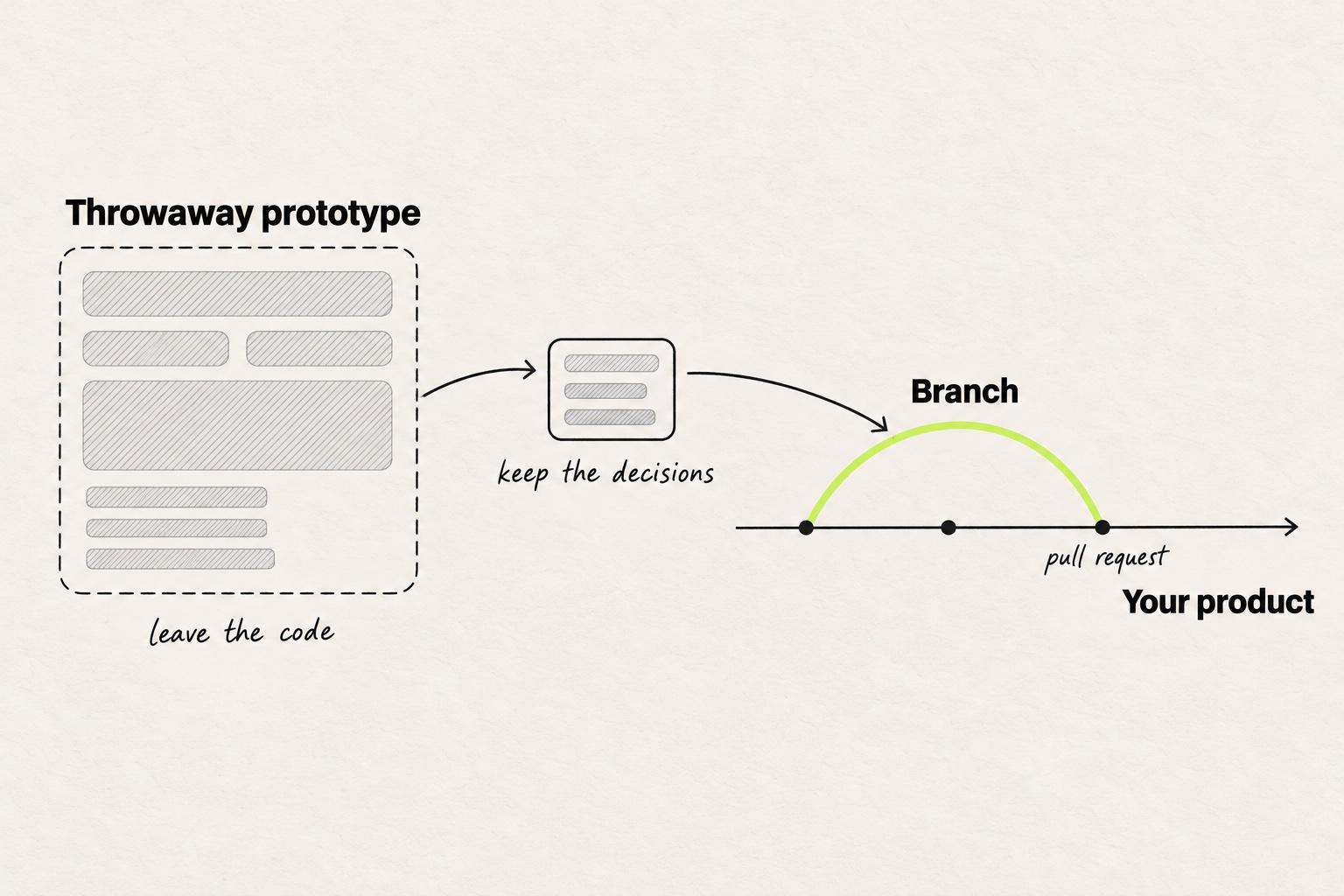
To replace a throwaway prototype with something shippable, keep what it decided and rebuild the change on a branch of the real codebase, with one of the codebase tools above. Don't try to convert the code. A generated app in its own repo is a second product, and merging two products is a rewrite.
The common advice, Figma's own Make kits included, is to make the generator better: write longer prompts, import the design system, attach the Figma frames. That makes the demo look more like the product. It does not put the demo in the product. The production environment beats a better mockup, because the branch that answered the question is the one engineers review.
Four steps:
- Write down what the prototype settled. The flow, the states, the copy, and what testers did. This is the part worth keeping.
- Open a branch of the product. Ask for repo access and staging data, as above.
- Rebuild with the components that exist. Tell the agent to use the design system's table and button, not new ones.
- Share a preview link from the branch, then open the pull request. The people who reacted to the throwaway react to the real thing. A first pass at that pull request is walked through in your first pull request as a designer.
Knak's design team works this way, with Claude Code. Jack Steele, Knak's director of engineering, writes that they "replaced Figma and Lovable handoffs with one git branch". One front-end developer said working from a handoff branch "cut his time-to-production roughly in half" (Knak).
It did not come free. Knak first "formed a tiger team of developers, which worked for six weeks to make the repo a safe, productive prototyping place for designers." On a codebase with no seed data and no staging environment, that setup is most of the work, and no tool on the list above removes it.
Best prompt-to-prototype tools for startups
With no product yet, there is no codebase to respect, and a prompt-to-app tool is the right start. The choice is about where the code should end up.
- v0 writes Next.js, React, Tailwind and shadcn, and can keep working in the repo once it exists.
- Lovable includes a backend, so sign-in and data work on day one.
- Bolt commits to a GitHub repo, so the code moves with the team.
- Replit hosts the app and its database in one place.
Decide before the first prompt whether the prototype will be thrown away or grown into the product, as the throwaway or evolutionary choice explains. If the question is only whether the idea makes sense, a rough prototype answers it faster, as how much fidelity a first test needs shows.
How to choose an AI prototyping tool
Choose by the question the prototype has to answer, then check where its answer will live. Four checks separate a demo from a change you can ship:
- Your components. Does it build with the design system's components, or imitate them?
- Your data. Does it run on your API, or on rows typed into a prompt?
- Your repo. Does the code land in the product, or in a project beside it?
- A pull request. Can an engineer review it like any other change?
Tools that work in your repo can pass all four checks a shippable prototype needs.
- Your components
- Partly: Imported as a reference
- Your data
- No: Sample data
- Your repo
- No: The tool's own file
- A pull request
- No: A handoff instead
- Your components
- Partly: Design system import on some plans
- Your data
- Partly: The tool's backend, or your APIs in v0
- Your repo
- Partly: New repo by default, yours in v0, Bolt, Replit
- A pull request
- Partly: v0 and Replit open one
- Your components
- Yes: In the repo, if the agent is told to use them
- Your data
- Yes: Whatever the app already calls
- Your repo
- Yes: A branch of the product
- A pull request
- Yes: Reviewed like any change
| Kind of tool | Your components | Your data | Your repo | A pull request |
|---|---|---|---|---|
| Prompt to UIClaude Design, Magic Patterns, Stitch | Partly: Imported as a reference | No: Sample data | No: The tool's own file | No: A handoff instead |
| Prompt to appFigma Make, v0, Lovable, Bolt, Replit | Partly: Design system import on some plans | Partly: The tool's backend, or your APIs in v0 | Partly: New repo by default, yours in v0, Bolt, Replit | Partly: v0 and Replit open one |
| On your codebaseCursor, Claude Code, Builder Code, Onlook, Modeinspect | Yes: In the repo, if the agent is told to use them | Yes: Whatever the app already calls | Yes: A branch of the product | Yes: Reviewed like any change |
Filled dot: yes. Half dot: some tools, or some plans. Empty dot: no. Make in your local codebase (closed beta, Mac only) is Figma's route toward the third row.
A tool can fail all four and still be right for a concept test or a new product. For a change to the product you already ship, it has to pass them.
Take the next change on your roadmap. If it touches the product you already ship, ask an engineer this week for repo access and a staging API, and build the prototype on a branch. If it is a new product, start in v0 or Lovable.
Frequently asked questions
What are the best AI prototyping tools in 2026?
The best AI prototyping tools in 2026 depend on where the prototype has to end up. For a new product, prompt-to-app tools such as v0, Lovable, Bolt, Replit and Figma Make build a running app fast. For a prototype on an existing product, codebase tools such as Cursor, Claude Code, Builder Code, Onlook and Modeinspect work in your repo with your components and data.
What is AI prototyping?
AI prototyping is building an interactive version of a product idea from a prompt, a sketch or a design, with an AI tool writing the screens or the code. People click through the result instead of reading a spec, so feedback comes from use rather than description.
Can AI prototyping tools use my design system?
Some can import it, and fewer build with it. Claude Design, Magic Patterns, Lovable (on paid plans) and Bolt (on Teams) import components or rules as a reference. v0 can work in your repo through Git Import. Codebase tools such as Cursor, Claude Code and Modeinspect work in the repo, so the components are already there to build with. An agent can still recreate one, so name the component you want.
Which AI prototyping tools connect to an existing codebase?
v0 through Git Import, Bolt and Replit through GitHub import, and the codebase tools Cursor, Claude Code, Builder Code, Onlook and Modeinspect. Lovable's Git sync always creates a new repository, and Figma Make pushes only to a repository it creates. Claude Design reads a repo for its components, but its output leaves as a handoff to Claude Code.
Can an AI prototype fetch real data?
Yes, if it runs where your data is. v0 can call your own APIs through environment variables. Codebase tools call whatever backend the app's environment points at, so a staging API shows real accounts. Lovable, Bolt and Figma Make default to a database of their own, filled with what you seed.
Can I turn a Lovable or v0 prototype into production code?
For a new product, yes: the generated repo can become the product if engineers accept its code. For a change to an existing product, rebuild it on a branch of your real codebase and keep the decisions, not the code. v0's Git Import can do that work on your repo from the start.
Is AI prototyping useful for designers?
Yes, for exploring flows, states and interactions that frames fake badly. AI prototyping for designers works best when the prototype uses the team's real components, because that is the version engineers can build on. Designers who prototype on the product skip the rebuild that a separate prototype creates.