
Modeinspect is a design canvas on your Next.js React codebase that uses Tailwind, where designers change the running product and engineers get the change as a pull request. The right alternative depends on the job you need done next:
- A canvas on your real codebase: Onlook, Subframe, Paper, pen.dev, Wonder, Noon, Builder Code and Cursor Design Mode.
- Figma's route: Figma Make, Dev Mode and the Figma MCP server.
- A coding agent: Cursor, Claude Code and Claude Design.
- A new app or UI screens from a prompt: Lovable, v0, Bolt and Google Stitch.
The comparison table lists where each tool's output lands and what it costs to start.
Key takeaways
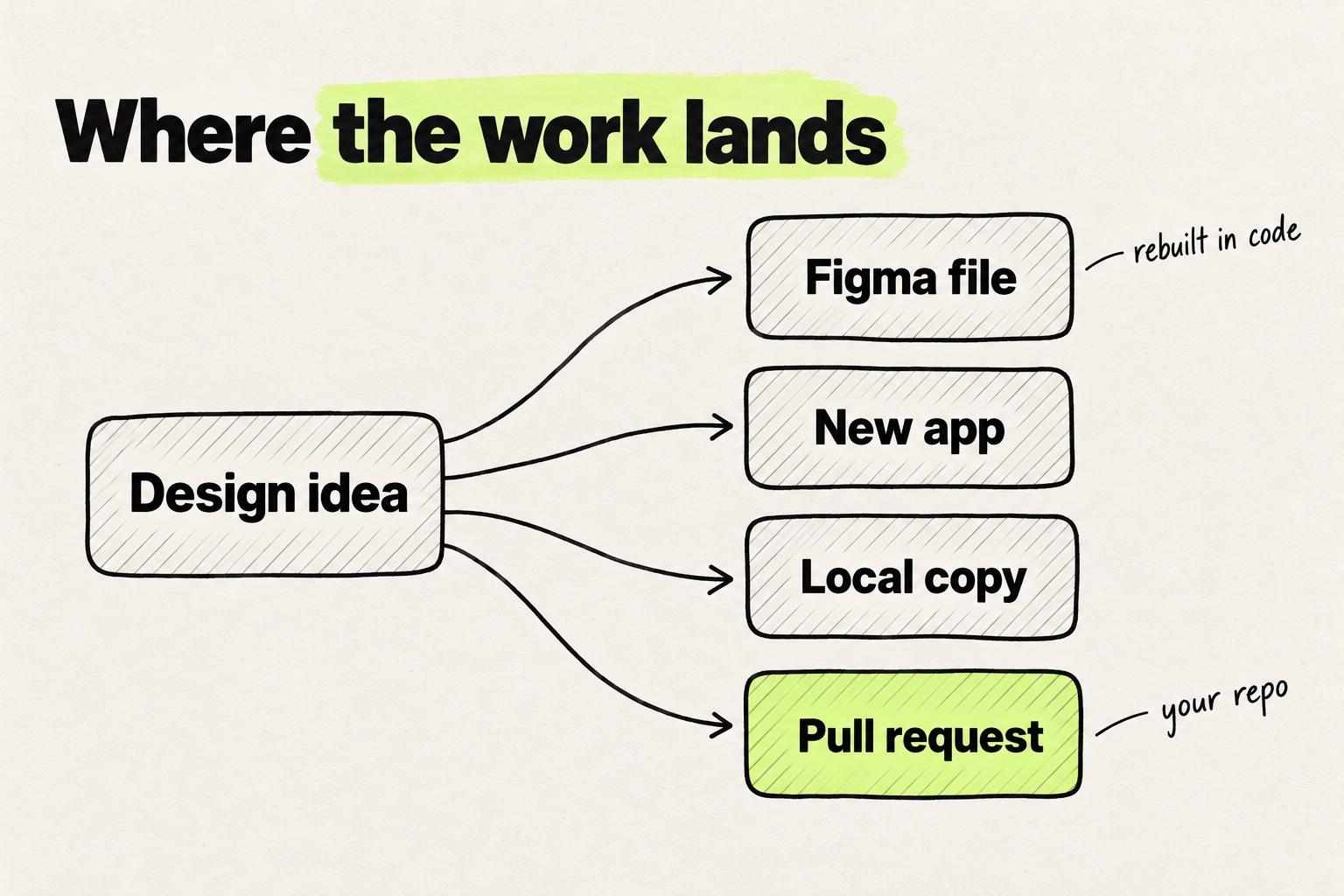
- Pick a Modeinspect alternative by where the work has to land: a design file, a new app, or a change in the repo you already ship.
- Most canvas tools now say they design on your real product. What differs is where the code runs and who writes it: your own agent on a local clone, or a cloud environment where the tool's own agent writes the change.
- Modeinspect fits Next.js React codebases that use Tailwind on GitHub. Other frameworks, other Git hosts and teams whose source of truth is a Figma file are better served elsewhere.
- New products can start in Modeinspect and become a GitHub repository, so a missing codebase is not by itself a reason to pick a prompt-to-app builder.
Four jobs, and where each one's work lands
Most "alternatives" pages list tools by feature. The question that decides the pick is what an engineer receives at the end.
A Figma file still has to be rebuilt in code. A prompt-to-app builder gives you a new app, usually in a new repository. A coding agent edits the repo you point it at, if you can run it. A canvas on the codebase writes the change into the product you already ship.
If you are a designer on a Next.js product who tried the Figma MCP server or a prompt-to-app builder and still saw the result rebuilt, look at the last two.
When Modeinspect is the right pick, and when it isn't
Modeinspect fits when the product is a Next.js React codebase that uses Tailwind, hosted on GitHub, and designers want to change what engineers already ship. Designers edit the live app with a design panel, pick values from the team's Tailwind theme, and drag the team's own React components onto the canvas. The coding agent follows the repo's CLAUDE.md, AGENTS.md and rule files, and one click opens a pull request with a preview link.
Modeinspect also fits design QA. Paste a GitHub pull request link and you get a canvas running that code. Fixes open as a new pull request stacked on the original.
Prelude's designers moved their work onto the real product and went from about 31 days to 13 from idea to merged pull request. Handoffs per feature fell from five or more to one (Prelude customer story).
Modeinspect is the wrong pick when:
- Your product is not Next.js with Tailwind. Builder Code runs React, Next.js, Vue, Svelte and Angular. Cursor's Design Mode passes component names to its agent in React, Vue and Svelte apps, and Claude Code works in whatever repo you point it at.
- Your repo is not on GitHub. GitHub is Modeinspect's only self-serve Git provider. Builder Code connects to GitLab, Bitbucket and Azure DevOps too.
- The Figma file is your source of truth. Figma's own route keeps it there.
- You want a hosted app with a database by tonight. Lovable builds the backend for you, and Bolt includes hosting and databases.
A new product is not on that list. A new Modeinspect project starts from a Next.js starter and can be published to GitHub on a personal account, then continued with pull requests.
Modeinspect's design panel has no hover or focus state switcher, so you ask the agent for state changes. Tokens are offered from the Tailwind theme, not enforced.
Modeinspect fits one stack and one Git host, and a new product can start in it too.
- Next.js React with Tailwind, repo on GitHubFitsModeinspect
- No repo yetFitsA new Modeinspect project, published to GitHub on a personal account
- Vue, Svelte or AngularElsewhereBuilder Code
- GitLab, Bitbucket or Azure DevOpsElsewhereBuilder Code
- The Figma file is the source of truthElsewhereFigma Make, Dev Mode or the MCP server
- A hosted app with a database by tonightElsewhereLovable or Bolt
Modeinspect supports Next.js React codebases that use Tailwind, with GitHub as its self-serve Git provider. Builder Code runs React, Next.js, Vue, Svelte and Angular, and connects GitHub, GitLab, Bitbucket and Azure DevOps.
Design canvas on your real codebase
Eight tools put a design canvas next to production code, and most describe it in similar words. What separates them is where the code runs and who writes it. Some work on a copy on your machine, or through your own agent over MCP, and hand the edits to the coding agent you already pay for. Others run the app in the cloud and write the change themselves.
Access is often the blocker. We hear the same thing on our calls with customers: many product designers have no access to the codebase. Some who do still need an engineer to set it up. Modeinspect runs the app in a cloud environment with its own coding agent, so no MCP server is needed.
Onlook
Onlook describes itself as "a free, local-first editor where designers craft exceptional experiences in code" (Onlook). Its Mac app needs Apple silicon and a Claude or ChatGPT account for the agent (Onlook docs). It "works on its own copy of the folder" and installs and starts your app (quickstart). The agent edits that copy on its own branch, which you send on as a pull request. It fits a designer with a Mac and a local clone. The core is open source under Apache 2.0 (GitHub). Unlike Modeinspect, its Mac app runs on your machine, and a hosted cloud version is by request.
Subframe
Subframe calls itself "a design tool for your codebase, and a coding agent with a canvas" (Subframe). Its desktop app connects a local repository, and you connect "your Claude Code or Codex subscription to Agent chat" (Subframe docs). "The agent edits the files in your connected folder directly" (docs). Subframe generates React components with Tailwind, and its components sync with your codebase's design system. It fits React teams who already pay for Claude Code or Codex. Unlike Modeinspect, the agent edits files on your computer.
Paper
Paper is a design canvas "built on web standards", and "Paper's HTML/CSS canvas means your design exports as code" (Paper). It reaches your repo through MCP: "AI agents can read and write your Paper files through MCP" (Paper docs). Paper says your agents can sync tokens, styles and components between codebase and canvas. It fits designers who want a free-form canvas and already drive Claude Code, Codex or Cursor. Paper holds the design, and your agent writes the product code, whereas Modeinspect's own agent writes it in a cloud environment.
pen.dev (formerly Pencil)
pencil.dev is now pen.dev, "an agentic canvas for building bold ideas" (pen.dev). Designs live as .pen files in your project, and pen.dev says each one "Works with Git like a code file" (pen.dev docs). You connect Claude Code, Codex, Cursor or another agent through MCP, and it can export a frame as HTML and CSS or Tailwind. It fits teams who want design files versioned next to the code. Unlike Modeinspect, the design lives in a .pen file and your own agent writes the product code.
Wonder
Wonder calls itself "a canvas where you design with AI on your real product" (Wonder). Connect a GitHub repository and it reads your components, tokens, icons and views and brings them onto the canvas. "Wonder connects to your agent over MCP." Its FAQ adds: "Your repository is cloned to your own machine, and your agent reads and edits the code there." Wonder can open a pull request on a new branch after you approve the plan (Wonder FAQ). It fits designers who already run Cursor, Claude Code or Codex. Unlike Modeinspect, the code runs on your machine through your own agent.
Canvas tools on the codebase split on where the code runs and whose agent writes the change.
Code on your machine
- OnlookCode runs onA copy of your folder on your MacAgent that writes itOnlook's agent, on your Claude or ChatGPT accountEnds inA branch or pull request
- SubframeCode runs onA local repositoryAgent that writes itClaude Code or Codex, on your subscriptionEnds inLocal files, then a pull request
- WonderCode runs onA clone on your machineAgent that writes itYour agent, over MCPEnds inA pull request on a new branch
- Cursor Design ModeCode runs onYour running dev serverAgent that writes itCursor's agentEnds inCode edits
Wherever your agent runs
- PaperCode runs onThrough Paper Desktop and MCPAgent that writes itYour agent, over MCPEnds inA Paper file, code where your agent writes it
- pen.devCode runs onThrough MCP, with .pen files in your projectAgent that writes itYour agent, over MCPEnds in.pen files in the repo
Code in the cloud
- Builder CodeCode runs onCloud containersAgent that writes itBuilder Code's agentsEnds inA pull request
- ModeinspectCode runs onA cloud environmentAgent that writes itModeinspect's coding agentEnds inA pull request with a preview link
Not published yet
- NoonNot published
Noon has not published how its tool reaches your code.
Noon
Noon says its tool "works entirely on your product code, so you can design how it looks and how it works" (Noon). Access is through an early access sign-up. Noon has not published documentation, supported frameworks, pricing or where its output lands. It fits teams willing to evaluate early. Unlike Modeinspect, which publishes its scope and ends in a pull request with a preview link, Noon has not said what engineers receive.
Builder Code
Builder Code (formerly Fusion, Builder.io) says "Build in your existing codebase" (Builder.io). It uses "your components, tokens, and usage patterns", and "Approved changes become pull requests". It runs React, Next.js, Vue, Svelte and Angular, and connects GitHub, GitLab, Bitbucket or Azure DevOps. Repos run in cloud containers (Builder.io docs), so it is the closest in shape to Modeinspect, and it fits teams on stacks or Git hosts Modeinspect does not cover.
Cursor Design Mode
"Design Mode lets you direct agents by leaving notes on your running app" (Cursor docs). Cursor's agent then edits the code. It fits designers who already run the product locally and read diffs. Changes go through the agent, including small visual ones. How Modeinspect and Cursor compare for designers goes deeper.
Figma's route: Make, Dev Mode and the MCP server
Figma's tools keep the design file at the center, which suits teams whose source of truth is Figma.
Figma Make turns a prompt into a working prototype or web app (Figma). It publishes to a Figma-hosted URL or pushes to a repository Figma creates, and Figma's help center says "You can't push to GitHub repos you've created yourself" (Figma Help). Make in your local codebase is "available to try for free in closed beta for a limited number of users" (Figma Help).
Dev Mode is Figma's workspace for developers who inspect designs, and Code Connect maps "design components to real production components" (Figma). Engineers still write the code.
The Figma MCP server gives Claude Code, Cursor and other agents design context from a file. Figma says its job "is to give your agent design context, not production-ready code" (Figma developer docs). Seat and rate limits are in the Figma MCP guide.
Unlike Modeinspect, each starts from the file, so the code is Figma's own app, or code your agent or an engineer writes from the file. If you are leaving Figma rather than adding to it, see Figma alternatives for product teams.
Coding agents: Cursor, Claude Code and Claude Design
Cursor and Claude Code edit the repo you point them at. They fit people who can run the product and read a diff.
Cursor's agent edits the code in your repo, and its Design Mode sends notes you leave on a running app to that agent (Cursor docs).
Claude Code is "an agentic coding tool that reads your codebase, edits files, runs commands". It "creates branches, and opens pull requests", and it reads CLAUDE.md at the start of every session (Claude Code docs).
Claude Design lets you "collaborate with Claude to create polished visual work like designs, prototypes, slides, and one-pagers" (Anthropic). It is on every Claude plan. You can link a code repository "so Claude understands your existing components", and it hands its work to Claude Code (Claude Help Center). Unlike Modeinspect, the design is made in Claude and then built by Claude Code. See what to use when a Claude Design has to land in your codebase.
The difference from Modeinspect is the interface. Cursor and Claude Code take every change as a prompt or a note, including a two-pixel padding fix. Modeinspect gives the same repo a design panel and a canvas.
Prompt-to-app builders: Lovable, v0, Bolt, plus Google Stitch
These start from a prompt and are built for when there is no product yet. v0 and Bolt can also import a repo, with different results. The wider field is in prototyping tools for product teams.
Each tool does something different with the repo you already have, from a new project to a pull request.
- LovableYour existing repoGit sync creates a new repository. A ZIP import becomes a new Lovable project.Where it endsA separate app
- BoltYour existing repoLoads your repository as a new Bolt project and syncs it with GitHub.Where it endsBranches merged in GitHub
- Figma MakeYour existing repoPushes only to repos it creates. Your local codebase is a closed beta.Where it endsA Figma-made repo
- v0Your existing repoImports your repository into a sandbox and works on a branch.Where it endsPublish merges and deploys, unless branch protection holds it
- ModeinspectYour existing repoRuns your Next.js React codebase that uses Tailwind in a cloud environment.Where it endsA pull request, merged by your engineers
From Lovable's, Bolt's, Figma's and v0's own docs.
Lovable builds a full-stack app with a backend, database and sign-in. Its GitHub docs say "Git sync always creates a new repository" (Lovable docs). See what to use instead of Lovable when you already have a codebase.
v0 builds on "Next.js, React, TypeScript, Tailwind CSS, and shadcn/ui" (v0 docs), and it can import an existing GitHub repository. Its Publish button creates a pull request, merges it into the base branch and waits for the production deployment, unless the repo's branch protection blocks the merge (v0 docs). See what fits an existing Next.js app when v0 does not.
Bolt can import a repository, but "Bolt loads your repository as a new Bolt project", and branches are merged in GitHub (Bolt docs).
Google Stitch is, in Google's words, "an AI-native software design canvas" (Google). It generates UI from a prompt, can take a codebase as context, and exports "editable Figma files, and frontend code (HTML/CSS)" (Stitch). Unlike Modeinspect, its output is a Figma file or exported code, not a change in your repo.
Compared with Modeinspect, Lovable and Bolt own a new app, and moving it into an existing product is a separate job. Modeinspect opens a pull request and leaves the merge to engineers.
Modeinspect alternatives compared
| Tool | Group | Where the output lands | Works in an existing repo | Uses your components and tokens | Starting paid price (November 2026) |
|---|---|---|---|---|---|
| Modeinspect | Canvas on the codebase | Pull request with a preview link | Yes, Next.js React with Tailwind on GitHub | Yes, React components, and Tailwind theme tokens offered in the panel | Pro $20 a month per person, Hobby free |
| Onlook | Canvas on the codebase | A branch or pull request from a local copy | Yes, a local folder on a Mac | Edits tokens and components in your code | Free app, teams custom |
| Subframe | Canvas on the codebase | Local files, then a pull request | Yes, a local repository | Synced with your codebase | Pro $20 per editor a month |
| Paper | Canvas on the codebase | A Paper file, code via your agent | Through your agent over MCP | Synced by your agent | Pro $16 per editor a month billed yearly, $20 monthly |
| pen.dev | Canvas on the codebase | .pen files in the repo, code via your agent | Through your agent over MCP | Imported from the repo by your agent | Pro $16 a user a month billed annually, $20 monthly |
| Wonder | Canvas on the codebase | Pull request on a new branch | Yes, cloned to your machine | Read from the repo | Pro $16 per editor a month billed yearly, $20 monthly |
| Noon | Canvas on the codebase | Not published | Not published | Not published | Early access, no published price |
| Builder Code | Canvas on the codebase | Pull request | Yes, React, Next.js, Vue, Svelte, Angular | Yes, components and tokens | Pro $24 per user a month billed annually, $30 monthly |
| Cursor Design Mode | Canvas on the codebase | Code edits by Cursor's agent | Yes, your running app | From the repo and rules files | Plus $8 a month (Grok models only), Premium $30 |
| Figma Make | Figma | Figma-hosted app or a repo Figma creates | Closed beta only | Make kits from npm packages | Professional Full seat $16 a month billed annually, $20 monthly |
| Figma Dev Mode | Figma | Specs an engineer builds from | No | Code Connect mappings | Professional Dev seat $12 a month |
| Figma MCP server | Figma | Design context for your coding agent | Through your agent | Context only | Included on every Figma plan, call limits by seat |
| Claude Code | Coding agent | Branches and pull requests | Yes, the repo you point it at | From the repo and CLAUDE.md | Claude Pro $20 billed monthly |
| Claude Design | Coding agent | Designs handed to Claude Code | Reads a linked repo | Builds a design system from it | Included in Claude plans, Pro $20 billed monthly |
| Lovable | Prompt to app | A new repository | No, a ZIP import becomes a new project | Copied into the project, paid plans | Pro $25 a month billed monthly |
| v0 | Prompt to app | Pull request, merged on Publish | Yes, imported into a sandbox | Design Systems from your sources | Plus $30 per user a month |
| Bolt | Prompt to app | A new Bolt project synced to GitHub | Loaded as a new Bolt project | Design system knowledge on Teams | Pro $25 a month billed monthly |
| Google Stitch | Prompt to UI | Figma files or HTML and CSS | Takes code as context only | Takes design files as context | No published price |
Prices: Modeinspect, Onlook, Subframe, Paper, pen.dev, Wonder, Builder.io, Cursor, Figma, Claude, Lovable, v0, Bolt.
Which one to try next
- A pull request on a Next.js product with Tailwind, without local setup: try Modeinspect on one real screen.
- A pull request on another stack or Git host: look at Builder Code.
- Your own AI subscription doing the work on a local clone: Subframe, Wonder or Onlook.
- A design file that stays the source of truth: Paper, pen.dev or Figma.
- A new app by tonight: Lovable, v0 or Bolt.
Then test the one you pick with a change you would actually ship this week.
Modeinspect alternatives: common questions
What are the alternatives to Modeinspect?
The closest tools like Modeinspect are other canvases on the codebase: Onlook, Subframe, Wonder, Noon, Builder Code and Cursor Design Mode. Paper and pen.dev keep the design in their own file and hand the code to your agent. Figma Make, Claude Code, Claude Design, Lovable, v0, Bolt and Google Stitch do neighboring jobs.
Is there a free alternative to Modeinspect?
Yes. Onlook's Mac app is free, and its open-source version can be self-hosted. Subframe is free for one project, and Paper, pen.dev and Wonder have free plans. Modeinspect's Hobby plan is free too.
Does Modeinspect work with Vue, Angular or other frameworks?
No. Modeinspect supports Next.js React codebases that use Tailwind. For Vue, Svelte or Angular, Builder Code supports all three. Cursor's Design Mode passes component names to its agent in React, Vue and Svelte apps, and Claude Code works in whatever repo you point it at.
What is the difference between Modeinspect and Onlook?
Both put a canvas on a running app and end in a pull request. Onlook is a Mac app that works on a copy of your folder with your Claude or ChatGPT account. Modeinspect runs the app in a cloud environment with its own coding agent.
What is the difference between Modeinspect and Subframe?
Subframe's desktop app edits a local repository through your Claude Code or Codex subscription, and Subframe says it "works best when used with React" (Subframe). Modeinspect needs no local checkout. It runs the connected repo in a cloud environment, and each pull request it opens carries a preview link.
Can I use Modeinspect for a new product?
Yes. A new project starts from a Next.js starter, from a blank canvas or a pasted Figma frame. You can publish it to GitHub on a personal account and keep working through pull requests.
Does Modeinspect need an MCP server or a local setup?
No MCP server is needed. The repo is connected once through the GitHub App, a setup agent installs and starts the app in a cloud environment, and designers work in the browser.