The best Figma alternative depends on why you want to leave. If Figma costs too much, or you want open source or a native Mac app, pick another design canvas. If you are tired of the handoff, another canvas will not help, because engineers still rebuild the design in code. For that, you need a tool that designs in code. The four routes from a design to a pull request compares these paths.
Fast answers:
- Free and open source: Penpot. Its Professional plan is $0, and you can self-host it.
- A native Mac app: Sketch, from $12 per editor a month billed yearly, or a $120 one-time Mac-only license.
- A free desktop app on Windows, macOS or Linux: Lunacy.
- Developers who only inspect designs: Penpot Inspect, Sketch's free web handoff, or Zeplin.
- Designs that arrive as code changes: a design-in-code tool such as Paper, Onlook, Subframe, Cursor Design Mode or Modeinspect.
Key takeaways
- A Figma Professional Full seat is $16 a month billed annually, or $20 billed monthly. Monthly AI credit limits per seat have been enforced since 18 March 2026 (Figma pricing, Figma).
- Penpot is open source under MPL-2.0, and its Professional plan is free (Penpot pricing).
- Another canvas changes the price and the file format, not the handoff. Sketch at $12 per editor a month billed yearly is cheaper than Figma (Sketch pricing), and its designs still get rebuilt in code.
- Design-in-code tools make the output a change engineers review in the repo. Figma's Code Layers, a closed beta, imports a GitHub repo onto the canvas (Figma). Figma treats Code Layers as a prototyping tool, not a replacement for the handoff, which still happens in Figma.
Why teams look for a Figma alternative
The bill is one trigger. On 11 March 2025, Figma moved to Full, Dev, Collab and View seats, raised the price of Figma Design, and put seat upgrades behind admin approval (Figma).
AI credits came next. Since 18 March 2026, each seat gets a monthly credit allowance with no rollover, and extra credits come as add-on packs (Figma, Figma Help Center). A Professional Full seat gets 3,000 credits a month. Dev and Collab seats get 500 (Figma pricing).
The complaints on Figma's own forum are specific. Admins say they cannot justify the increase. Developers pay for FigJam and Slides they do not use, and ask for an inspect-only seat (Figma Forum). Another thread is about credits spent fixing wrong AI output (Figma Forum).
Files and licenses matter too. On XDA Developers, one writer says years of .fig files are what stalls most attempts to switch, because other tools cannot read the format cleanly (XDA). Another points out that Figma's AI features that edit the canvas sit mainly behind a paid seat (XDA).
Teams that ship code have one more reason, and pricing does not touch it. The design file is a copy of the product, and someone rebuilds every change from it. Switching canvases leaves that step where it was.
Sort Figma alternatives by the handoff, not feature parity
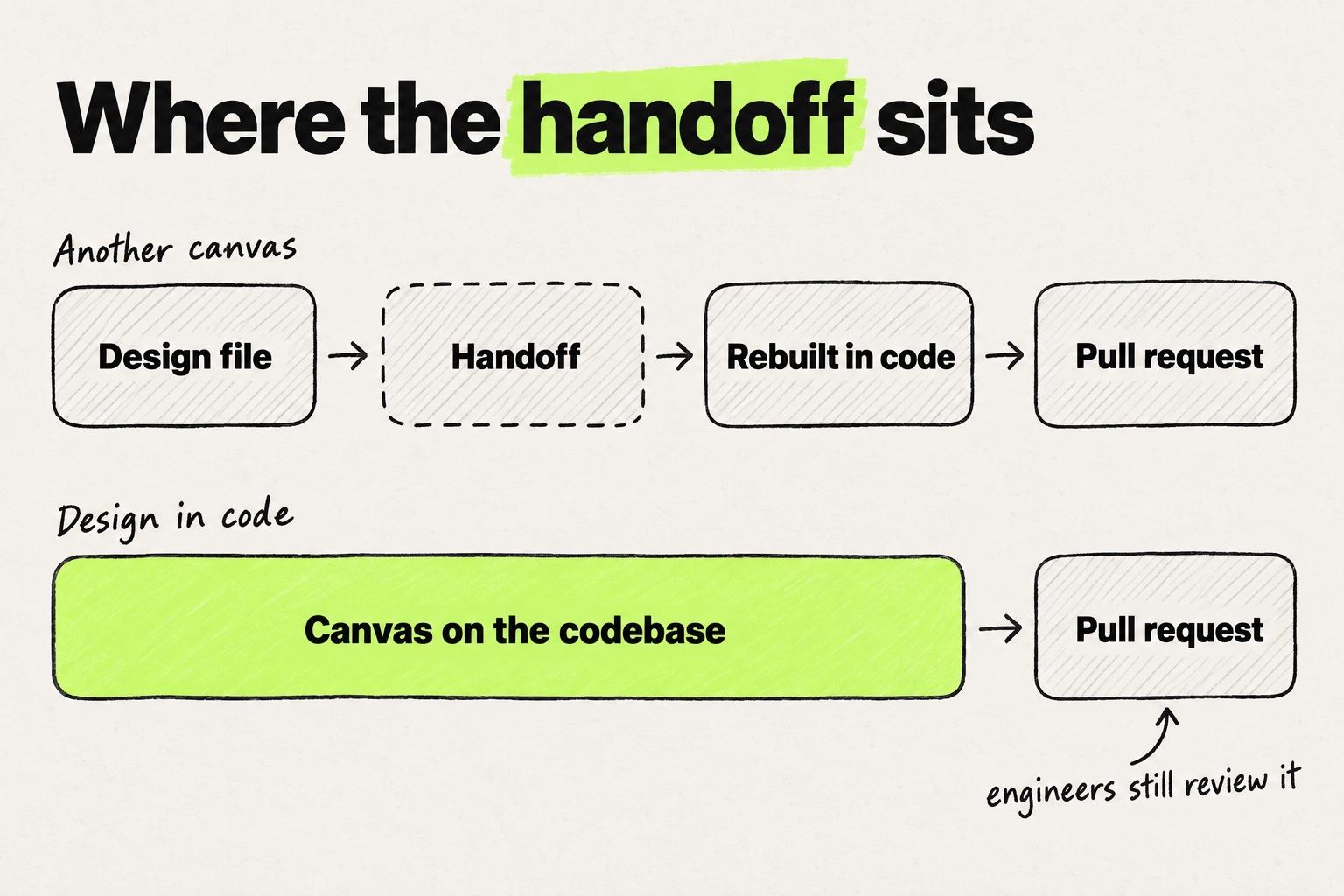
Most lists of alternatives to Figma compare canvases feature by feature. For a product team, the more useful question is where the design ends up. Three groups answer it differently.
- Other canvases. Penpot, Sketch, Lunacy and UXPin Merge. You design in a file, and developers inspect it and build it in code.
- Design-in-code tools. Paper, pen.dev, Onlook, Subframe, Cursor Design Mode, Modeinspect and similar tools. The canvas is connected to your codebase or to your coding agent.
- Skip the canvas. Figma Make, v0, Lovable, Bolt and Claude Design. You describe an app in a prompt and get code, usually in a new project.
A tool removes the handoff when its output is a change engineers review in the repo, not a file someone rebuilds. Review stays. Engineers still read every change and decide whether it merges. What goes away is the translation from a picture of the product into the product.
Designers have told us about the cost of that translation. Some start in Claude Code, rebuild the result in Figma for a handoff file, and the later code changes never make it back to Figma. How the Figma to code workflow is shifting away from that loop is covered in rethinking the Figma to code workflow.
Other canvases: cheaper or open, same handoff
These tools change where the design file lives and what it costs. The step after it stays the same: developers inspect the design and build it in code.
Penpot
Penpot is an open-source design tool (MPL-2.0) that runs in the browser and can be self-hosted (GitHub, Penpot Help). It has CSS Grid and Flex layout and native design tokens in the W3C DTCG format, with JSON import and export (Penpot). Inspect gives developers SVG, HTML and CSS (Penpot Help). An official MCP server lets coding agents read and edit components, styles and tokens, and generate HTML and CSS (Penpot Help).
Where it stops: the output is a design file, and the markup it generates is not your components. Someone still builds the screen in your codebase.
Price: Professional is $0. Unlimited is $7 per editor a month, capped at $175 a month. Enterprise is $25 per member a month (pricing).
Sketch
Sketch is a native Mac editor. Its web app is free for viewers, who can inspect, copy values, export assets and download tokens for handoff (Sketch). A local MCP server, off by default, arrived in October 2025 (Sketch).
Where it stops: editing is Mac only, and handoff is the same inspect-and-build step as in Figma.
Price: Standard is $12 per editor a month billed yearly, $14 billed monthly. A Mac-only license is $120 per seat, one-time, with one year of updates (pricing).
Lunacy
Lunacy, from Icons8, is a desktop design app for Windows, macOS and Linux (Lunacy docs). It is "completely free, both for personal and commercial use" (Lunacy docs). Its Code tab shows CSS, XAML, JSON and SVG (Lunacy docs).
Where it stops: there is no connection to a codebase. The Code tab gives values to copy.
Price: the app is free. Personal Cloud is $4.99 a month, and Team Professional is $4.99 per user a month (plans).
UXPin Merge
Merge lets designers work with real React or Web components pulled from Git, Storybook or npm (UXPin). Get Code turns what they build into React and JSX (UXPin docs).
Where it stops: the components are real, but the output is a prototype and its JSX, not a change in your repo.
Price: UXPin starts with Core at $29 per seat a month billed annually, $49 billed monthly. Growth is $40 billed annually, $69 billed monthly. Git integration is on Enterprise, with custom pricing (pricing).
Framer, Adobe XD and Motiff
These three still appear on older lists. Framer is a website builder, and it "does not offer HTML export for self-hosting" (Framer). Adobe says "Adobe XD is currently in maintenance mode" (Adobe). Motiff shut down: it went offline on 23 June 2026, and data export runs until 31 October 2026 (Motiff). Before you move a team's files, check the footing of the tool you are moving to.
Figma Dev Mode alternatives for developers who only inspect
Dev Mode comes with Full and Dev seats, and Collab seats get basic inspection. A Professional Dev seat is $12 a month billed annually, $15 billed monthly (Figma pricing). If developers only read specs, three alternatives cover that job.
- Penpot Inspect gives SVG, HTML and CSS for a selection, at no cost (Penpot Help).
- Sketch's web app lets viewers inspect, copy values, export assets and download tokens for free (Sketch).
- Zeplin is a handoff layer that imports from Figma, Sketch and XD, with code snippets, tokens and Storybook links (Zeplin). It is free for one project. Basic starts at $13.75 a month per project and Advanced is $12 per seat a month, both billed annually (pricing).
Each gives developers a clear view of the design. None of them changes who rebuilds it. Where handoff breaks, and how teams patch it, is in how Figma developer handoff works and where it breaks.
Design-in-code tools: the canvas edits the product
In a design-in-code tool, canvas to code happens without a handoff, so the result is a code change. There are two kinds. In the first, a canvas talks to your coding agent over MCP and the agent writes the code: Paper and pen.dev. In the second, the tool edits the repo itself, as in Onlook, Subframe, Cursor Design Mode and Modeinspect.
Either way, designers design directly in code without writing it, and engineers still review every change. Expect gaps on the canvas side. One design lead who tried a newer canvas told us it missed basics designers take for granted in Figma, such as spacing between elements, snapping and parts of auto layout.
Paper
Paper gives a Figma user a design canvas that is HTML and CSS underneath. Your coding agent, in Claude, Cursor, VS Code or Zed, connects over MCP and syncs tokens, styles and components (Paper).
Where it stops: the code comes from your agent, not from the canvas.
Price: free with 100 MCP calls a week. Pro is $16 per editor a month billed yearly, $20 billed monthly (pricing).
pen.dev
In pen.dev, formerly Pencil, the design file itself lives in your repo as .pen JSON, next to the code (pen.dev docs). Agents such as Claude Code, Codex and Gemini CLI read it over MCP (pen.dev).
Where it stops: the code change still comes from your agent.
Price: "currently free" (pricing).
Onlook
With Onlook, a Figma user edits the running React app instead of a frame. It is an open-source visual editor (Apache 2.0) that writes the changes to your code, and it focuses on "Next.js and TailwindCSS for now" (GitHub). What to check before picking an editor like this is in what to look for in a React visual editor.
Where it stops: other stacks are outside its focus, and the hosted product is "currently in closed beta".
Price: free to self-host. The hosted version has custom pricing (pricing).
Subframe
Subframe puts a canvas, a coding agent and a browser in one tool, on macOS or the web. It reads and writes your local files, works best with React, supports Tailwind, and can use your Claude or Codex subscription (Subframe).
Where it stops: it works on a local checkout, and it works best with React.
Price: free for one project. Pro is $20 per editor a month (Subframe).
Cursor Design Mode
Cursor has no canvas in the Figma sense. For a Figma user, Design Mode swaps the frame for the running app. You click, draw on or speak about an element, and Cursor's agent edits the code in your local repo (Cursor docs).
Where it stops: the app has to run in Cursor, on your machine or in a cloud agent (Cursor changelog), and each visual change goes through the agent.
Price: Hobby is free and Pro is $20 a month (pricing).
Modeinspect
Modeinspect opens your connected codebase as a design canvas, in a private cloud environment, so there is no local setup. The canvas uses your components one to one and reads tokens from the repo. Changes leave as pull requests with specs and preview links for engineers to review. You can also start a new project in it and turn it into a GitHub repository. How it compares with Cursor for a Figma-first designer is on the Modeinspect and Cursor comparison.
Where it stops: it supports Next.js React codebases that use Tailwind. Its canvas is its own, so check the Figma features your team relies on.
Price: Hobby is free and Pro is $20 a month per person (Modeinspect pricing).
Figma Code Layers
Figma has a feature in this area, but it is not built to remove the handoff. Code Layers, in closed beta, imports a GitHub repo or local folder as a code layer on the canvas and can push changes to your repo (Figma, Figma Help Center). Figma treats it as a way to prototype with real code, not as a replacement for the handoff. The handoff still happens in Figma.
Where it stops: it is a closed beta with a waitlist, and it is aimed at prototyping, not at replacing the handoff.
Price: not priced yet.
Setups for each role, with coding agents and canvases side by side, are compared in the design engineer's tool stack.
Skip the canvas: prompt-to-app tools
Prompt-to-app tools skip the design file and generate an app. They suit prototypes and new projects. For a product team, the question is how each one treats an existing repo.
- Figma Make pushes one way, and it "only pushes to repositories it creates" (Figma Help Center). For an existing repo, Make in your local codebase is a closed beta in Figma's Mac beta desktop app (Figma Help Center). It is part of the Full seat (Figma pricing).
- v0 can import an existing GitHub repo and create a pull request (v0 docs). Plus is $30 per user a month (pricing).
- Lovable says "You can only export from Lovable to GitHub, not the other way around" (Lovable docs). Pro starts at $25 a month with 100 credits (plans).
- Bolt docs describe importing an existing repository and committing to it automatically, with no merge step inside Bolt (Bolt). Pro is $25 a month (pricing).
- Claude Design, in beta, can link a repo to learn your components and hands off to Claude Code (Claude Help Center). It comes with Claude Pro at $20 a month and up, not Free (pricing).
These tools get a longer look as prototyping tools for product teams and in AI tools for designers, sorted by where the output lands.
Figma alternatives compared
| Tool | Group | Open source | Runs on | Works on your codebase | Output | Starting paid price (checked 28 September 2026) |
|---|---|---|---|---|---|---|
| Figma (baseline) | Canvas | No | Browser and desktop app | Code Layers and Make in your local codebase, both closed betas | Design file, Dev Mode | $16 per Full seat a month billed annually, $20 billed monthly |
| Penpot | Other canvas | Yes, MPL-2.0 | Browser, or self-hosted | No, MCP server edits the design file | Design file, Inspect CSS and HTML | Free, Unlimited $7 per editor a month capped at $175 a month |
| Sketch | Other canvas | No | Mac, web app for viewers | No | Design file, web handoff | $12 per editor a month billed yearly, $14 monthly |
| Lunacy | Other canvas | No | Windows, macOS, Linux | No | Design file, CSS, XAML, JSON, SVG | Free app, cloud plans $4.99 a month |
| UXPin Merge | Other canvas | No | Browser | Uses components from Git, Storybook or npm, Git on Enterprise | Prototype, React and JSX | UXPin from $29 per seat a month billed annually, Git integration on Enterprise (custom) |
| Zeplin | Handoff layer | No | Zeplin, imports Figma, Sketch, XD | No, links to Storybook | Specs, snippets, tokens | Free for 1 project, Basic from $13.75 a month per project, Advanced $12 per seat a month, both billed annually |
| Paper | Design in code | No | Canvas app, connects to any IDE or CLI agent | Through your coding agent over MCP | Canvas, code by your agent | $16 per editor a month billed yearly, $20 monthly |
| pen.dev | Design in code | No | Desktop app, VS Code and Cursor extension | .pen files in the repo, code by your agent | .pen files, code by your agent | Currently free |
| Onlook | Design in code | Yes, Apache 2.0 | Self-hosted, hosted in closed beta | Yes, Next.js and Tailwind | Code in your repo | Free self-hosted, hosted custom |
| Subframe | Design in code | No | macOS app, web | Yes, local files, React first | Code in your local repo | Free for 1 project, Pro $20 per editor a month |
| Cursor Design Mode | Design in code | No | Cursor, local repo or cloud agent | Yes | Code diff or pull request | Free Hobby, Pro $20 a month |
| Modeinspect | Design in code | No | Private cloud environment | Yes, Next.js React with Tailwind | Pull request | Free Hobby, Pro $20 a month per person |
| Figma Code Layers | Prototyping in code | No | Figma | Yes, closed beta, for prototyping | Code layer on the canvas, handoff stays in Figma | Not priced |
| Figma Make | Skip the canvas | No | Figma | New repo it creates, existing repo in closed beta | App, one-way push | Included in a Full seat |
| v0 | Skip the canvas | No | Browser | Yes, Git Import | Pull request | $30 per user a month |
| Lovable | Skip the canvas | No | Browser | No, export only | Export to GitHub | $25 a month |
| Bolt | Skip the canvas | No | Browser | Imports a repo, commits to it | Commits to the repo | $25 a month |
| Claude Design | Skip the canvas | No | Browser | Links a repo to learn components | Design, handoff to Claude Code | Claude Pro, $20 a month |
When Figma is still the right answer
Switching costs time whichever way you go, and in several cases Figma remains the right tool.
- Early exploration. A freeform canvas is built for many loose directions side by side, before anyone commits to one.
- Flows you cannot pause. A multi-step interaction with a step that finishes in seconds, such as an upload, is easier to design as frames. A live app will not stop on that screen.
- Stacks the design-in-code tools do not cover. Most of them target web front ends, often React with Tailwind. A native mobile app or a different stack sits outside that scope.
- Canvas habits your team depends on. If daily work runs on auto layout and snapping, test those first in any alternative.
- Only the bill is the problem. If developers hold Full seats just to inspect, move them to Dev seats. A Dev seat is $12 a month billed annually, which may cost less than moving the team (Figma pricing).
A team can run both: Figma for exploration, and a design-in-code tool for changes to the product that ships.
Which Figma alternative fits your team
- You want to stop paying for Figma and keep designing in a file. Penpot, or Lunacy if you want a free desktop app. Test the features your team uses daily before you move.
- Your designers are on Macs and want a native app. Sketch.
- Your design system already lives in React components. UXPin Merge puts them on the canvas, with Git integration on Enterprise.
- Your developers only inspect. Figma Dev seats, or a Dev Mode alternative such as Zeplin.
- Your problem is the rebuild after handoff. A design-in-code tool. Paper or pen.dev if your team already runs a coding agent. Onlook, Subframe, Cursor Design Mode or Modeinspect if the canvas should edit the repo directly. Converters and coding agents are compared in design to code tools compared.
- You need a prototype, not a product change. Figma Make, v0, Lovable or Bolt.
- Your team has both profiles. Engineers keep their agent, designers pick a canvas, and every change goes through the same code review.
Frequently asked questions
Is there a free Figma alternative?
Yes. Penpot's Professional plan is $0, Lunacy is free for personal and commercial use, pen.dev is currently free, and Onlook is free to self-host. Figma's own Starter plan is free too. More options are in a broader roundup of UI design tools.
Is Penpot as good as Figma?
Penpot covers much of daily design work: CSS Grid and Flex layout, design tokens, Inspect, an MCP server and self-hosting. Whether it covers your team depends on the features you use daily. Import a real file with the Penpot Exporter plugin and test before you move (Penpot).
What is the best Figma alternative for developers?
It depends on what developers do with the design. If they only read specs, a Dev Mode alternative covers it. If they want design changes to arrive as code they review, look at the design-in-code tools, such as Onlook, Subframe, Cursor Design Mode or Modeinspect.
Can designers design directly in code without learning to code?
Yes, within a scope. Canvas tools that edit the repo give designers layout and style controls, and the tool or a coding agent writes the code. Engineers still review each change. Most of these tools support web front ends, often React with Tailwind, so check your stack first.
Is there a Figma Dev Mode alternative?
Yes. Zeplin is a dedicated handoff tool, and Penpot Inspect and Sketch's web app are free for developers who only read designs. If you stay on Figma, a Dev seat is $12 a month billed annually.