Pick Figma Make if your team already pays for Figma Full seats and wants a working prototype or web app from a prompt. Pick Modeinspect to change the product your engineers ship, with design controls on the running app, when that product is a Next.js React codebase that uses Tailwind.
You are probably the product designer on a team that already pays for Full seats. You built a flow in Make, stakeholders clicked through it, and now it has to go into the product. If you tried Push to GitHub, you got a new repository instead.
Most lists of Figma Make alternatives offer another prompt-to-app builder. Make can now clone your repo and open a pull request, so the two tools differ in how each change gets made and what reaches review. More tools are in the prototyping tools a product team can choose from.
Key takeaways
- Figma Make builds a working prototype or web app from a prompt, and it can now clone a GitHub repo and open a pull request.
- Make comes with a Full seat at no extra cost. Its AI actions spend credits that expire monthly.
- Make is handed your design system as a Make kit. Modeinspect reads the components and Tailwind theme already in your repo.
- Pick Make for new apps, stacks outside Next.js and Tailwind, and teams on Full seats. Pick Modeinspect to change a Next.js React product that uses Tailwind through a pull request.
Figma Make vs Modeinspect at a glance
| Figma Make | Modeinspect | |
|---|---|---|
| Built for | Designers who want a prototype or web app from a prompt | Product designers and design engineers changing an existing product or starting a new one |
| Where you work | A Make file in Figma: a prompt box and a live preview you click to edit | A canvas in the browser, running your product in a cloud environment |
| What the design is made of | An app Make generates, or Figma's clone of your repo | Your product's own code, plus canvas frames |
| Design system | A Make kit: npm packages, library variables and styles, guidelines | Your repo's React components and Tailwind theme, tokens offered, not enforced |
| Frameworks | React by default. Clones a frontend web app that runs locally | Next.js React codebases that use Tailwind (Next.js 15 or newer, Tailwind v3 or v4) |
| Getting to a pull request | Push to a new repo, or clone your repo and click Create PR from a branch | One click on GitHub, with written text and a preview link |
| AI models | A model picker with OpenAI, Anthropic and Google models (models) | Anthropic and OpenAI (how Modeinspect handles your code) |
| Price (November 2026) | Included in a Full seat: Professional $16 a month billed annually or $20 monthly, with 3,000 AI credits a month (Figma pricing) | Hobby free, Pro $20 a month per person, custom team pricing (Modeinspect pricing) |
What Figma Make does well
Give Figma Make a prompt and a Figma frame or a PDF (Figma), and it builds an app you can click through, in React by default (Figma Help Center). Figma's pricing page sums up the job: "Generate a functional prototype or web app via prompt" (Figma pricing).
For small changes, Make lets you "Refine your prototypes by clicking elements to style, swap, or prompt for changes directly in the preview." Make kits "Sync your npm packages, library styles, and guidelines directly with Figma Make to generate high-fidelity prototypes" (Figma).
Apps get "A built-in CMS powered by Payload" (Figma), and Figma calls Payload "Figma Make's native backend moving forward" (Figma Help Center). Published apps are hosted while publishing is in beta (Figma Help Center).
Figma Make and GitHub: what happens to your existing repo
Push to GitHub sends a Make file to a new repository. "Figma Make only pushes to repositories it creates," and the push is one way, so edits made in GitHub are overwritten on the next push (Figma Help Center).
Clone from GitHub starts from your code. Figma's advice is that "The best way to use your own code with code layers and Figma Make is by cloning repositories hosted on GitHub." You "Create a Figma Make file and, below the initial prompt box, click Clone from GitHub," optionally on a branch. Figma stores the clone, and you push changes back to the original branch or click Create PR from a different branch (Figma Help Center).
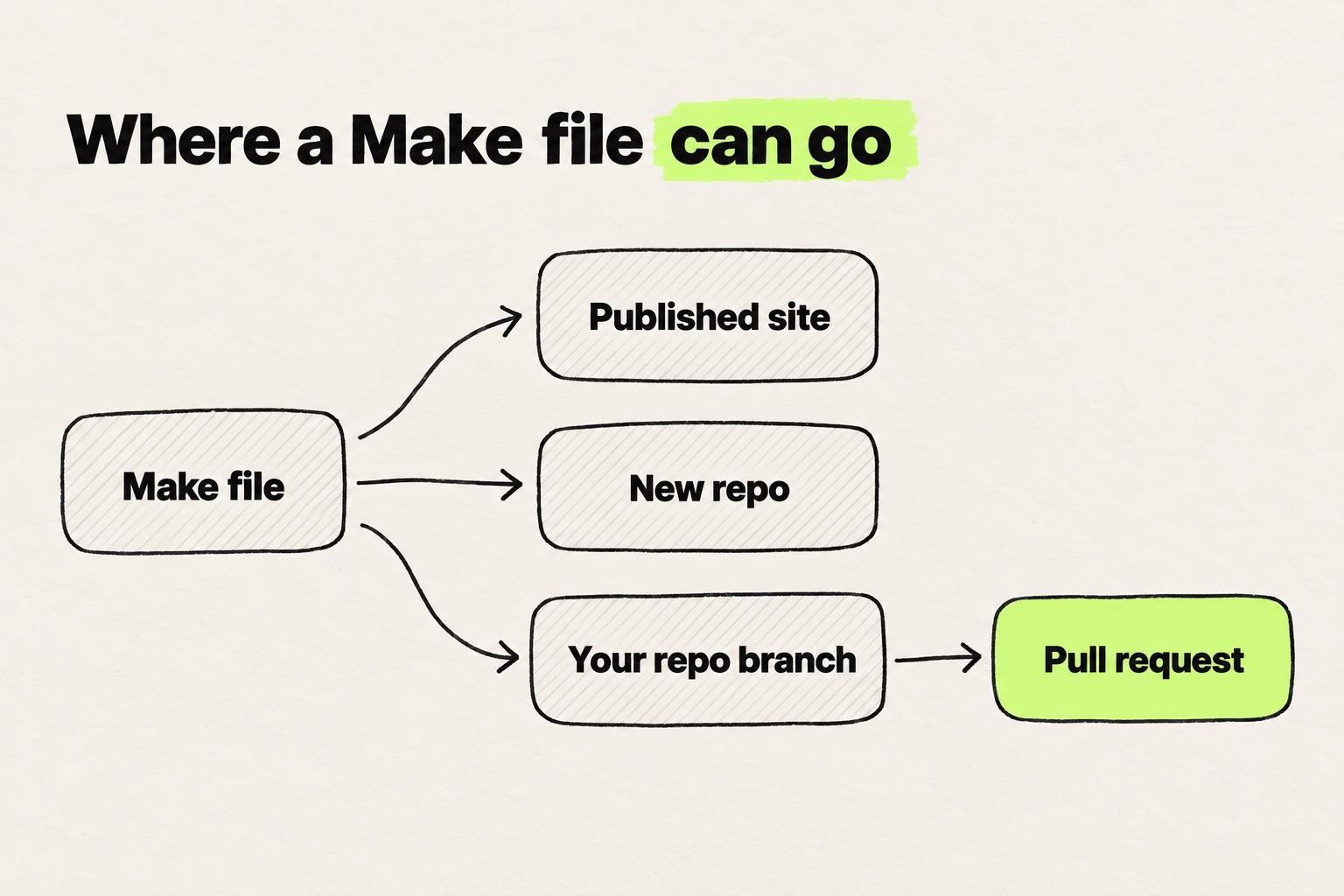
The branch route needs a Make file cloned from your repo. A Make file built from a prompt reaches GitHub only as a new repo.
The repo must be a frontend web app you can install and run locally, under 3GB. Repos behind a VPN, firewall or IP allowlist are not supported, and neither are private npm packages that need a login. GitHub is the only host, connected through the Figma GitHub app by a Figma org admin (Figma Help Center).
Make in your local codebase is a separate route, a closed beta for a limited number of users, in Figma's beta desktop app for Mac. "Each repository needs a one-time setup by an engineer on your team" (Figma Help Center).
Where a product team hits Make's limits on an existing codebase
With a cloned repo, a product team meets three things next: how Make learns the design system, what happens to the code, and what each change costs.
The design system comes in as a kit
A Make kit brings npm packages, variables and styles from published libraries, and guidelines (Figma Help Center). Publishing private packages for a kit needs an Organization or Enterprise plan (Figma Help Center). In a Figma Forum bug report from February 2026, a designer wrote: "The tool completely ignored my attached components and explicit styling rules" (Figma Forum).
The agent edits Figma's copy of your code
Figma notes that "Occasionally, the Figma agent may need to make small tweaks to the cloned code to ensure it can run in the code layer" (Figma Help Center). Ask the engineer who reviews the pull request to look for them. Anyone with edit access on the Make file can also see the source code.
Prompted changes are paid in credits
Figma's AI credits article gives Make costs on the default model as of February 2026. A font change takes about 30 credits or more, and an app from scratch about 100 or more (Figma Help Center). Some models "may use substantially more credits per task" than others (Figma Help Center). Polishing a screen by prompt takes many small changes, and each prompt spends credits. After November 4, 2026, code layers, the other place Figma documents Clone from GitHub, use AI credits for their tasks (Figma Help Center).
We hear the same thing on our calls with customers: when a task costs more than the result is worth, it stops making sense to do it in the tool.
Figma Make pricing: does it cost extra on top of a seat?
No. "Figma Make is included on the Full seat" (Figma Help Center), and the Full seat "includes full access to all Figma products, including Figma Design, Figma Make" (Figma pricing). On Professional, as of November 2026, a Full seat is $16 a month billed annually or $20 billed monthly, with 3,000 AI credits a month.
Other seats can try Make but cannot share or publish from it. "Users with a Dev, Collab or View seat can also try Figma Make in drafts," but those files "cannot be shared without upgrading to a Full seat." Only Full seats on paid plans, and Starter users, can publish (Figma Help Center). A Professional Dev seat costs $12 a month annually or $15 monthly, and a Collab seat $3 or $5 (Figma pricing). Dev, Collab and View seats each get 500 AI credits a month (Figma Help Center). Full and Dev seats can download code, and Collab and View seats cannot (Figma Help Center).
Every Professional seat can try Figma Make, but only a Full seat can share or publish what it builds.
Price a month, billed annually or monthly. Professional plan, November 2026.
Dev, Collab and View seats can try Make in drafts. Credits expire monthly and do not roll over. Prices from figma.com/pricing, credits from Figma's AI credits article.
Source: Figma Make FAQs
A Full seat gets 500 credits on Starter, 3,000 on Professional, 3,500 on Organization and 4,250 on Enterprise. "AI credits expire monthly and do not roll over." With none left, "you will be unable to complete any additional AI actions" until they reset, or until an admin adds a credits subscription or pay-as-you-go (Figma Help Center).
Starter is free, with "150 AI credits/day, up to 500 AI credits/mo" (Figma pricing). Its users "cannot use team libraries to bring style context to Figma Make" (Figma Help Center). For a product team, the cost is a Full seat for each designer who shares or publishes from Make, plus any credits the team buys.
How Modeinspect handles the same job
In Modeinspect, a designer selects a card in the team's running app, picks a padding value from the Tailwind theme in the design panel and clicks Apply. The coding agent writes the change into the code.
The app runs in a cloud environment, never on the designer's machine. A setup agent installs the repo, starts the app and asks for missing environment values, and the repo is connected once. Modeinspect supports Next.js React codebases that use Tailwind, on Next.js 15 or newer and Tailwind v3 or v4.
Designers drag the team's React components onto the canvas and edit their props. Tokens from the Tailwind theme sit in the design panel, offered, not enforced, so a value that matches no token becomes a one-off value. The coding agent follows the repo's CLAUDE.md, AGENTS.md and Claude, Cursor and agent rule files.
Figma Make is handed your design system in a kit. Modeinspect reads the one already in your repo.
- npm packagesInstalled through a Make kit. Private packages need an Organization or Enterprise plan.
- Library variables and stylesFrom published Figma libraries, through the same kit.
- GuidelinesWritten instructions that travel with the kit.
- Figma framesAttached to a prompt as design context.
- React componentsFound in the repo after setup, dragged onto the canvas with their props.
- Tailwind theme tokensOffered in the design panel, not enforced. Other values stay one-off values.
CLAUDE.md,AGENTS.md, rule filesRead and followed by the coding agent, including Claude and Cursor rules.
Figma layers pasted into Modeinspect arrive as plain layers, and Figma variables do not become tokens.
Figma work comes in by copy and paste: select layers in Figma and paste them onto the canvas as editable frames, or paste a frame link. Component instances arrive as plain layers, not linked to your code components, and Figma variables do not become tokens. Drop a pasted frame onto a live page, and the coding agent builds it into the code.
One click creates a branch, commits and opens a pull request on GitHub, with a drafted title and description the designer can edit and an "Open Preview" link. For design QA, paste a pull request link to get a canvas running that code, and fixes open as a stacked pull request. Modeinspect never commits to someone else's pull request.
New projects start from a Next.js starter codebase and publish to GitHub on a personal account, not an organization. Plans and prices are in the table above and on Modeinspect pricing.
When Figma Make is the better pick
- You are starting from an idea. Make builds a clickable app from a prompt and hosts it while publishing is in beta, with a Payload backend if needed.
- Your product is not Next.js with Tailwind. Make clones a frontend web app that runs locally and opens a pull request. Modeinspect does not cover other stacks.
- Your team already pays for Full seats. Make comes with them, and extra cost starts when credits run out or a kit needs private packages.
- Your reviewers live in Figma. Comments, version history and Make on mobile sit next to the design files they already open (Figma).
Which one should you choose?
Choose by where the change has to land and what your product runs on.
- You need a clickable app from an idea. Figma Make, on the Full seat you already have.
- You need a change in a product outside Next.js and Tailwind. Make's Clone from GitHub, or a coding agent such as Cursor or Claude Code.
- You change a Next.js React product that uses Tailwind. Modeinspect, with design controls on the running app and a pull request for review.
- You prototyped in Make and need a screen in the product. Copy the preview into Figma as layers (Professional plan and above), paste the frame into Modeinspect and drop it onto the live page.
Bolt imports a repo and commits each working change. Lovable builds a new app from a prompt. Both are in the Lovable comparison. Magic Patterns generates screens to explore and sits in what replaces v0 on an existing app. Paper, a design canvas built on web standards, gets its own page: how Modeinspect compares with Paper. For more, see the full list of alternatives we compare or replacing Figma for a product team.
Start with one screen from your Make prototype that has to ship. On a Next.js product with Tailwind, copy it into Figma as layers and paste the frame onto the Modeinspect canvas. Drop it onto the running page and open the pull request. On another frontend web app that runs locally, clone the repo into Make, work on a branch and click Create PR. Otherwise, hand it to a coding agent such as Cursor or Claude Code.
Figma Make: common questions
Does Figma Make cost extra on top of a design seat?
No. Figma says "Figma Make is included on the Full seat" (Figma Help Center). The cost you manage is AI credits. Each seat gets a monthly allowance, and credits do not roll over. With none left, you cannot run AI actions until they reset or an admin adds a credits subscription or pay-as-you-go (Figma Help Center). Dev, Collab and View seats can try Make in drafts but cannot share or publish those files.
Can a Dev or Collab seat use Figma Make?
Yes, in drafts. "Users with a Dev, Collab or View seat can also try Figma Make in drafts." Those files "cannot be shared without upgrading to a Full seat" (Figma Help Center). Only Full seats on paid plans, and Starter users, can publish. A Dev seat can view and download Make code, and a Collab seat cannot (Figma Help Center). On paid plans, both get fewer AI credits a month than a Full seat.
What are the best alternatives to Figma Make?
Lovable, Bolt and v0 do the job Make does: a new app from a prompt. The right pick depends on where the work has to land. For screens to explore, look at Magic Patterns. For a pull request in a repo you already have, look at Cursor, Claude Code and visual editors on the codebase, including Modeinspect for Next.js React codebases that use Tailwind. Our comparison hub covers the rest.
Can Figma Make push to an existing GitHub repo?
Yes, through Clone from GitHub. Plain Push to GitHub "only pushes to repositories it creates" (Figma Help Center). Clone from GitHub copies your repo into a Make file, and from there you push changes to the original branch or click Create PR from another branch (Figma Help Center). The repo has to be a frontend web app that runs locally, under 3GB, connected through the Figma GitHub app by an org admin.
How do you get from Figma Make to code?
Three ways: download it, push it to a new repo, or open a pull request from a cloned repo. "Viewing and downloading code is available to people with a Full or Dev seat" (Figma Help Center). New Make files use React, "the default framework for Figma Make files" (Figma Help Center). Push to GitHub creates a new repository, and Create PR works from a branch of a cloned repo. A Make preview can go back into Figma as design layers, though "The layers aren't automatically tied to your design system" (Figma Help Center).
Can Figma Make export to HTML?
Figma documents React code, which Full and Dev seats can download and Make can push to a new GitHub repo, and a published app on a Figma-hosted URL. React is "the default framework for Figma Make files" (Figma Help Center). For static HTML from a Figma design, turning a Figma design into HTML compares the routes, including what to do with a React app like Make's.
How does Figma Make compare with Bolt for AI app generation?
Both build a new app from a prompt. Make works inside Figma, takes Figma frames as input, gets a design system from a Make kit and comes with a Full seat. "Bolt loads your repository as a new Bolt project" and commits each change that does not break it (Bolt docs). If your team designs in Figma, Make keeps the work there. Bolt's plans and repo handling are in how Lovable and Bolt compare.
What should you compare between Magic Patterns and Figma Make?
Compare where the design system comes from and where the design goes next. Magic Patterns imports a design system from GitHub, npm or Figma (Magic Patterns docs). Its GitHub sync "creates a new repository in your selected organization" (Magic Patterns docs). Make takes a Make kit, publishes a hosted app, pushes to a new repo or opens a pull request from a clone of yours. Both sit in the v0 roundup.