Pick Paper (paper.design) for a free-form HTML and CSS canvas. Your own coding agent (Claude Code, Codex, Cursor or another) reads the file over MCP and writes the code locally. Pick Modeinspect, a Paper design alternative, for a canvas on the running product of a Next.js React codebase that uses Tailwind. Modeinspect's own agent writes the change, and one click opens a pull request.
Key takeaways
- Paper keeps the design in a Paper file made of HTML and CSS. Your own coding agent reads it over MCP and writes the code in a repo on your machine.
- Modeinspect puts the canvas on the running product, and its agent writes your edits into the code engineers ship. The change goes to review as a pull request.
- Paper fits free-form exploration, any stack, and teams that already drive a coding agent every day. Modeinspect fits Next.js React codebases that use Tailwind, on GitHub.
- Paper's code components and native Tailwind integration are in progress. When they ship, the gap between the two narrows.
Paper vs Modeinspect at a glance
| Paper | Modeinspect | |
|---|---|---|
| Built for | In Paper's words, "teams shipping with agents" | Designers changing a Next.js React codebase that uses Tailwind, or starting a new one |
| Where you work | Paper Desktop or the browser app, plus your coding agent on your machine | A web app, with the running product on the canvas in a cloud environment |
| What the design is made of | HTML and CSS layers in a Paper file | The running app's real elements and React components, plus canvas frames |
| Design system | Your agent syncs tokens, styles and components between codebase and canvas | The team's React components and Tailwind theme, read from the repo. Tokens are offered, not enforced |
| Frameworks | Whatever stack your agent writes. Selections copy as Tailwind classes or React CSS | Next.js 15 or newer, with Tailwind v3 or v4 |
| Getting to a pull request | Through your agent and your own Git workflow | One click opens a GitHub pull request with drafted text and a preview link |
| AI agent | Your own agent over MCP, billed by its own vendor | Modeinspect's own build and canvas agents, using Anthropic and OpenAI models (enterprise) |
| Price (November 2026) | Free with unlimited viewers and editors and 100 MCP tool calls a week. Pro $16 per editor a month billed yearly, $20 billed monthly, with 1M MCP tool calls a week (pricing) | Hobby free, Pro $20 a month per person, custom pricing for teams and enterprises (pricing) |
What Paper is, and what it does well
Open Paper Desktop and it "starts the MCP server in the background and installs the Paper CLI used to connect agents" (Paper docs). From then on, "AI agents can read and write your Paper files through MCP". The docs have setup sections for Cursor, Claude Code, Codex, VS Code, the GitHub Copilot app, OpenCode and Antigravity.
Paper's homepage says: "Paper's HTML/CSS canvas means your design exports as code." It adds that "your agents can sync design tokens, styles, and components between your codebase and your canvas" (Paper).
Small jobs can skip the agent. "Press ⌥ T to copy the selection as Tailwind classes. Press ⌥ R to copy the selection as React CSS." (Paper support)
Paper's build log shows what arrived in 2026:
- May 2026: Figma copy and paste, "SVGs and images included".
- August 2026: comments for teammates and agents, unlimited editors for free teams, and free viewer roles.
- September 2026: a one-click MCP connection panel, WebMCP in the browser app, image generation through MCP, and an export panel for React CSS or Tailwind.
- October 2026: agents manage files and folders through MCP.
Paper Snapshot, a browser extension marked done on Paper's roadmap, lets you "copy sections of your live site and paste them into Paper, ready to edit".
Where the design lives, and who writes the code
Paper's design exports as code, and it is tempting to stop there. A change is production-ready when it lands in the repo your team ships, through the review your team already uses. The export is one step before that.
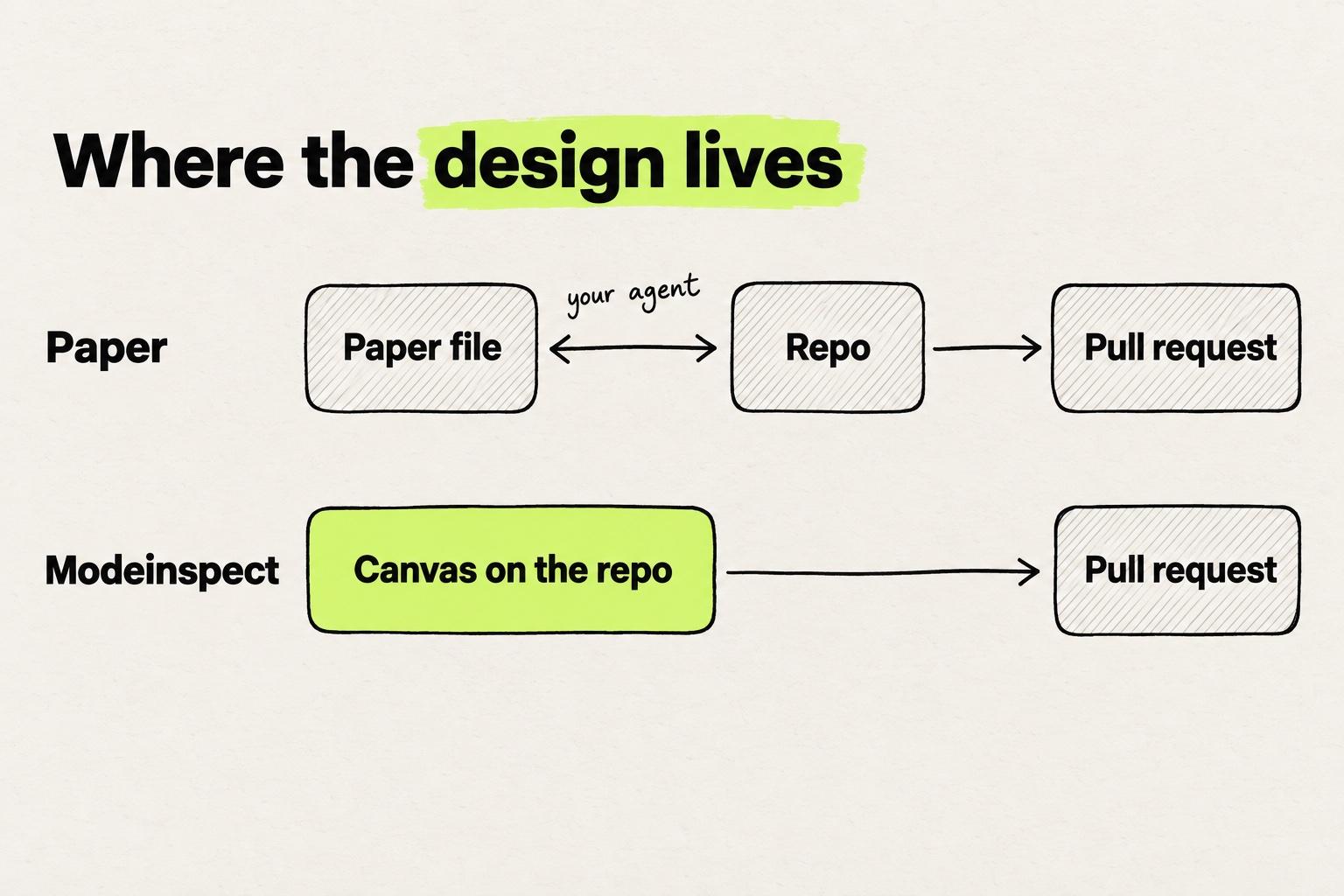
In Paper, the design lives in a Paper file. Your agent reads it over MCP and translates it into your repo, in whatever stack the repo uses. That leaves two copies of the interface, the file and the code, and someone has to keep them in step. When an engineer changes a component in the repo, the file follows only when an agent syncs it.
Paper's roadmap names the same gap. One item, marked in progress, reads: "Use your code components: No need to maintain two design systems. Compose new flows with one source of truth and the same code your users see" (Paper roadmap).
In Modeinspect, the canvas sits on the running app. The design panel edits real elements of the product: size, layout, spacing, type, fill, border, radius and opacity. You review the pending changes and click Apply, and the build agent writes the code. The change goes to review as a pull request.
Paper's route keeps a translation step and frees the canvas from the codebase. For edits to live pages, Modeinspect's route has one copy and binds the canvas to a Next.js React codebase that uses Tailwind.
What has to run, and where
Paper's MCP route runs on your machine. Its support page says "Make sure you have the Paper Desktop app open with a file loaded", and "The MCP server operates on the currently open file." (Paper support) The server runs locally, in the background of Paper Desktop. The build log lists "Remote MCP" as coming soon. The browser app supports WebMCP for agents that run inside the browser.
The code side is local too. Your agent works on a clone of the repo on your machine, and the running app comes from that clone, started by you or your agent. In the website walkthrough in Paper's MCP docs, you make a new folder and ask the agent to use React and Tailwind. Later you ask it to "add git to this folder and commit the changes".
Modeinspect runs in the browser. Someone installs its GitHub App and picks a repo, once. A setup agent installs the repo in a cloud environment, starts the app and asks for any missing environment values. If that needs an engineer, you can send a coworker a link to finish setup. The scope is narrower than Paper's: GitHub only, Next.js 15 or newer, Tailwind v3 or v4.
You may be the designer on a team that already pays for Claude Code. You have probably connected an MCP server to it, the one Figma offers or Paper's, and asked for a screen. We hear the same thing on our calls with customers: designers use MCP servers, Paper's among them, mostly to give Claude Code or Codex more context. The context helps. The repo, the running app and the pull request are still somebody's job.
With Modeinspect, no MCP server is needed. Side by side, the two routes look like this.
Paper's MCP route runs on your machine. Modeinspect's runs in a cloud environment.
- Design appPaperPaper Desktop, open with a file loadedModeinspectA web app in the browser
- Link to the codePaperA local MCP server. Remote MCP is listed as coming soonModeinspectThe GitHub App, with the repo connected once
- Who writes the codePaperYour agent: Claude Code, Codex, Cursor and othersModeinspectModeinspect's build agent
- Where the product runsPaperYour machine, on your own cloneModeinspectA cloud environment a setup agent prepares
- Pull requestPaperFrom your agent or your own Git workflowModeinspectOne click from the canvas
- StackPaperWhatever your agent writesModeinspectNext.js 15 or newer with Tailwind v3 or v4, on GitHub
Design system: synced by your agent, or read from the repo
Paper's design system route runs through your agent, which can "sync design tokens, styles, and components between your codebase and your canvas", in the homepage's words. Two pieces that would tie the canvas closer to the repo are in progress on the roadmap: code components, and "Native Tailwind CSS integration", built with the Tailwind team. The build log lists Components under coming soon. Until those ship, your agent decides which component in your repo a Paper frame becomes.
Modeinspect reads the design system from the repo. After setup, it finds the team's React components. You drag them onto the canvas, edit their props or mention them in chat, and the agents place them too. The design panel offers values from the team's Tailwind theme instead of raw numbers.
Those values are offered, not enforced. A value that matches no token becomes a one-off value, and a reviewer has to catch it. The build agent follows the repo's CLAUDE.md, AGENTS.md and rule files. Each change is type-checked, and errors go back to the agent to fix.
What to look for in a React visual editor lists the questions to put to any tool here.
Paper vs Figma, and bringing Figma work over
Paper's own comparison page states its case in one line: "Real HTML/CSS canvas vs proprietary design tool" (Paper vs Figma). Katharina Pilz, comparing the two on her blog, wrote: "Figma reads visually and corrects. Paper reads code and translates." (Katharina Pilz)
If the wider question is what replaces Figma on a product team, see Figma alternatives for product teams.
In Paper, you copy objects in Figma and paste them in. Images need Paper's extension for Figma, or they are not imported. Paper's Figma paste docs list what drops off: "Components, instances, and variables are currently detached when pasted into Paper." Components marked "Code connected" are not supported, and "Masks aren’t yet supported in Paper."
In Modeinspect, you copy layers in Figma and paste them onto the canvas as editable frames, text, vectors and images. You can also paste a link to a Figma frame or layer, though not to a whole file. Auto layout arrives as flex. Component instances arrive as plain layers, not linked to the team's code components. Figma variables do not become tokens, and fonts are not imported. A pasted frame is a starting point. You can drop it onto a live page, and the build agent builds it into the code.
Neither tool keeps Figma's components or variables when you paste a frame.
- How it comes inPaperCopy in Figma, paste as editable layersModeinspectCopy layers and paste, or paste a link to a frame
- LayoutPaperRebuilt in CSS. Gradient strokes and arbitrary dash lengths dropModeinspectAuto layout arrives as flex
- Component instancesPaperDetachedModeinspectPlain layers, not linked to code components
- VariablesPaperDetachedModeinspectDo not become tokens
- Also lostPaperMasks, and
Code connectedcomponentsModeinspectFonts - Next stepPaperKeep designing in the Paper fileModeinspectDrop the frame on a live page, and the agent builds it into the code
Source: Paper docs, Paste from Figma
If you are weighing Figma's own prompt-to-app tool instead, see how Figma Make compares.
When Paper is the better pick
- You want to explore freely before anything touches code. Paper is a design canvas first. Modeinspect's canvas has Select, Frame, Text and Portal tools, and no shape or pen tools.
- You make visual assets as well as screens. Paper's Pro plan adds video export, and image generation runs through MCP.
- Your product is not Next.js with Tailwind, or not on GitHub. Paper's output is HTML and CSS, and your agent writes whatever stack the repo uses.
- Your team already drives a coding agent every day. Paper keeps a design file as the source of truth, and your agent writes the code.
- You need many editors for free. Paper's Free plan has unlimited viewers and editors, with 100 MCP tool calls a week.
Paper's code components and its native Tailwind integration are both marked in progress on its roadmap. When they ship, the two-copies gap narrows, and the case for Paper on an existing codebase gets stronger.
When Modeinspect is the better pick
- You have an existing Next.js React product that uses Tailwind, on GitHub. Engineers get each change as a pull request they review like any other.
- You do design QA on open pull requests. Paste a GitHub pull request link and you get a canvas running that code. Fixes open as a new pull request stacked on the original. More on fixing the build in an open pull request.
- You need to show a change before it merges. Preview links open without an account, and each pull request Modeinspect opens carries an "Open Preview" link.
- You do not want local setup. Once the repo is connected, the app runs in a cloud environment, never on your machine.
- You are starting something new. A new project starts from a Next.js starter and can be published to a personal GitHub account, then continued with pull requests.
The design panel has no shadow, effects or state controls, so hover and focus changes go through the agent. Prelude's designers moved their work onto the real product and went from about 31 days to 13 from idea to merged pull request (Prelude customer story).
Which one should you choose?
Choose by where the design should live and who should write the code. The design to code guide maps the whole route.
- Your design file is the source of truth and your team runs a coding agent daily. Paper.
- You want to change the product you already ship, and it is Next.js with Tailwind. Modeinspect.
- Your stack is something else, or your repo is not on GitHub. Paper, or another canvas tool. Builder Code supports Vue, Svelte and Angular and connects GitLab, Bitbucket and Azure DevOps. pen.dev keeps design files in your repo.
This week, pick one small change your team shipped late, such as a spacing fix or a new card. Build it once with Paper and your agent, and once on the live page in Modeinspect. Hand both diffs to the engineer who would review them, and ask which one they would merge.
Paper vs Modeinspect: common questions
Is Paper a good Figma alternative?
For the canvas, yes, if you want layers that are HTML and CSS and a coding agent that reads them. Figma work comes over by copy and paste, but components, instances and variables arrive detached. Test a real file from your component library before you switch.
Paper vs Figma: what is the difference?
Paper's canvas is HTML and CSS, which Paper's comparison page calls "web-native, no translation step". It describes Figma's as a proprietary, WebGL-based model (Paper vs Figma). Your coding agent still writes your repo's code from those layers.
What does Paper's MCP server need to run?
Paper Desktop, open, with a file loaded. Opening the app starts the MCP server in the background on your machine, and the server works on the file that is currently open. Remote MCP is listed as coming soon, and the browser app supports WebMCP for in-browser agents (Paper docs, build log).
How much does Paper cost?
Paper Free costs nothing and includes unlimited viewers and editors, 100 MCP tool calls a week and limited image generation. Pro is $16 per editor a month billed yearly, or $20 billed monthly, with 1M MCP tool calls a week and video export. Organizations are priced on request, and viewer seats are always free (Paper pricing). Your coding agent is billed separately by its own vendor.
Does Paper write code to my repo or open pull requests?
Not by itself. In Paper's docs, your own coding agent reads the Paper file over MCP and writes the code in a repo on your machine. Commits and pull requests come from that agent and your own Git workflow.
What is a good Paper design alternative?
It depends on where you want the design to live.
- Modeinspect: a canvas on the running product of a Next.js React codebase that uses Tailwind, ending in a pull request.
- pen.dev: designs as
.penfiles in your project, with your own agent connected through MCP. - Onlook: a local-first Mac app that works on its own copy of your repo.
- Subframe: a desktop app where your Claude Code or Codex subscription edits a connected local folder.
All four are compared side by side, with prices.
Does Modeinspect import Figma files?
Not as .fig files. You copy layers in Figma and paste them onto the canvas, or paste a link to a Figma frame or layer. Auto layout arrives as flex, component instances arrive as plain layers, Figma variables do not become tokens, and fonts are not imported.
Can I use Paper and Modeinspect on the same team?
Yes, as separate tools for separate jobs. A designer can explore freely in Paper with a coding agent, while changes to the shipped product and design QA on pull requests happen in Modeinspect.