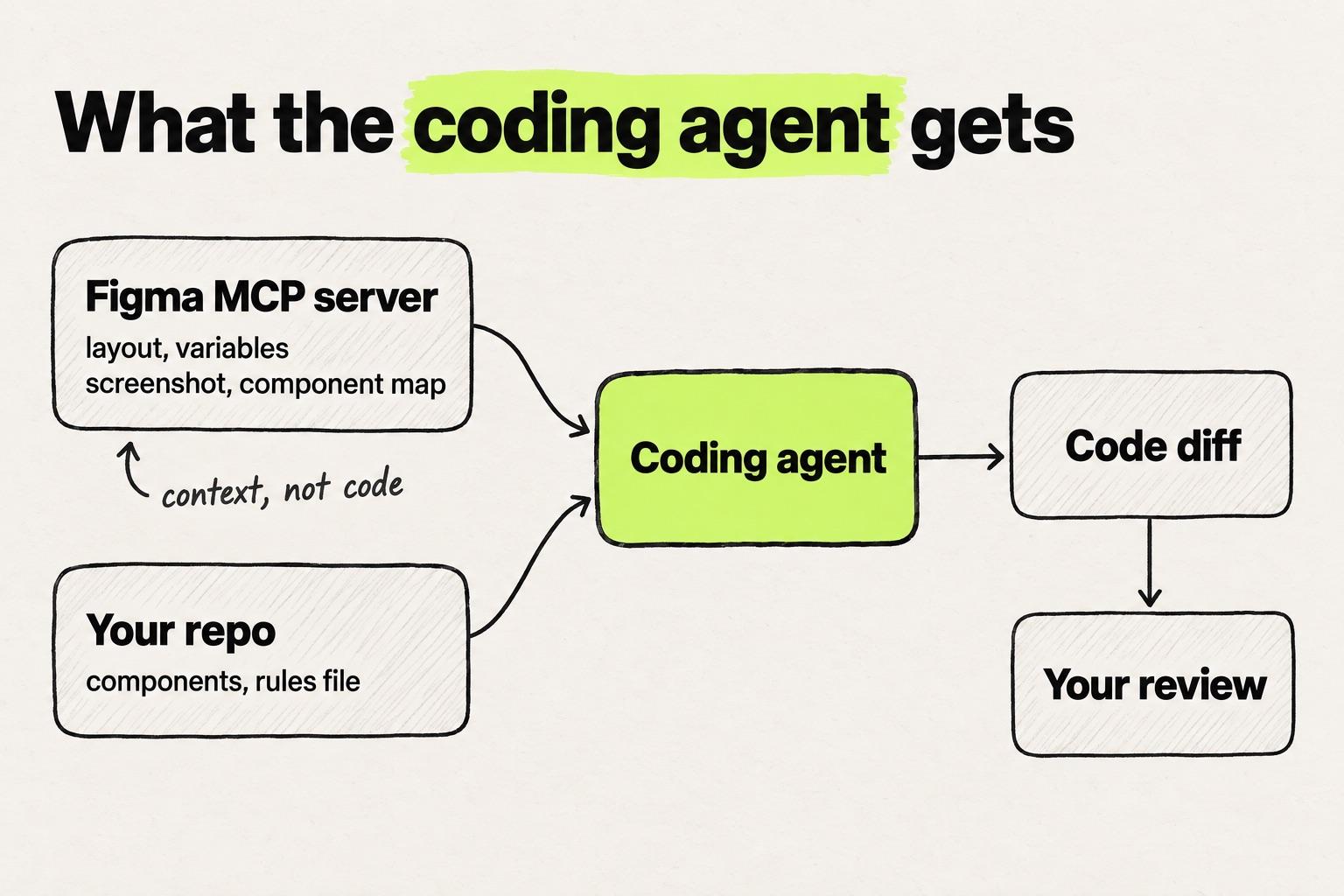
The Figma MCP server lets a coding agent read your Figma file. Connect it to Claude Code, Cursor or VS Code and paste a link to a frame. The agent gets the frame's structure, variables, a screenshot and any component mapping (Figma developer docs). Since March 2026 it can also write to the canvas (Figma).
What you get is context, not code. The agent writes the code, someone reviews the diff, and how much you can do depends on your seat, your plan and the team that owns the file. How this route compares with screenshots, prompts and designing in code is in the four routes from a design to a pull request.
Key takeaways
- The remote server works on every seat and plan. The desktop server needs a Dev or Full seat on a paid plan (Figma Help Center).
- Starter allows 20 tool calls a month, and a Professional Dev or Full seat allows 200 a day. The limit follows the team that owns the file (Figma developer docs).
- The server returns design context, written as React and Tailwind by default, not production-ready code (Figma developer docs).
- Without Code Connect, which needs Organization or Enterprise, the agent may build a new component instead of reusing yours (ByteByteGo).
What the Figma MCP server is: the remote and desktop servers
Definition
The Figma MCP server lets coding agents such as Claude Code, Cursor and GitHub Copilot in VS Code read design context from Figma files over the Model Context Protocol. The remote server can also write to the canvas.
Figma launched it on 4 June 2025 as the Dev Mode MCP server, a desktop beta (Figma). That is why older tutorials use the old name, a get_code tool or an /sse endpoint. The remote server followed in September 2025, and the server became generally available on 28 October 2025 (Figma).
| Remote server | Desktop server | |
|---|---|---|
| Runs | Hosted by Figma | In the Figma desktop app |
| Address | https://mcp.figma.com/mcp | http://127.0.0.1:3845/mcp |
| Seats and plans | All | Dev or Full, paid plans |
| Point at a design | Link to a frame or layer | Selection in the app |
| Write to canvas | Yes, in beta | No |
"Figma strongly recommends using the remote MCP server" (Figma developer docs). The desktop server's one advantage is that it reads your selection instead of a link. Pick one per client: if you configure both, your client can connect to the desktop server and miss remote-only tools (Figma developer docs).
How to set up the Figma MCP server
Steps checked against Figma's docs on 5 October 2026. Two things to know first:
- Only approved clients connect to the remote server. Your coding tool has to be in the Figma MCP Catalog, which covers VS Code, Cursor, Claude Code and others (Figma developer docs).
- Keep the file in your paid team. Rate limits follow the team that owns the file, so a file in your Drafts gets the Starter cap (Figma Forum).
Claude Code
Figma prefers its plugin, which adds Figma's skills along with the server. Paste this into a terminal:
claude plugin install figma@claude-plugins-official
Then type /mcp, select figma, choose Authenticate and click Allow Access (Figma developer docs). Prompts and review for this setup are in Figma to code with Claude Code.
Cursor
Type /add-plugin figma in the agent chat. The plugin bundles the server with Figma's skills. Then open Cursor Settings > Tools & MCP, click Connect and sign in to Figma (Figma Help Center). The full Cursor workflow is in the Cursor guide, from frame to pull request.
VS Code
VS Code needs GitHub Copilot. Run "MCP: Open User Configuration" from the command palette and paste this into mcp.json:
{
  "servers": {
    "figma": { "url": "https://mcp.figma.com/mcp", "type": "http" }
  }
}
Click Start above the server name, then Allow Access (Figma developer docs).
For the desktop server instead, open a file in the Figma desktop app, press Shift+D for Dev Mode and click "Enable desktop MCP server" in the inspect panel. Then use http://127.0.0.1:3845/mcp in place of the remote address (Figma developer docs).
To check it works, ask the agent to run whoami, which returns your plans and seat type. Then copy the link to a small frame and try:
Implement this Figma frame using components from src/components/ui: <link to the frame>
What the Figma MCP server can do
The server answers questions about the design, and your agent writes the code from the answers. These are the tools that matter most for design work (Figma developer docs).
| Tool or prompt | Ask for it when you want | Remote only |
|---|---|---|
get_design_context | Design context for a frame, React and Tailwind by default | No |
get_variable_defs | Colors, spacing and type used | No |
get_screenshot | A picture of the frame | No |
get_metadata | An outline of a very large frame | No |
get_code_connect_map | The code component for a Figma one | No |
create_design_system_rules | A rules file for your repo (a prompt) | No |
use_figma | To create or edit in Figma | Yes |
get_design_context does most of the work, and its output is React and Tailwind unless your prompt says otherwise. So tell the agent where your components live, or it may write new ones.
Writing to the canvas, through use_figma, is free during the beta and "will eventually be a usage-based paid feature" (Figma). It needs a Full seat, and the beta has a 20 KB output limit per call, with no images or custom fonts yet (Figma developer docs).
Figma MCP rate limits and seats
Every read call counts against a limit set by your seat and the plan of the team that owns the file (Figma developer docs).
| Seat (5 October 2026) | Starter | Professional | Organization | Enterprise |
|---|---|---|---|---|
| View, Collab | 20 a month | 6 a month | 6 a month | 6 a month |
| Dev, Full | 20 a month | 200 a day, 10 a minute | 200 a day, 15 a minute | 600 a day, 20 a minute |
The limit follows the file, not you. Figma staff explained that "MCP rate limits attach to the team that owns the file you're reading, not to your account or your best seat." Move the file into your paid team and the higher limit applies (Figma Forum).
There is no meter. "There isn't currently a dedicated dashboard or usage counter," Figma staff wrote (Figma Forum). On Starter, that is 20 calls for the month with nothing to watch. Older guides still say 6, the Starter limit before September 2026.
Where the Figma MCP server works well
It does best with a structured file, a small scope and an existing component to aim at. Chinwike Maduabuchi built a clean sign-up page "on the first try", with one corner radius off (LogRocket). Ellie Jetton reported "great success" on scoped tasks, such as adding a table from a frame to an existing page (Atomic Object). The more the file and the repo tell the agent, the less it has to guess.
Where the Figma MCP server stops
It sends context, not code
Figma is direct about this: "the server isn't designed to return production-ready code to you." Figma tells you to "guide your AI agent to translate the returned context to match your codebase" (Figma developer docs). The agent writes a diff against your repo, and someone has to read it before it merges.
Tokens arrive as raw values
Left alone, agents reach for raw values. ByteMinds got p-[40px] and text-[64px] instead of the Tailwind scale. A rules file fixed much of it, but "With a messy design, you might get nowhere" (dev.to). The server also cannot read variables across modes such as light and dark, a feature request open since June 2025 (Figma Forum). How tokens travel from Figma into code is in the design tokens guide.
Your components need Code Connect
Code Connect tells the agent which code component matches each Figma component, and it is available only on Organization and Enterprise (Figma developer docs). Without it, the agent searches your codebase, and "If it does not find a match, it will create a new one from scratch" (ByteByteGo). On our sales calls, design teams describe the same pattern: recreated components and hardcoded values instead of tokens.
Big frames get cut
"Large selections can slow the tools down, cause errors, or result in incomplete responses" (Figma developer docs). Claude Code caps a tool response at 25,000 tokens by default and stops with an error past it (Claude Code docs). Some clients cut the response without telling you, so the last part of the frame goes missing (GitHub).
How to get better output from Figma MCP
- Structure the file. Use components, variables for spacing, color and type, and auto layout, and rename layers like
Frame1268(Figma developer docs). - Go one section at a time. For a large frame, ask for
get_metadatafirst, then request context for one part at a time. - Write a rules file. Run the
create_design_system_rulesprompt and keep the file in your repo. Figma's sample rule reads "Avoid hardcoded values, use design tokens from Figma where available" (Figma developer docs). - Name your tokens and components in every prompt, and ask the agent to map each value to one of your tokens.
- Set up Code Connect if your plan has it, starting with the components you use most.
A shorter route: paste the frame into your codebase
The MCP route has a lot of moving parts: a client, a server, a seat, a rate limit, a rules file and a prompt, and then a diff to check for hardcoded values. If the frame is going into a product you already ship, there is a shorter way.
In Modeinspect, you select a frame in Figma, copy it, and paste it onto the canvas, next to live pages of your Next.js React codebase that uses Tailwind. Drop the frame onto a page and the coding agent builds it into your code. From there you refine it on the running app: place your own React components, pick values from your Tailwind theme in the design panel, adjust spacing with on-canvas handles, and apply. The change leaves as a pull request for engineers to review.
There is no MCP server to configure, no local dev environment, and no prompt loop to fix a two-pixel padding. What you paste is a starting point, not a finished screen. Figma components arrive as plain layers and Figma variables do not become tokens, so the build step is where your own components and theme take over. For other ways to work on the product instead of a picture of it, see rethinking the Figma to code workflow and AI tools for designers, sorted by where the output lands.
Frequently asked questions
Is the Figma MCP server free?
Yes, the remote server works on every seat and plan, including the free Starter plan (Figma Help Center). Starter allows 20 tool calls a month (Figma developer docs). Writing to the canvas is free during the beta and will become a usage-based paid feature (Figma).
Does the Figma MCP server work on the Professional plan?
Yes. Dev and Full seats on Professional get 200 calls a day and 10 a minute (Figma developer docs). Code Connect is not included, because it needs Organization or Enterprise (Figma developer docs). Professional teams can write a rules file with the create_design_system_rules prompt instead.
Is there an alternative to Figma's own MCP server?
Framelink MCP for Figma is a community server that connects with a personal access token (GitHub). Its rate limits are Figma's REST API limits (Framelink docs). To skip MCP altogether, a design-in-code tool such as Modeinspect takes the frame by copy and paste.