The best design tool for connecting design files to AI coding agents is one whose design the agent can both read and edit. Figma, Penpot, Sketch and Paper now run MCP servers that let Claude Code, Cursor or Codex do both, and pen.dev keeps the design file in your repo.
A third group puts the canvas on the repo: Cursor Design Mode, Builder Code, Onlook, Subframe's desktop app and Modeinspect. There, the design the agent edits is the running app.
A design file and the code are two copies of one screen, and every file route needs someone to keep them in step. The table sorts fourteen tools by what the agent reads, what it can change and whether it sees your code components. The other routes to a pull request are in the design to code guide.
Key takeaways
- Figma, Penpot, Sketch and Paper let a coding agent read and edit a design file over MCP. Write access depends on the plan, the seat or a running desktop app.
- An agent that reads a design file uses your code components only through a map or a library built from them. Otherwise expect new components and hardcoded values.
- A design file in the repo is reviewed with the code, but it is still a second copy the agent has to be asked to update.
- A canvas on the repo has nothing to sync, because the design is the running app. For loose directions on a flow nobody has built, a design file is the better place to explore.
Design tools that coding agents can see and edit, compared
Figma, Penpot, Sketch, Paper, Subframe and UXPin Wire let a coding agent read and edit a design file over MCP. Canvases on the repo, such as Cursor Design Mode, Builder Code and Onlook, let the agent edit the running app, so the design it changes is your code.
| Tool | Where the design lives | How the agent connects | Reads | Edits the design | Sees your code components | Needs (November 2026) |
|---|---|---|---|---|---|---|
| Figma MCP server | Figma file | Remote or desktop MCP server | Frames, variables, screenshots | Yes, remote server, in beta | Through Code Connect | Reads on any seat, View and Collab 20 calls a month. Professional and up, with a Full seat to write and a Dev or Full seat for Code Connect |
| Penpot | Penpot file | MCP server, hosted or local | Components, styles, tokens, pages, layers | Yes, the focused page | No, Penpot's own | A Penpot account |
| Sketch | Sketch document on a Mac | Local MCP server | Layer tree, screenshots, symbol overrides | Yes | No, Sketch symbols | Sketch 2025.2.4 or later, not the Mac App Store version |
| Paper | Paper file, in HTML and CSS | MCP server in Paper Desktop | The open file | Yes | If the agent syncs them in | Paper Desktop running. Free plan: 100 MCP calls a week |
| Subframe MCP | Subframe project | Subframe MCP server | Pages, components, snippets | Yes, with an editor seat | Subframe's, synced to code by its CLI | Editor seat to edit. Design tools use AI credits |
| UXPin Wire | UXPin project | UXPin MCP server | Merge library components | Yes, builds screens | Yes, through Merge | Core, Growth or Enterprise |
| pen.dev | .pen JSON in your repo | Local MCP server | The .pen file | Yes, through MCP tools | In the repo beside it | Desktop app or IDE extension. Unlimited MCP calls on every plan |
| Figma Make and code layers | Clone of your GitHub repo | Make's own agent | The cloned code | Edits the code, in a branch, then a pull request | The repo's, in the clone | Starter and up. Code layers in open beta. An admin connects GitHub |
| Claude Design | Designs in Claude or Claude Code | Imports your repo, hands off to Claude Code | Your repo's components | Its own artboards | Yes, imported from the repo | Every Claude plan, including Free |
| Cursor Design Mode | Running app, in Cursor's browser | Cursor's agent | Clicked element, component stack, computed styles, screenshot | Edits the code | Yes, in React, Vue and Svelte | Cursor. Annotate needs 3.24.18 or later |
| Builder Code | Your repo, on Builder's canvas | Builder's agent | Repo, components, patterns, project rules | Edits the code | Yes | A Builder account. Approved changes become pull requests |
| Onlook | Running app | Onlook, on your Claude or ChatGPT plan | Next.js, React, Vite or Storybook code | Edits the code | Yes, including shadcn/ui | Free self-hosted, hosted through sales |
| Subframe desktop app | Your local repo | Your Claude Code or Codex | The repo | Edits the code | Yes | macOS or Windows. Claude Code or Codex subscription |
| Modeinspect | Running app, in a cloud environment | Its own coding agent, no MCP server needed | The repo and its rules files | Design panel edits, written to code on Apply | Yes, drag your React components | Next.js React codebases that use Tailwind, on GitHub |
"Sees your code components" means the agent places the components your repo already has, not lookalikes.
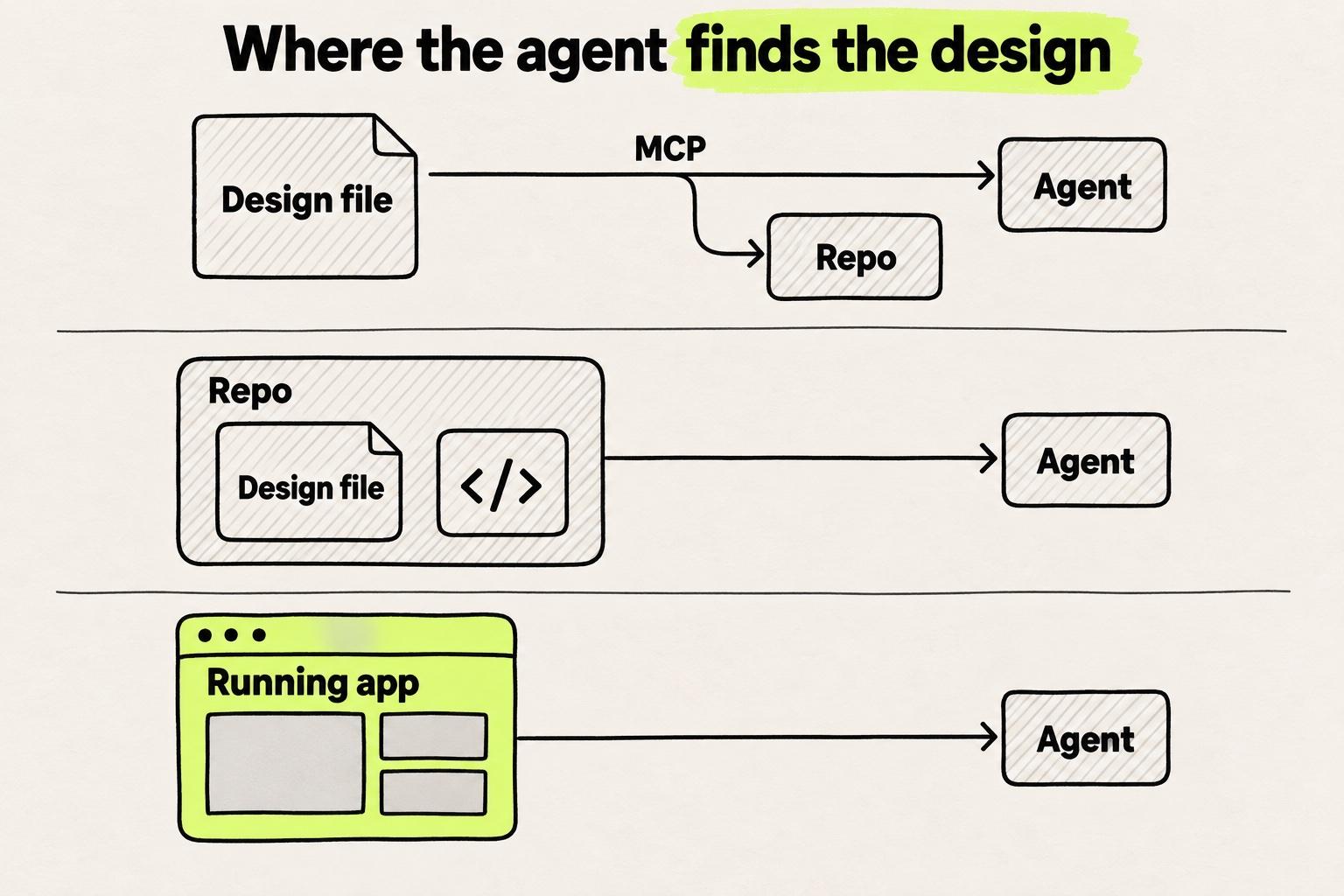
Three places the design can live, and what the agent gets from each
A file over MCP. The design lives in the vendor's file. The agent reads a description of a frame, writes code in your repo, and with write access changes the file too.
A file in the repo. The design is a file next to the code, under Git.
The running app. The canvas renders your repo's code. The agent edits the code behind the element you select.
Maybe you are the designer on a team of ten engineers who already run Claude Code or Cursor. You connected Figma's MCP server, and the agent built a screen that looked close but used none of the team's components.
We hear the same thing on our calls with customers: designers complain most about the visual and code fidelity of Claude Design, Cursor and other MCP routes. The design system gets ignored, new components appear, and tokens turn into hardcoded values. Modeinspect has no second copy: you design on the running app with your own components, and its coding agent writes the change into the code (see how it works).
Design files an agent reads and edits over MCP
Each of these servers reads a file outside your repo, and most now write to it too.
Figma MCP server
Figma's MCP server hands an agent a frame through its get_design_context tool. Figma calls the result "design context, not production-ready code" (Figma developer docs).
Since March 2026, the remote server also writes: agents "create and edit content directly in your Figma files" (Figma developer docs). That needs a Full seat on a Professional, Education, Organization or Enterprise plan. It is free during the beta and "will eventually become a usage-based paid feature".
Figma says the agent "can build with the components, variables, and layout rules your team already uses", meaning Figma components. Code Connect, on Professional and up, tells the agent which code component matches each one. Any approach to mapping design components to code needs someone to keep the map current. The Figma MCP server guide covers seats, read limits and setup.
Ali Shouman of Bitovi wrote that "The agent doesn't pick up on a linked design system unless you tell it to." And: "Don't ask, and you get a file full of hardcoded hex values that won't respond to theme changes or token updates" (Bitovi).
Penpot
With Penpot's MCP server, "your agent can read and modify your Penpot file structure (components, styles, tokens, pages, layers, etc.)" (Penpot docs).
Sketch
Sketch's server lets an agent "read from and write to your documents" (Sketch docs). "The MCP server is local-only."
Paper
"AI agents can read and write your Paper files through MCP," say Paper's docs (Paper docs). The pitch is the format: "Paper is built on HTML and CSS, which LLMs already understand well". The Paper comparison covers how its file differs from a canvas on the repo.
Subframe and UXPin Wire
UXPin Wire lets an agent "Build screens with the real components from your own UXPin Merge library, so what you build matches production" (UXPin docs). Subframe's server reads, designs and deletes pages, components and snippets, and "tools that design or edit require an editor seat" (Subframe docs).
On each route the agent reads something different for the same card. It gets a description of a frame, a design node in a file in the repo, or the rendered element with its component stack.
For the same card, the agent reads a frame description, a design file or the rendered element.
<div className="flex flex-col gap-4 rounded-[12px] bg-[#FFFFFF] p-6"><p className="text-[18px] font-semibold">Pro</p><button className="bg-[#111110] px-4 py-2">Upgrade</button></div>
- app/
- pricing/
- plan-card.tsxM
- Figma filethe design, a second copy outside the repo
- A description of the frame as it was at the call. Values arrive as numbers, such as
bg-[#FFFFFF], unless variables name them. - A new
buttonunless Code Connect maps it to theButtonin your repo.
Example. A pricing card, asked for on three routes. File formats are shortened and illustrative.
A design file in the repo: pen.dev
pen.dev, formerly Pencil, tells you to "Keep .pen files in your project workspace alongside the code" (pen.dev docs). The files are "JSON-based", and each one "Works with Git like a code file". The desktop app or IDE extension runs a local MCP server.
For merges: "Do not resolve a design conflict by editing the JSON directly." Use "pen.dev, the CLI or the MCP tools" instead.
Google's DESIGN.md also sits in a repo, but it is a rules file for a design system, not a design.
The .pen design is versioned with the code and reviewed in the same pull request. It is still a second copy, kept in step with the code only when someone asks.
Canvases on the repo: the design is the running app
These tools open your app and write each change into its code.
Cursor Design Mode
Cursor's docs describe it in one line: "Click an element in the running app, prompt against that selected element, and let the agent edit the code" (Cursor docs). In React, Vue and Svelte apps, the agent also gets the component name and component stack.
Builder Code
Builder Code works "using your repo, components, patterns, and project rules as context", and "each change updates the underlying code". "Approved changes become pull requests" (Builder.io).
Onlook
Onlook's site says "Design on the real product, not a copy of it. Your work never drifts from what ships" (Onlook). It runs on the Claude or ChatGPT plan you already have.
Subframe desktop app
Subframe's desktop app reads and edits a local repo with your own Claude Code or Codex subscription (Subframe docs).
Figma Make and code layers
Figma Make also sits between the groups, with its own agent. It clones a GitHub repository, works in a branch and opens a pull request, on Starter and up (Figma Help Center). Code layers in Figma Design share that Git workflow and are in open beta.
Claude Design
Claude Design sits between the groups too. It imports from GitHub, design files or a local codebase "so Claude can build with your real components" (Claude). Its designs leave as a handoff to Claude Code, and the alternatives to Claude Design are compared separately.
Modeinspect
Modeinspect runs the team's app in a cloud environment. A designer edits layout, spacing and type in the design panel, or drags the team's React components onto the canvas. Click Apply, and the coding agent writes the code, following the repo's CLAUDE.md, AGENTS.md and Claude, Cursor and agent rule files. No MCP server is needed, and changes leave as a pull request on GitHub.
It works on Next.js React codebases that use Tailwind. Tokens from the Tailwind theme are offered in the panel, not enforced. In a pasted Figma frame, component instances arrive as plain layers, not linked to code components, and Figma variables do not become tokens.
The React visual editor checklist applies to all of them.
Is there a tool to sync design with frontend code?
Yes, but on every file route the sync is your coding agent, run one prompt at a time. A canvas on the repo, such as Onlook, Builder Code or Cursor Design Mode, has nothing to sync, because the design is the running app.
Once an engineer changes the code in review, the design file is out of step until someone or something updates it.
Two copies stay in step only while someone updates both. A canvas on the repo keeps one.
Design file
Plan card frame
padding: 24
In step
Code
plan-card.tsx
className="p-4"
Out of step
The designer changes the padding in the file. The code still says 16 pixels.
Example. The padding of one card, as the design file and the code record it.
The production environment beats a better mockup, because the code your users run is the design. On Hacker News, atonse put it as a question: "Why bother with a drawing tool when you can literally mockup with real components and react etc." (Hacker News).
The question has an answer when the code does not exist yet. For loose directions on an unbuilt flow, or a large design team that works in Figma, a file over MCP is the better place. The running app shows only the states it already renders, and an unbuilt flow has none. Each repo canvas also supports a limited set of frameworks.
Which design tool to connect to your coding agent
- Your team designs in Figma, and engineers run Claude Code or Cursor. Connect Figma's remote MCP server, set up Code Connect if your plan has it, and name your components in a rules file. Follow Figma to code with Claude Code or Figma to code with Cursor.
- The agent should update the design file too. Use Figma's write to canvas, Penpot, Sketch on a Mac, or Paper with Paper Desktop open.
- Design changes should be reviewed with the code. Use pen.dev, with
.penfiles in the repo. - Components live in a UXPin Merge library or Storybook. Use UXPin Wire, or a design system MCP server.
- A React app already ships, and the change is to an existing screen. Use a canvas on the repo that supports your framework.
- You are exploring loose directions for an unbuilt flow. Use a design file over MCP, or Claude Design.
This week, pick one screen your team ships and make one small change through your current route, such as new padding on a card. Read the diff. Then count the copies of that screen your team keeps in step, and write down who updates each one.
Frequently asked questions
What is the best design tool for connecting design files to AI coding agents?
Figma, Penpot, Sketch, Paper, Subframe and UXPin Wire run MCP servers that let Claude Code, Cursor or Codex both read and edit the design. pen.dev does the same with a design file kept in your repo. If your product already ships as a React app, a canvas on the repo lets the agent edit the running app instead, with no design file to keep in step.
Are there professional design tools that allow coding agents to see and edit visual components directly?
Yes. Since March 2026, Figma's MCP server lets agents create and edit components, variants and variables in Figma files with a Full seat on Professional and up, and Penpot's server reads and modifies Penpot components. To work with the components your code uses, UXPin Wire builds screens from your Merge library, and Cursor Design Mode gives the agent the clicked element's component stack.
Which AI tools turn designs into real, working code?
Coding agents such as Claude Code and Cursor turn designs into working code in your repo, reading the design over an MCP server from Figma, Penpot, Sketch or Paper. Canvases on the repo, such as Builder Code and Onlook, write each visual change into the existing code. Either way, have an engineer review the diff: Figma calls its server's output "design context, not production-ready code". Design to code tools compared sorts more tools by where the code lands.
Can Claude Code or Cursor edit a Figma file?
Yes, through the remote Figma MCP server, which has been able to write to the canvas since March 2026. Agents can create and edit frames, components, variants, variables and auto layout with a Full seat on Professional, Education, Organization and Enterprise plans (Figma developer docs). Writing is free during the beta and will become a usage-based paid feature.
Does Penpot or Sketch have an MCP server?
Yes, both do. Penpot's server lets an agent read and modify a file's components, styles, tokens, pages and layers, and it runs hosted or locally. Sketch's server reads and writes documents, runs locally only, and needs Sketch 2025.2.4 or later outside the Mac App Store version.
What is the difference between Figma MCP and Code Connect?
Figma's MCP server sends a coding agent the design of a frame, and Code Connect tells the agent which code component matches each Figma component. Without Code Connect, the agent may build a new component instead of reusing yours. Code Connect needs a Dev or Full seat on Professional or above, and someone has to keep its maps current.
Do I need an MCP server to give a coding agent my design?
Not always. You need one when the design lives in a file outside the repo, such as Figma, Penpot, Sketch or Paper. A canvas on the repo, such as Cursor Design Mode, Builder Code or Modeinspect, lets an agent edit the running app, with no MCP server needed. pen.dev keeps its file in the repo but still edits it through local MCP tools.