
Claude Code reads your Figma frames through Figma's MCP server. Install Figma's plugin with one terminal command, sign in, put your design system rules in a CLAUDE.md file and paste a frame link into Claude Code. It writes the frame into your repo, and "create a pr for my changes" opens the pull request.
Figma's setup guide ends when you are "ready to start prompting" (Figma Learn). The rules that make your second frame better than the first come later, out of the first pull request's review. Step 2 has a starter design system section to copy into CLAUDE.md.
What the server sends, and where it stops has its own guide. Not set on Claude Code yet? Four ways from a design to a pull request compares the routes.
Key takeaways
- Install Figma's plugin with
claude plugin install figma@claude-plugins-officialand sign in from/plugin. The manualclaude mcp addroute skips Figma's skills.- Design system rules go in CLAUDE.md at the repo root. Start with a few lines that name your component folder and Tailwind theme.
- Claude Code reads CLAUDE.md at the start of every session but does not enforce it. Check the plan's new files and the diff's raw values before the pull request.
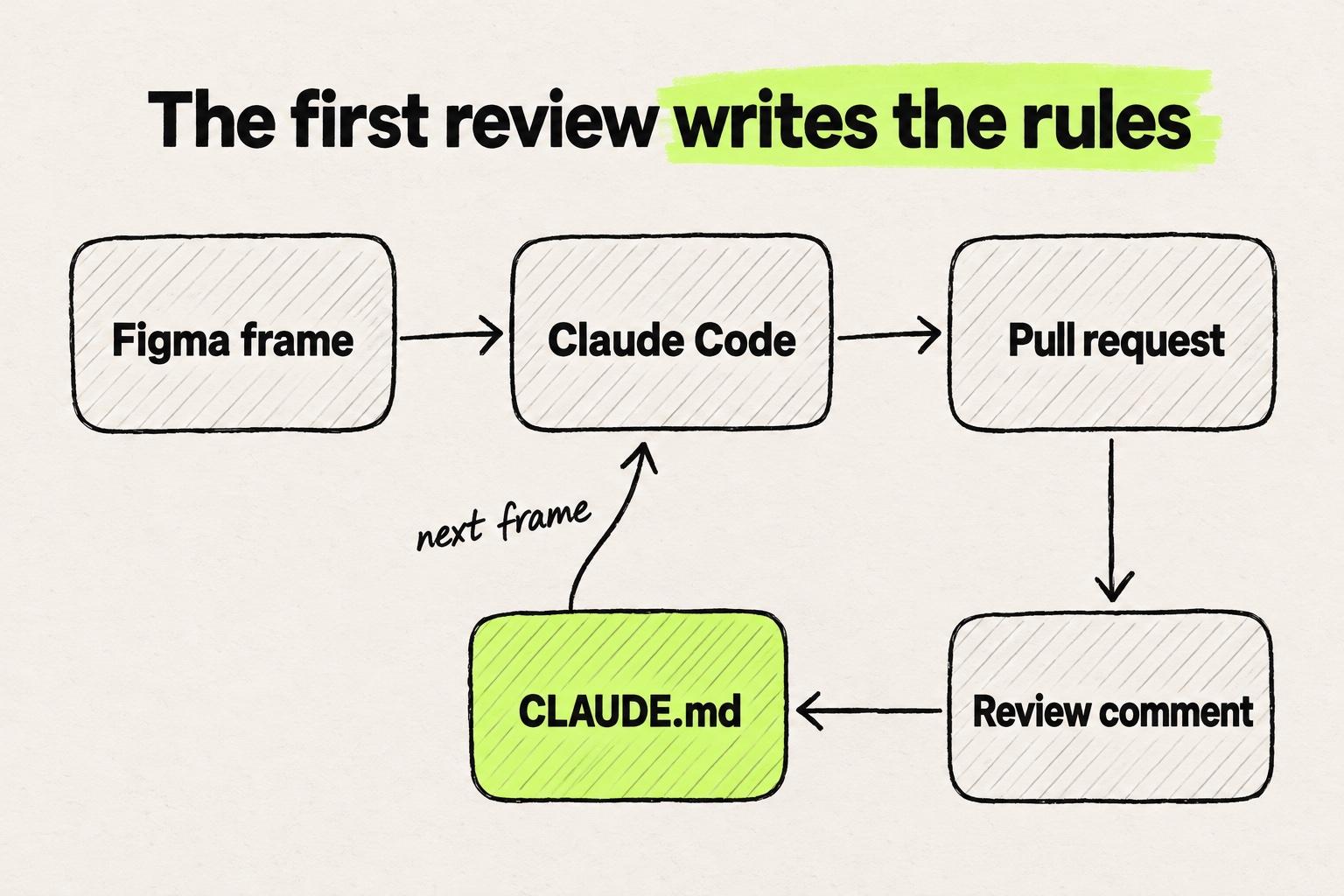
- The most useful rules come from review. Turn each comment that applies to the next frame into a concrete CLAUDE.md line, committed with the fix.
Before you start: a Claude plan, the repo and a frame
You are probably the designer on a product team whose engineer cloned the repo for you once. You may have pasted a screenshot into Claude Code already and got a page that looked close but used none of your team's components. If Claude Code is new to you, start with Claude Code basics for designers.
- A Claude plan that includes Claude Code. "Claude Code requires a Pro, Max, Team, Enterprise, or Console account" (Claude Code docs).
- A Figma account. The remote MCP server works on every Figma seat and plan, and call limits per seat are in the Figma MCP guide.
- A clone of the repo. Ask an engineer to clone your team's codebase and show you the command that starts the app.
- A frame built from components, variables and auto layout. Figma's file guide asks for variables "so your agent can reference your tokens instead of hardcoded values" (Figma developer docs).
Anthropic recommends a one-line install in the terminal, the window where you type commands:
curl -fsSL https://claude.ai/install.sh | bash
New to the terminal? Anthropic's terminal guide starts from zero.
Step 1: Connect Figma's MCP server to Claude Code
Figma Learn says "The recommended way to set up the Figma MCP server in Claude Code is to install the Figma plugin." It brings "Figma's skills for common workflows" along with the server (Figma Learn). In your terminal, run:
claude plugin install figma@claude-plugins-official
Sign in from Claude Code (Figma developer docs):
- If Claude Code is running, restart it.
- Type
/pluginand press the right arrow to reach the Installed tab. - Select
figma, press Enter, then press Enter again to sign in. - A browser page opens. Click Allow access.
- Back in Claude Code, type
/pluginagain.figmanow shows as connected.
Figma warns that "your organization may have blocked plugin installation". If so, add the server by hand, with one catch: "This doesn't install Figma's skills."
claude mcp add --transport http figma https://mcp.figma.com/mcp
"By default, Claude Code adds the server to the current project only." To add it to every project, include --scope user:
claude mcp add --scope user --transport http figma https://mcp.figma.com/mcp
Then sign in. Type /mcp, select figma, choose Authenticate and click Allow access. Claude Code confirms with "Authentication successful. Connected to figma".
For a team, --scope project writes the server into .mcp.json, a settings file at the repo root that you commit. Claude Code asks for approval before using that file (Claude Code docs).
To check either route, ask Claude Code to run Figma's whoami tool, which "Gets your identity, plans, and seats" (Figma developer docs).
The two routes differ in sign-in, Figma's skills and where the server is available:
The plugin brings Figma's skills with the server. The manual command adds the server alone.
claude plugin install figma@claude-plugins-official/plugin, Installed tab, figmaclaude mcp add --transport http figma https://mcp.figma.com/mcp/mcp, figma, Authenticate--scope user or --scope projectStep 2: Put your design system rules in CLAUDE.md
Claude Code reads CLAUDE.md, a markdown file in your repo, at the start of every session (Claude Code docs). Figma's rules page points there too: "In Claude Code, add them to your CLAUDE.md file" (Figma developer docs).
The team's copy is ./CLAUDE.md at the repo root, committed next to src/components/ui/ (and .mcp.json, if the team added one) and reviewed like code. A rule for editing the component folder goes in .claude/rules/ui-components.md. CLAUDE.local.md holds your personal notes and stays out of git. ~/.claude/CLAUDE.md, outside the repo, applies to every project you open.
What the team shares is committed in the repo. Your own notes stay out of review.
- .claude/
- rules/
- ui-components.mdCommitted. Loads for src/components/ui
- src/
- components/ui/Your components
- .mcp.jsonCommitted. Figma server for the team
- CLAUDE.local.mdGitignored. Your notes for this repo
- CLAUDE.mdCommitted. Team rules, every session
- ~/.claude/
- CLAUDE.mdOnly you, every project
Example repo. Claude Code reads CLAUDE.md at the start of every session, and a rule in .claude/rules with a paths line loads when Claude works on matching files.
Source: Claude Code docs
No CLAUDE.md yet? Run /init and Claude Code drafts one. Then add a design system section like this one, written for a repo with src/components/ui and a Tailwind theme:
## Design system
- Use the components in src/components/ui. Check there before creating one.
- Take colors, spacing, radius and type from the Tailwind theme. No hex codes, no square-bracket values.

## Figma MCP server
- Figma MCP output is a reference for layout and values. Rewrite it into our components.
- If the Figma MCP server returns a localhost source for an image or an SVG, use that source directly.
- Do not add new icon packages.
- Check the result against the Figma frame before finishing.
Swap in your own folder names. Anthropic's memory docs advise you to "target under 200 lines per CLAUDE.md file. Longer files consume more context and reduce adherence." They also ask for instructions "concrete enough to verify".
In .claude/rules/ui-components.md, a paths: line at the top scopes the rule to src/components/ui. Figma's create_design_system_rules prompt can draft rules too. An engineer should approve its draft like any other rules change.
On Professional plans and above, Code Connect ties each Figma component to its match in your code. Figma calls it "the most effective way to get your agent to reuse your real components" (Figma developer docs). Pete, who writes Zero to Pete, names the gap: "Without Code Connect, Claude is guessing which components to use" (Zero to Pete).
Start short and general. The first frame shows which lines are missing, and its review supplies them.
Step 3: Prompt with a frame link and your components
Copy the link to one frame in Figma. Then start in plan mode: press Shift+Tab until the status bar reads ⏸ plan mode on. "Plan mode tells Claude to research and propose changes without making them" (Claude Code docs).
Build this Figma frame: <link to the frame>
Use the components in src/components/ui and classes from our Tailwind theme.
Put the page in src/app/settings/page.tsx.
List the components you will reuse. Ask me before you create a new one.
If the plan creates a SaveButton beside your Button, say so before you approve it. A new file is cheaper to stop here than in review. For a full route in a Next.js app, see the Figma to Next.js guide.
Send one frame per prompt. Figma warns that "Large selections can slow down the tools, cause errors, or return incomplete results" (Figma developer docs). For a big screen, ask for get_metadata first, which Figma calls "useful for very large designs, where get_design_context returns too much at once" (Figma developer docs).
Claude Code has a size cap too. A tool result over the default 25,000 tokens is saved to a file, and Claude gets the file path instead (Claude Code docs).
Expect a first draft. Figma says as much about its server: "Its job is to give your agent design context, not production-ready code" (Figma developer docs).
Step 4: Check the page against the frame and open the pull request
Ask Claude Code to start the app on your machine, or run your team's start command yourself, and open the page next to the frame.
Then give Claude Code the frame as a picture. You can "Drag and drop an image into the Claude Code window" or paste a screenshot with Ctrl+V (Claude Code docs). Ask for a list of differences before any fixes.
Claude Code can also check the page itself in Chrome:
claude --chrome
Anthropic names this use case: "Design verification: build a UI from a Figma mock, then open it in the browser to verify it matches" (Claude Code docs). It needs the Claude in Chrome extension and "A direct Anthropic plan (Pro, Max, Team, or Enterprise)".
Tell it when to stop, such as when its list of differences is empty. Wmedia's Claude Code tip explains why: "Without a clear goal, the agent keeps polishing. With a goal, it knows when to stop" (Wmedia).
A frame shows one width and one state. Resize to phone width, then check hover, a long email address and an empty notification list.
When the page matches, type "create a pr for my changes". Claude Code runs gh pr create, so GitHub's gh tool has to be on your machine (Claude Code docs).
What designers hit on the first pull request
The diff has values and components you did not ask for
Maksym Chervynskyi, head of design at Eleken, warns that "Claude may still produce one-off values that don't match the product's existing UI" (Eleken). DesignWhine, a design publication, puts the reviewer's rule in one line: "An agent should import your Button, not invent another button that merely looks right" (DesignWhine).
We hear the same thing on our calls with customers: given a Figma file, Claude sometimes reads a stray stroke as part of the design system. One design system team has to test every token on each component.
Step 2's general rules and a clean-looking plan are no guarantee. A first run of that settings frame can still add a SaveButton file outside src/components/ui, with mt-[18px] for spacing and text-[#6B7280] for muted text. The reviewer's comment becomes a concrete line: Muted text is text-muted-foreground. Buttons come from src/components/ui/button. Spacing uses the Tailwind scale. On a rerun, the same frame can come back importing Button, with mt-4 and text-muted-foreground.
The same frame, before and after a review comment became a CLAUDE.md line.
- src/components/SaveButton.tsxA
- src/app/settings/page.tsxA
+import { SaveButton } from "@/components/SaveButton"+<section className="mt-[18px] rounded-xl border p-6">+<h2 className="text-lg font-semibold">Notifications</h2>+<p className="text-[#6B7280]">Choose what we email you about.</p>+<SaveButton />+</section>
- A new button file, next to the Button already in src/components/ui.
- A square-bracket value instead of the spacing scale.
- A raw hex color instead of the theme's muted text color.
Example diff for a settings frame. Pick a run to see what changes.
Before the pull request, ask Claude Code to list every changed line with # or -[, which catches hex colors and square-bracket values. Each hit is a theme class to swap in, or a missing rule.
Review comments come back to your terminal
Review comments land on the pull request, and the fix goes on the same branch. Paste a comment into Claude Code, check the change in the app and ask Claude Code to commit and push. The pull request updates with the new commit.
If branches and commits are new, a designer's first pull request walks through them.
The review is where the rules get written
Some review comments only fix this frame. Others, such as using the team's Button or the theme's muted text color, hold for the next one too. Write each of those as a concrete CLAUDE.md line, committed in the same pull request as the fix.
The engineer then reviews the rule beside the code it fixed. The second frame starts where the first review ended, not where the setup guide did.
A rules file still guarantees nothing. Anthropic's memory docs say "Claude treats them as context, not enforced configuration" (Claude Code docs), so the diff and the reviewer stay the check.
We hear that on our calls too: a design lead at a startup with five designers had the team's Figma design system written into a markdown file for agents. It has not paid off yet. The designers do not read code, so they cannot verify what the agent writes.
Sign-in and server glitches
If Figma's tools never appear, check /mcp. Bora, who writes Design, Explained, gives the fix: "If you see figma-desktop in the list, disable it. It's the local read-only MCP and will conflict with the remote one" (Design, Explained).
Sign-in can also hang. DaveLaFontaine reported on GitHub that the Figma server "gets stuck in authentication mode and never exposes actual Figma tools" (GitHub). Open /plugin (or /mcp if you added the server by hand), select figma and sign in again. If that fails too, restart Claude Code.
When Claude Code fits, and when it does not
Claude Code fits when you have the repo cloned, can run its start command in a terminal or in the desktop app, and an engineer reviews your pull requests.
The Claude desktop app runs Claude Code in its Code tab. Anthropic says MCP servers "configured in ~/.claude.json or .mcp.json work in both" the desktop app and the terminal (Claude Code docs). On the web, a cloud session carries only the MCP servers in a committed .mcp.json (Claude Code docs), and Anthropic's docs do not say whether Figma's sign-in works there.
If you would rather leave the build to an engineer, the Figma to code ranking covers that route next to the others. Claude Code also fits less when the start command fails on your machine, or when most changes are spacing fixes that each cost a prompt and a review. The Cursor version of this workflow connects Cursor, a code editor, to the same server.
Modeinspect's coding agent reads and follows the same CLAUDE.md. In a cloud environment, Modeinspect runs Next.js React codebases that use Tailwind, so nothing runs on your machine and no MCP server is needed. Paste a Figma frame onto its canvas, the agent builds it into the app, and the change goes out as a pull request. Pasted component instances arrive as plain layers, not linked to code components, and Figma variables do not become tokens. The repo is connected once.
This week, pick one small frame built from your own components. Connect the plugin, write a short CLAUDE.md, build the frame and open the pull request. When the review comes back, add the comments that hold for the next frame to CLAUDE.md and commit them with the fix.
Frequently asked questions
How do I bring a Figma design into Claude Code?
Run claude plugin install figma@claude-plugins-official in your terminal and restart Claude Code. Type /plugin, open the Installed tab, select figma, press Enter twice and click Allow access in the browser (Figma developer docs). If your organization blocks plugins, claude mcp add --transport http figma https://mcp.figma.com/mcp adds the server without Figma's skills. Then paste a link to one frame into Claude Code and name your component folder.
Do I need a paid Claude plan to use Figma with Claude Code?
For Claude Code, yes. "Claude Code requires a Pro, Max, Team, Enterprise, or Console account. The free claude.ai plan does not include Claude Code access" (Claude Code docs). On the Figma side, the remote server works on every seat and plan, and the Figma MCP guide covers what each seat allows.
Can Claude Code use my design system components from Figma?
It uses the code components in your repo once it knows where they are, so name the folder in CLAUDE.md and in your prompt. On Professional plans and above, Code Connect links each Figma component to the one in your repo, so the agent does not have to guess (Figma developer docs). Without either, the agent may build a new component that only looks like yours.
Can I use Figma with Claude Code in the desktop app or on the web?
In the desktop app, yes. Its Code tab lets you "review its changes without using a terminal" (Claude Code docs). MCP servers "configured in ~/.claude.json or .mcp.json work in both" the app and the terminal (Claude Code docs). If you use Figma's plugin, add it in a local session: click + next to the prompt box and select Add plugins. On the web, a cloud session carries only MCP servers from a .mcp.json committed to the repo, not your user or local servers or plugins (Claude Code docs). Anthropic's docs do not say whether Figma's sign-in works in a cloud session.
Is Claude Code or Cursor better for Figma to code?
Both connect to the same Figma MCP server, and the same frame link works in either. Claude Code keeps its rules in CLAUDE.md and works in the terminal or the desktop app, while Cursor is a code editor with its own rules files. Pick the one your engineers already use, so they can help with setup and review.
Can an AI agent turn a Figma design into production code?
It can write a first version that an engineer reviews and merges. Figma says its server's "job is to give your agent design context, not production-ready code" (Figma developer docs). The agent turns that context into a diff against your repo, and whether it merges depends on your components, your rules and the engineer who reviews it.
Why does Claude Code hardcode colors and spacing from Figma?
The server's output is React and Tailwind by default (Figma developer docs), and without rules the agent can keep the frame's raw values. Figma's file guide adds that variables let your agent "reference your tokens instead of hardcoded values". Add a CLAUDE.md line such as Figma's sample rule, "Avoid hardcoded values, use design tokens from Figma where available" (Figma developer docs). How Figma variables reach your Tailwind theme is in the design tokens guide.