Design tokens are named values for design decisions such as color, spacing, type and radius, stored once and used by name in both the design file and the code. In Figma they are variables. In a Tailwind codebase they are theme variables, and each one becomes a class: --color-surface gives you bg-surface.
A token gets from one to the other in four hops. Figma exports a mode as JSON, a build tool turns the JSON into CSS variables, the theme points Tailwind names at them, and the names become classes. This guide traces one token through all four.
Moving the value is the easy half. The harder half is deciding which copy wins when the Figma file and the theme disagree, and it shapes every route from a design to a pull request.
Key takeaways
- A design token is a named value for one design decision, stored once and used by name in the design file and in the code. In Figma it is a variable, and in Tailwind a theme variable.
- A token reaches code in four hops: export a Figma mode as JSON, build CSS variables, point the Tailwind theme at them, and use the classes. Tailwind creates classes only from variables in
@theme.- The theme owns the names and values, and Figma mirrors it. A Figma export seeds the theme once, and every later export reaches code as a diff someone reviews.
- Code back to Figma stays manual for most teams. Syncing through Figma's variables API needs an Enterprise Full seat, and import takes one JSON file per mode.
What are design tokens?
A design token is a name for one design decision, with the value stored behind it. The Design Tokens Community Group (DTCG), which publishes the token format standard, calls a token "the single source of truth to name and store a design decision" (DTCG glossary).
The term started at Salesforce. Jina Anne "coined the term with Jon Levine when she was at Salesforce", according to the DTCG. Salesforce's Lightning Design System v1 docs call tokens "named entities that store visual design attributes". The team used them "in place of hard-coded values (such as hex values for color or pixel values for spacing)".
Tailwind uses the same word for its theme. "These low-level design decisions are often called design tokens, and in Tailwind projects you store those values in theme variables" (Tailwind docs). In a Tailwind codebase, gap-6 and bg-brand-500 are tokens in use, and each class reads its value from the theme.
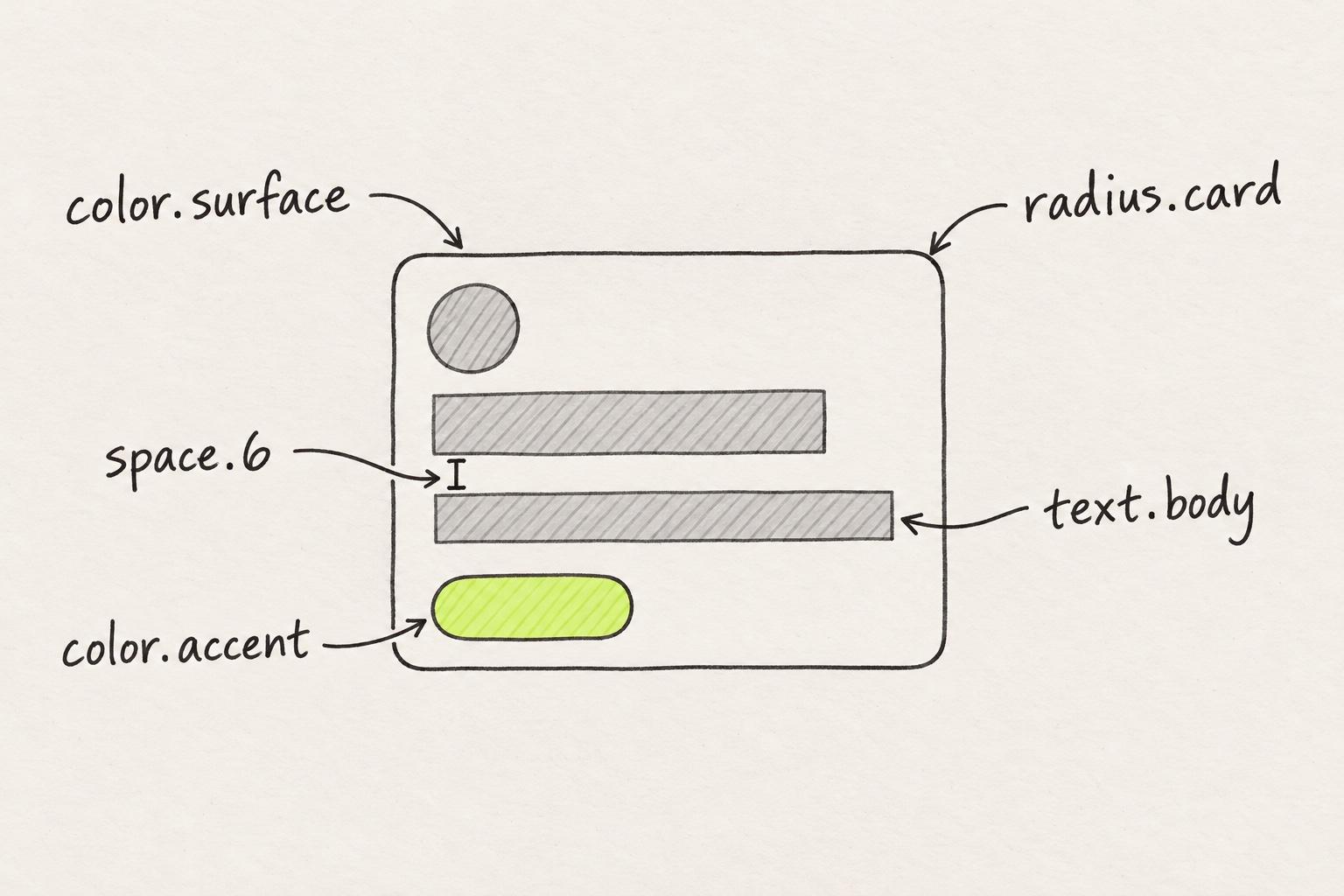
On a screen, each visual decision gets a name. The card's background is color.surface, its corner is radius.card, and the gap under its title is space.6.
Naming a decision is what lets you store it once. A hex value pasted into twelve components needs twelve edits when the brand color changes. A token needs one. Values copied by hand instead of read from the theme are how design debt builds up.
Primitive, semantic and component tokens
Token sets are usually described in three tiers, and each tier points at the one beneath it. zeroheight's design systems report finds that most teams have primitive and semantic tokens, and about half also have a component tier (zeroheight).
Material Web names the tiers and says what each one holds (Material Web):
- Reference tokens, the primitives: "Reference tokens hold concrete values, such as a hex color, pixel size, or font family name."
- System tokens, the semantic tier: "System tokens define decisions and roles that give the design system its character".
- Component tokens "are design attributes assigned to elements".
Brad Frost describes the middle tier as the one that carries a theme. "Tier 2 tokens are a semantic theme layer that map Tier-1 tokens to high-level usage within a UI" (Brad Frost).
Atlassian names its tokens by foundation, property and modifier, as in color.text and color.icon.success. Atlassian's token docs say "Choose tokens based on meaning where applicable, not specific values." And: "Don't use a token just because the colors appear to match. This can break the experience in other themes."
Modes show what the semantic tier is for. In light mode, color.surface points at the primitive white. In dark mode, it points at gray-950. The name stays and only the value switches, so every card built on color.surface follows the mode. Further up, button.background points at color.accent, which points at blue-600 in light mode and blue-400 in dark.
The semantic name stays the same in both modes. Only the primitive behind it switches.
button.backgroundLightcolor.accentDarkcolor.accentcolor.surfaceLightwhite#FFFFFFDarkgray-950#0B0F19color.accentLightblue-600#2563EBDarkblue-400#60A5FAInvite your team
Members can edit every page.
Send invitebg-surface, bg-accent
Invite your team
Members can edit every page.
Send invitebg-surface, bg-accent
Example values. button.background points at color.accent, and each semantic token points at a different primitive per mode. Both cards use the same two classes, and the dark one sits under data-theme="dark".
Design tokens in Figma: variables, collections and modes
In Figma, design tokens are variables. The name "Figma Tokens" belongs to a plugin: Tokens Studio, "formerly known as Figma Tokens" (GitHub). Figma's help center ties tokens to variables. "If you have a complex design system and wish to implement design tokens, you can alias color variables to do so" (Figma Learn).
Variables and styles do different jobs. Figma Learn says "Variables can store single, raw values." Styles "hold a combination of values", and "Styles don't support aliasing". Aliasing is how Figma builds the tiers: a semantic variable such as color/surface points at a primitive such as white.
Variables sit in collections, and a collection can have modes, such as Light and Dark. Professional allows up to 10 modes per collection and Organization up to 20. Enterprise has no limit and adds extended collections (Figma plan limits).
Each variable can also carry its name in code. Figma allows "one name per platform, including Web, Android, and iOS" (Figma Learn). Type the theme variable's name, such as --color-surface, into the Web field. Scopes narrow where a variable can go. Figma's docs say "Scope a variable to limit which properties the variable can be applied to".
Figma's MCP server reads variables too. Its get_variable_defs tool "Returns the variables and styles used in your selection, such as colors, spacing, and typography" (Figma developer docs). The docs say nothing about modes. A Figma Forum request to read variable modes has been open since June 2025, and Figma staff replied "It is definitely in our list!"
How design tokens get from Figma into code
Each of the four hops has its own tool. Follow one variable through them: color/surface, #FFFFFF in the Light mode and #0B0F19 in Dark.
1. Export a mode to JSON. Figma Learn says "You can export variable modes to a JSON file", one mode at a time or all of a collection's modes at once. Import names the format. "Design tokens must be in a JSON file and follow the Design Tokens Community Group (DTCG) format." In that format, "An object with a $value property is a token", and its path reads color.surface (DTCG format).
2. Build CSS variables. Style Dictionary's css/variables format writes the tokens into a :root block. With outputReferences, an alias stays a var() reference instead of a copied value. None of its predefined formats writes a Tailwind theme (Style Dictionary). It reads DTCG tokens, though "the latest format 2025.10 does not have full support yet" (Style Dictionary).
Terrazzo skips a step. Its docs say "The Tailwind Terrazzo plugin can generate a Tailwind v4 Theme from your design tokens", and the output is an @theme block (Terrazzo docs). It also reads DTCG resolvers and can map a theme modifier to @variant dark (Terrazzo docs).
3. Point the theme at the variables. Tailwind's docs separate the two kinds of block. "Use @theme when you want a design token to map directly to a utility class, and use :root for defining regular CSS variables that shouldn't have corresponding utility classes." Each mode's value sits in a plain variable with its own prefix, --app-surface, set in :root and again under [data-theme="dark"]. An @theme inline block points --color-surface at it, the pattern Tailwind's colors docs show for variables that reference other variables.
:root {
  --app-surface: #ffffff;
  --app-accent: #2563eb;
}

[data-theme="dark"] {
  --app-surface: #0b0f19;
  --app-accent: #60a5fa;
}

@theme inline {
  --color-surface: var(--app-surface);
  --color-accent: var(--app-accent);
}
4. Use the class. The theme variable --color-surface gives the class bg-surface. It draws #FFFFFF in light mode and #0B0F19 once the page carries data-theme="dark".
One Figma variable, traced through four hops to the class that draws it.
- Figma variable
color/surfaceLight#FFFFFFDark#0B0F19 - Token JSON, Light modelight.tokens.json
"color": {"surface": {"$type": "color","$value": {"colorSpace": "srgb","components": [1, 1, 1],"hex": "#ffffff"}}} - CSS variables, one block per modetokens.css
:root {--app-surface: #ffffff;}[data-theme="dark"] {--app-surface: #0b0f19;} - Tailwind themeapp.css
@theme inline {--color-surface: var(--app-surface);} - The classbg-surfaceLight#FFFFFFDark#0B0F19
Example values in the DTCG 2025.10 format, where a color value is an object with an optional hex. A build tool writes hop 2, one selector per mode. Terrazzo's Tailwind plugin writes the @theme block of hop 3 directly.
Running hop 1 without anyone opening Figma needs Figma's variables REST API, which needs an Enterprise Full seat (Figma developer docs). Figma's GitHub Actions example runs that sync both ways. Naming the variables so they match the theme's classes is covered in the guide to mapping Figma variables onto a Tailwind theme.
Which copy wins: the Figma file or the theme?
The token that ships is the one in the theme, so the theme owns the names and values, and Figma mirrors it. An export from Figma seeds the theme once. After that, each new export is a proposal. It reaches code as a diff someone reviews, and the theme keeps the last word.
The common advice runs the other way. Figma's resource library page on tokens includes a step called "Sync to code with Dev Mode", with the file upstream of the code.
Andreas Kutschmann wrote on martinfowler.com that it is "considered best practice to use the Git repository as the single source of truth for design tokens", not the design tool. His next sentence names the catch. "However, this requires the plugin to support syncing both ways between the repository and the design tool, which not all plugins do."
zeroheight's design systems report finds that most teams have not automated this at all. Among those that have, most push from the design tool to code, and very few push back.
If the Figma variables are yours, you are likely one designer next to about ten engineers on a Next.js and Tailwind codebase, with a brief to use AI. You have likely exported the variables already, or pointed an agent and Figma's MCP server at a frame. The export kept Figma's names, which the theme may not share, and the agent's code came back with hex codes and pixel counts.
A Hacker News commenter, F7F7F7, wrote: "we still don't have a reliable way to make sure Figma and the component library are always 1:1" (Hacker News).
We hear the same thing on our calls with customers: the Figma file falls behind the code, so a design exported from it clashes with the repo's tokens. One design-system owner had built a large set of custom tokens in Figma while engineering went back to Tailwind's, and drift came from both sides.
Five kinds of drift
In the six-token example below, the file and the theme agree once. The other five rows are the five forms drift takes. A token is renamed in Figma and keeps its old name in the theme, or a value changes in code while the file still shows the old one. A token exists only in Figma, or only in the theme. And a component holds a raw hex with no theme variable behind it.
The Figma file and the theme agree on one row of six.
- MatchFigma file
color/surface#FFFFFFTheme and components--color-surface#FFFFFF - Figma file
color/brand/primaryTheme and components--color-accent - Figma file
radius/card12Theme and components--radius-card16px - Figma file
color/success/soft#DCFCE7Theme and componentsMissing - Figma fileMissingTheme and components
--color-overlay#0B0F1999 - Figma file
color/text/muted#5B6472Theme and componentstext-[#5b6472]
- Renamed in Figma only. Classes still read
bg-accent, and the next export brings a name the theme does not have. - Changed in code only. The file still shows 12, so new designs use the old radius.
- Exists only in Figma. A design that uses it arrives in code as a raw hex.
- Exists only in the theme. Designers cannot pick it, so they draw their own.
- A raw hex in a component, with no theme variable behind it. No change to the theme reaches it.
Example values. Regenerate the theme from a fresh export and findings 1 to 4 show up in its diff. Finding 5 lives in a component, so only lint catches it.
A committed theme makes drift visible. Keep the generated theme file in the repo. When the Figma file changes, regenerate it from a fresh export on a branch. The pull request shows each rename, new token, removed token and changed value as a line in the diff. The engineer keeps new tokens and changed values from design, and rejects renames and any line that would undo a change made in code. Each rejected line goes back to Figma as a fix. A raw hex in a component never shows up there. That one needs lint, the first guardrail in the chapter on building a design engineering team.
Code back to Figma
Code back to Figma stays manual for most teams. Pushing values from the theme into Figma through the API needs that Enterprise Full seat. Import takes one DTCG file per mode, and "A new mode will be created for each file you import" (Figma Learn). Kutschmann names Tokens Studio as one plugin that syncs both ways.
Units such as rem and % are a second gap. On the Figma Forum, mattaningram wrote: "Unfortunately Figma doesn’t support a lot of the units that can exist natively in code."
Design tokens in code: keeping them in use
In code, a token is a class such as bg-surface or a variable such as var(--color-surface). A hardcoded #ffffff draws the same white, and the next theme change passes it by. The screenshot looks right either way, so design QA checks tokens in the code, not in pictures.
Agents left alone reach for raw values, as the Figma MCP guide shows. We hear the same thing on our calls with customers: AI tools such as Cursor and Claude Design rebuild the team's components and hardcode values instead of its tokens. Customers also describe double work: getting the design perfect in Figma, then someone translating it into code and policing it there. Moving hardcoded values onto tokens is the job they would hand to an AI.
Getting an agent to reach for the theme instead of raw values takes context and rules, covered in getting AI to use your team's components and tokens.
Lint turns the theme into a check. One rule flags an arbitrary value where the theme already has one, and another flags classes the theme does not define. The lint step of the Figma to Tailwind guide names both.
Tools that take a design system to code differ in whether they read your theme. Anima's Figma plugin generates a tailwind.config with "all the design tokens used in your design" (Anima docs). That is a second theme next to yours, unless its Frontier extension reuses the one you have. More tools are compared in the design to code tools comparison. sorts the rest by that question.
On Next.js React codebases that use Tailwind, Modeinspect's design panel offers values from the team's Tailwind theme instead of raw numbers. Tokens are offered, not enforced, so a value that matches no token becomes a one-off value. Figma variables do not become tokens when a Figma frame is pasted onto the canvas.
Where to start
- Search the repo's CSS for
@themeand list every name it defines. - Open Figma's variables panel and compare each collection with that list. Mark every pair as a match, a rename, a changed value or a one-sided token.
- Rename the Figma variables to the theme's names, and type each name into the variable's Web code syntax.
- Export each mode and run it through Style Dictionary, then point
@theme inlineat the output. Terrazzo writes the@themeblock itself. Commit the generated file so every later export arrives as a diff. - Add the two lint rules, then search the codebase for raw hex values and swap each one for its token in a pull request.
Frequently asked questions
What are design tokens in simple terms?
Design tokens are names for design decisions, such as a brand color, a spacing step or a corner radius, with the value stored once behind each name. The design file and the code both use the name instead of the raw value, so a change to the value reaches every screen that uses it (DTCG glossary).
Are Figma variables design tokens?
Yes, in practice. Figma variables store single raw values such as colors, numbers and strings, and they can alias each other, which is how primitive and semantic tiers are built. Figma's help center says "If you have a complex design system and wish to implement design tokens, you can alias color variables to do so" (Figma Learn). Styles are different, because they combine values and cannot alias.
What is the difference between Figma Tokens and Figma variables?
Figma Tokens is the old name of Tokens Studio, a plugin. Variables are built into Figma. Tokens Studio stores tokens in JSON, syncs them with a provider such as GitHub, and hands them to code through Style Dictionary (GitHub, Tokens Studio docs). Variables hold one value per mode, and Figma exports modes as JSON (Figma Learn). Andreas Kutschmann on martinfowler.com names Tokens Studio as a plugin that syncs both ways between a repository and the design tool.
What format are design tokens saved in?
The standard is JSON in the Design Tokens Community Group (DTCG) format, whose first stable version is 2025.10 (W3C DTCG). In it, "An object with a $value property is a token", and an alias points at another token by its path in curly braces (DTCG format). Figma's variable import accepts only DTCG JSON, and Style Dictionary, Tokens Studio and Terrazzo are reference implementations of the standard.
Can Figma export design tokens to code?
Figma exports variable modes to a JSON file, one mode or all of a collection's modes at once (Figma Learn). Code needs one more step. Style Dictionary writes :root variables, which need an @theme inline block before Tailwind makes classes. Terrazzo writes the @theme block itself. Automatic sync through Figma's variables API needs "a Full seat in an Enterprise org" (Figma developer docs).
How do design tokens work with Tailwind?
Tailwind stores tokens as theme variables in an @theme block, and each one creates utility classes. --color-surface gives bg-surface, for example. Variables in :root do not create classes, so Style Dictionary's output needs an @theme inline block that points theme names at it (Tailwind docs).
Do design tokens handle dark mode?
Yes, through modes. In Figma, a collection can hold a Light and a Dark mode, and each variable gets a value per mode. Modes need an Education, Professional, Organization or Enterprise plan. In a Tailwind codebase, the light values sit in :root, the dark values under [data-theme="dark"], and an @theme inline block points a name such as --color-surface at them (Tailwind docs).