AI tools break a design system because they never see it, or they see only a description of it. Ask a coding agent for a settings page and it writes a card that looks like yours, styled with values that look like your tokens. Neither is the real thing.
Three things make generated UI use your real components. The components sit where the agent can import them. The theme offers only the system's values. And the checks engineers already answer to (lint, the type check and review) reject what slips through. A better rules file helps, but it stays a request. For the wider picture of tools, see our guide to AI tools for designers.
Key takeaways
- A rules file such as CLAUDE.md is context, not enforced configuration. Inline hex values in nearby files win over the rules.
- Agents use your real components when they can find and import them, in the repo or through a component registry. An index tells them what exists but cannot stop a new copy.
- Enforcement is a theme that holds only your values, plus lint and type checks on every pull request. A look-alike built from the right tokens still passes them.
- AI helps most with the work owners already do by hand: finding what exists, moving code onto tokens and keeping docs current. A lint rule in CI keeps a migration from sliding back.
Why AI tools recreate your components
A coding agent writes the code that best fits your prompt and the files it has open. If your Card is not in that context, a new card fits just as well. Hardik Pandya wrote on his blog about the token side of it: "LLMs don't look up your design system tokens." "They generate plausible-looking ones." (hvpandya.com)
If you are the only design system designer for several product teams, you have probably tried the usual fixes. You pasted the docs site into a project and wrote a rules file. Perhaps you set up Figma's MCP server too. Then a pull request arrived with a second card next to the Card in components/ui, styled with a gray that is almost yours. The first review comment said you already have one.
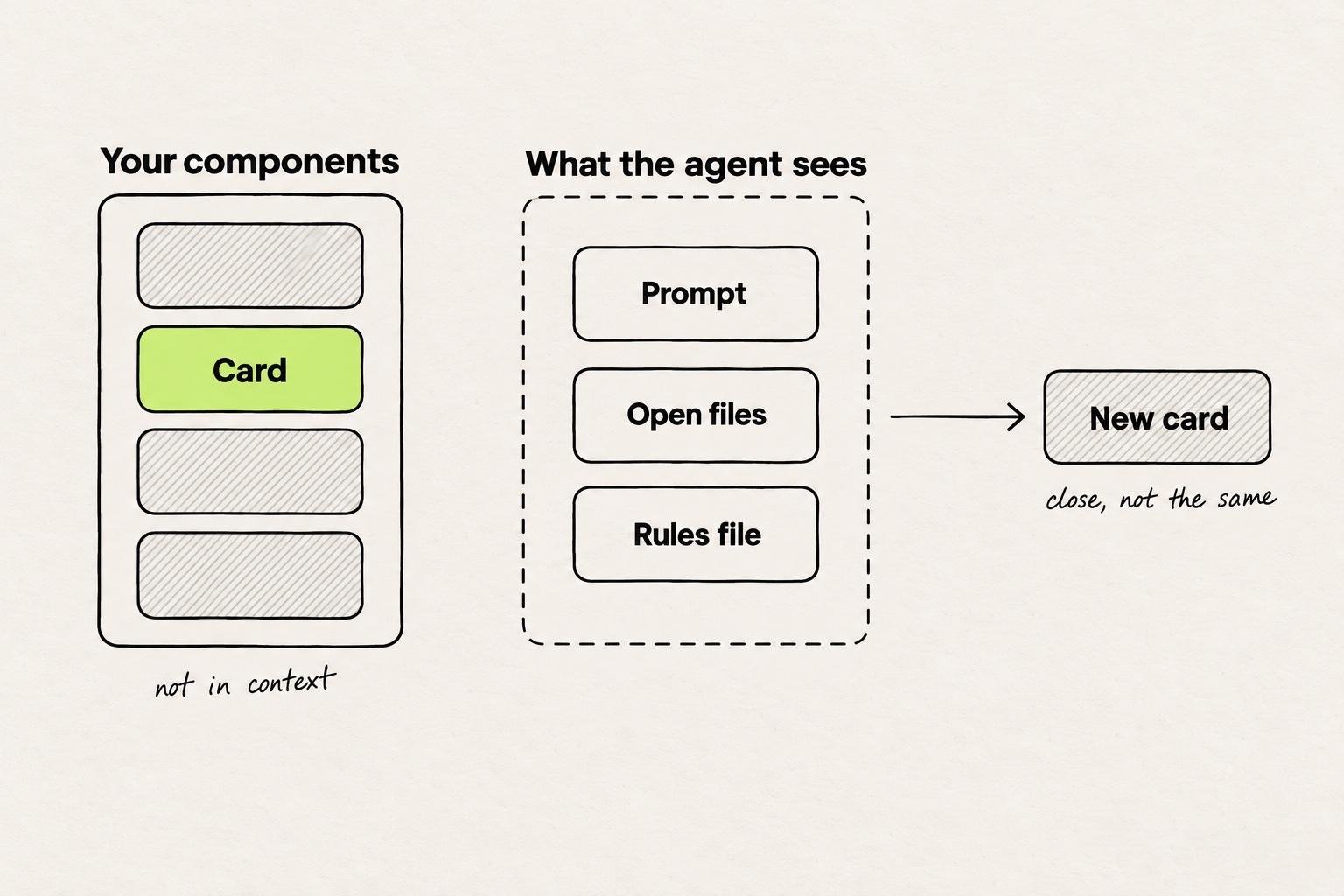
We hear the same thing on our calls with customers: AI tools follow the design system poorly. They recreate components that are close to the real ones but not one to one. They hardcode values where tokens exist, and they write markup engineers reject in review. Low fidelity is the pain that comes up most. Full adherence to the system and its tokens is what teams are looking for.
On our calls with customers, teams also trace the drift to two layers. Figma falls behind the code, and engineers step around the components. A design exported from a Figma file that lags the code then fights the tokens engineers ship. In one team, the system's owner had built custom tokens in Figma while engineering went back to Tailwind's own.
None of the usual fixes is wrong. Each one describes the system to the agent, and a description is a request. The agent weighs it against everything else in its context, and the nearest code often wins.
How do you make AI use your design system's components?
Give the agent the components, not a description of them. A design system reaches an agent in one of three forms: a description, an index, or the code itself. Only the last two put a real component within reach.
A description. The AGENTS.md project offers one file for instructions to coding agents (agents.md). CLAUDE.md and .cursor/rules play the same part for Claude Code and Cursor. Anthropic's docs say what that buys: "Claude treats CLAUDE.md files as context, not enforced configuration" (Claude Code docs). Alice Moore wrote on Builder.io's blog about what happens when that context and the code disagree. Her example: "If your rules file says 'always use semantic tokens' and the three nearest files use inline hex values, the hex values win." (Builder.io) The rules-file setup is in the Figma and Cursor workflow.
An index. An index tells the agent which components exist and where to fetch them. The shadcn MCP server "allows AI assistants to interact with items from registries", including a company's internal component libraries (shadcn MCP docs). Storybook's MCP server "connects your Storybook to AI agents, allowing them to understand your components and documentation" (Storybook docs). Its AI features are still in preview. v0 saves a design system as a skill, with one rule: "If a component, prop, or token cannot be verified from the sources, v0 should not use it." (v0 docs)
Figma's Code Connect links Figma components to their code versions, as the Figma MCP server guide covers. monday.com built its own server. Rivka Ungar wrote on the monday.com Engineering blog: "We built an MCP that represented the design system as structured machine-readable knowledge." Then the limit: "the MCP only provided knowledge" (monday.com Engineering). An index cannot stop the agent from writing a new component.
The code itself. This is the strongest of the three forms. An agent working in your checkout has the real Button in front of it, with its props and its types. Here Moore's finding works for you: the nearest code wins, and the nearest code is the system. Tokens work the same way. Tailwind theme variables "influence which utility classes exist in your project" (Tailwind docs), so a color missing from the theme gets no utility class. For what tokens are, see how design tokens work. Working in the code is one of the four routes from design to code.
A design system built on shadcn/ui is the clearest case. Its components are copied into your repo instead of installed as a package, so an agent in the checkout reads your edited Button, not the stock one. An agent outside the repo sees your version only if a registry serves it.
In a repo, each kind of file does a different job.
In a repo, rules files only ask. The components, the theme and the checks are the system.
- AGENTS.mdrules for every agent
- .cursor/
- rules/
- design-system.mdcthe same rules, for Cursor
- app/
- globals.css@theme: the only colors and spacing
- components/
- ui/the real Button, Card and Select
- button.tsx
- card.tsx
- select.tsx
- registry.jsonwhat exists, one description each
- eslint.config.mjsfails off-system classes
- tsconfig.jsontype check: props and variants
- Asks. Rules files are context. The agent weighs them against the code around it.
- The system. Components the agent can import, and a theme that decides which classes exist.
- Index. Tells agents outside the repo what exists, through a shadcn registry or Storybook’s MCP server.
- Checks. Run on every pull request, whoever wrote the change.
How to enforce design system rules on AI-generated code
Which AI design tool is best at enforcing design system rules automatically? No tool does it alone. Enforcement is a set of checks that run on every change, whoever wrote it, plus an agent that reads the errors and fixes them. This is where the design system stops being a request, because the rules live in the codebase instead of the prompt.
The theme limits the values. With Tailwind's default palette removed and only the system's colors and spacing in the theme, the agent has no class for an off-system value. It can still type an arbitrary one, such as bg-[#3b82f6].
Lint rejects what slips through. The better-tailwindcss ESLint plugin has a no-unknown-classes rule to "Disallow unknown classes in Tailwind CSS class strings." Its no-restricted-classes rule can flag arbitrary values (eslint-plugin-better-tailwindcss). Atlassian's design system plugin goes further. Under its ensure-design-token-usage rule, "Using anything other than design tokens such as hardcoded values or legacy theme colors will be considered violations" (Atlassian Design System). Its no-html-button rule steers code away from native HTML buttons and toward the system's Button (Atlassian Design System).
Types reject wrong props. If the Button accepts only a primary or secondary variant, an invented variant="brand" fails the type check. In Alice Moore's words, "The TypeScript compiler becomes the design-system reviewer for an entire class of mistakes" (Builder.io).
Run lint and the type check in CI on every pull request, and set lint rules to error rather than warn. A warning lets the build pass, so an agent can move on without fixing it. A change from an engineer and a change from an agent then meet the same gate.
Agents fix what they can read. Claude Design "checks its output against your design system, and makes corrections before you see it" (Anthropic). A coding agent in the repo can run lint and the type check before it opens a pull request, then fix the lines that fail.
A rules file earns its place here. A line telling the agent to run lint and the type check before it finishes puts the errors in front of it, with the file and the line.
Take one generated diff with four flagged lines. Three fail a check. The fourth adds a card built entirely from tokens.
Lint and the type check catch three problems in this diff. The look-alike card passes both.
+import { Button } from "@/components/ui/button"+import { FancyCard } from "@/components/fancy-card"+<FancyCard>+<h3 className="text-sm font-medium">Weekly digest</h3>+<p className="text-[13px] text-[#6b6b6a]">Email me every Monday.</p>+<button className="rounded-md bg-primary px-3">Save</button>+<Button variant="brand">Cancel</Button>+</FancyCard>
+export function FancyCard({ children }: { children: React.ReactNode }) {+return <div className="rounded-lg border bg-card p-4">{children}</div>+}
text-[13px]andtext-[#6b6b6a]are arbitrary values. Lint fails them.- A raw
<button>where the system hasButton. A rule like Atlassian’sno-html-buttonfails it in lint. variant="brand"is not a Button variant. The type check fails it.- FancyCard uses only theme classes, so lint and the type check pass it. Only review knows
Cardalready exists.
Example diff from an agent asked for a weekly digest setting.
A search for similar components is the other way to catch that fourth line.
Where AI adds the most value to design system management
AI helps most in the jobs owners already do by hand: finding what exists, moving code onto tokens and keeping docs current. The zeroheight design systems report found that many practitioners do not use AI yet, or are only experimenting. Design generation is their top worry, and documentation the use they want most. In the report's words, "teams want AI to stay away from design generation" (zeroheight).
Finding what already exists. On our calls with customers, a design system manager at a large enterprise software company described consolidating several design systems into one. Across them sit three kinds of dropdown. She wants an agent to tell her a component already exists before it builds another. Omlet is built around that job, with a promise to "Surface similar components to update or consolidate" (Omlet). Builder Code's design system intelligence starts from the same inventory: "The AI scans your codebase once, learns what components exist, how they work, and when to use them." (Builder.io docs)
Every copy an agent adds grows the design debt the consolidation has to pay down.
Three dropdowns in one codebase. Consolidation starts with finding them, not generating a fourth.
- components/ui/select.tsxused in 84 files
- components/forms/dropdown.tsxused in 31 files
- features/billing/plan-picker.tsxused in 6 files
- A second dropdown from a forms package, with its own height and radius.
- A one-off built for the billing page, now copied into two more features.
The keeper is Select. An agent asked for a fourth dropdown should import it.
A scan for similar components finds copies like these. The values here are an example.
Migrations. A design system designer told us on a call that much of his job is convincing teammates to use the system. He also does the work twice: perfect in Figma, then translated into code by someone else. The token migration is the part he would hand to an AI.
Island did that at scale. Boaz Hoch wrote on Island's blog about an AI migration of "over 12,000 individual token instances", with a custom lint rule added to CI behind it. His summary: "The linter makes sure it stays migrated, forever, without a human in the loop." (Island)
Not every migration needs a model. Atlassian's token codemod "goes into every single color in the target files and suggests tokens based on context of the surrounding code". Its docs add that "manual review is required after running the codemod" (Atlassian Design System).
Documentation. Romina Kavcic, writing about agents for design systems, starts small: "Documentation generation is usually the safest starting point." (The Design System Guide)
Storybook points its MCP server the same way. Its docs list tools an agent can call "to retrieve component information, generate stories, run component tests, and more" (Storybook docs). A story written for each new prop keeps the examples next to the code they document.
Where to start with an AI design system
Start with a number, then make the system findable, then make it checkable.
- Count hardcoded values in last month's merged pull requests, such as hex codes and
p-[13px]. The count is your baseline. - Make the system findable. Publish a shadcn registry with a description per item, set up Storybook's MCP server, or write one rules file that points at
components/ui. - Turn on one lint rule in CI, such as
no-restricted-classesfor arbitrary values, and let it fail the build. - Give the agent one migration with that lint rule behind it, such as moving one hardcoded color to its token across the repo.
- Add one review question to every AI-generated pull request: does a new file in this diff duplicate something in
components/ui? No check answers that yet.
The rules file in step 2 can be three lines:
Import UI from components/ui. Search it before writing a new component.
Use classes from the Tailwind theme only. No hex codes or arbitrary values.
Run lint and the type check before you finish, and fix every error.
Modeinspect works on Next.js React codebases that use Tailwind. After setup it finds your React components, and its agents place them. The design panel offers tokens from your Tailwind theme but does not enforce them. You can paste Figma layers onto the canvas, but Figma variables do not become tokens and component instances arrive as plain layers, not linked to your code components. The coding agent reads the repo's CLAUDE.md, AGENTS.md and rule files. Each agent change is type-checked, and errors go back to the agent to fix. The check reports errors. It does not guarantee type safety.
Other editors that change real React components are compared in the React visual editor guide.
Open last month's merged pull requests now, search the diffs for [#, and write down the three values that come up most. Ban those three in your first lint rule, and make the most common one your first migration.
Frequently asked questions
What is an AI design system?
The term covers three things: a design system AI agents can read and use, one built with AI help, and AI tools that generate UI in a system's style. For a team with a codebase, the useful meaning is the first. It means components the agent can import, a Tailwind theme that offers only the system's tokens, and lint and type checks that reject off-system code.
Which AI design tool is best at enforcing design system rules automatically?
No tool enforces a design system on its own. Enforcement comes from checks that run on every pull request: a Tailwind theme limited to your values, ESLint rules such as no-unknown-classes or Atlassian's ensure-design-token-usage, and the TypeScript compiler. Tools differ in whether their agent reads those errors and fixes them. Claude Design checks its output against your design system before you see it, and a coding agent in the repo can run lint itself.
What is a shadcn design system?
It is a design system built on shadcn/ui, where component source is copied into your repo instead of installed as a package. The team owns that code and changes it freely. A shadcn registry is how the team ships its own versions, and the shadcn MCP server lets AI assistants pull items from registries, including private ones for internal component libraries.
What does design-system-aware AI mean?
It means an AI tool that knows which components and tokens your system has before it writes UI. It can learn them from an index, such as a shadcn registry, Storybook's MCP server or a design system MCP, or by reading the codebase. Awareness is knowledge, not a gate. Lint, the type check and review still decide what merges.
Can an AI React component generator use my component library?
Yes, if the generator can read the library. Magic Patterns imports an existing design system: it "scans it and proposes the components, colors, typography, and tokens it finds" (Magic Patterns docs). v0 saves a design system as a skill and should not use a component it cannot verify from the sources. A coding agent working in your repo imports the library directly. Whatever generates the code, lint and the type check decide what stays.
Which visual builders let engineers add React components without breaking the design system?
Two kinds of tool fit. Repo editors such as Builder Code, Onlook, Cursor Design Mode, Subframe and Modeinspect edit the real React components in your repo, so their changes go through the same lint, type check and review as any other code. Visual builders such as Builder Content, Plasmic and Makeswift let engineers register React components that editors arrange on pages, so editors use only what engineers registered. Our comparison of React visual editors covers both.
How do you design a component library that AI can use?
Make each component easy to find, typed and hard to misuse. Keep components in one folder, such as components/ui, with a short description of what each one is for. Type props as fixed options, so an invented variant fails the type check. Keep tokens in the Tailwind theme, so off-system values get no class. Publish a registry or set up Storybook's MCP server for agents outside the repo, and add a lint rule that flags hardcoded values.