A design system is the set of design tokens, components and usage rules a team builds its interface from. It keeps them in one place, so every screen draws on the same decisions. Nielsen Norman Group defines it as "a complete set of standards intended to manage design at scale using reusable components and patterns" (NN/g).
Figma's own guide, Design systems 102, builds the system in a design file and treats the code as the place it gets implemented. That order made sense when people built every screen by hand. Now a coding agent builds a growing share of the UI, and it reads the repo, not the Figma library. The code is the system, and your component library is the prompt.
The seven steps below run from cutting the catalog to governing how components get used. They are for designers and design engineers on a React codebase who already point Claude Code, Cursor or Codex at their components. How AI tools treat a system once it exists is covered in AI and design systems.
Key takeaways
- Keep the design system in code. Figma files, Storybook, generated docs and screenshots are copies, and an agent trusts a stale copy as much as a current one.
- An agent picks the right component when its name says what it is and each design decision is one typed prop. Export every part of a compound component, with an example.
- Write "when not to use" next to the component, index every component in AGENTS.md, and move whatever keeps breaking into lint.
- Theme with semantic tokens that switch per mode. A
dark:class on every element is a pair someone forgets.
What is a design system?
A design system has three layers. Design tokens name the decisions: color, spacing, type, radius, shadow and motion. Components turn those decisions into reusable parts such as Button, Card and Accordion. Guidelines say when to use each part, and when not to.
A component library is the second layer on its own. The shadcn/ui docs draw the line plainly: "This is not a component library. It is how you build your component library" (shadcn/ui). A library becomes a system when the tokens and the guidelines travel with it. Of the public design system examples, the GOV.UK Design System is worth studying for exactly that: each component page carries code beside its guidance.
Brad Frost's workshop description puts the center of a successful design system in "a component library that lives in code and directly powers an organization's software products" (Smashing Conference). That is the version this guide builds.
Why the code has to be the source of truth
Every copy of a design system drifts from the code. A theme change restyles every component without touching a single component file, so yesterday's screenshot is already wrong. A Figma library, a Storybook nobody rebuilt and a design doc generated last month all show the system as it was.
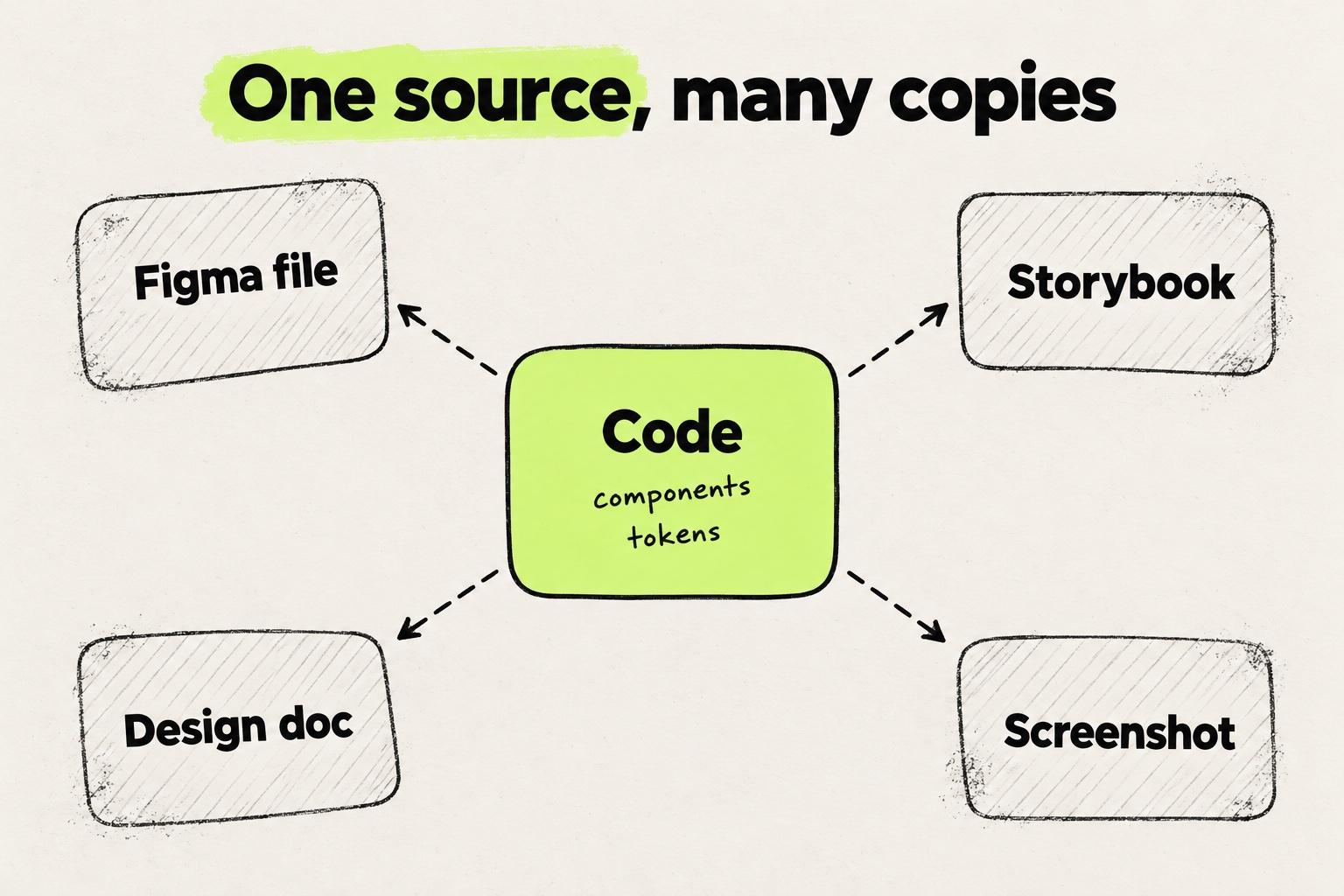
Agents trust every copy equally. Anthropic's Claude Code docs say Claude "starts every task by reading your code" and finds "how existing components are built" (Claude Code docs). Whatever it reads, it copies.
We hear the same thing on our calls with customers: at one 16-engineer startup, a stale Storybook led the agent to override a Figma frame with an old component. Folder names work the same way. A design-system/ folder holding one stray file reads as an instruction.
Brad Frost made the point before agents existed: "Once the pattern library ceases to reflect the current state of the products it serves, it becomes obsolete" (Atomic Design, chapter 5). An agent copies an obsolete library faithfully, which makes it worse than no library.
So generate every other view from the code on every change, and keep a few lines of human intent beside the components. A Figma design system then mirrors the code library instead of mastering it. The same logic explains why the Figma MCP server hands an agent a description of a component, not the component.
Step 1: subtract before you add
Inventory what the codebase already has, then delete. Three dropdowns mean an agent picks one of three, and nothing says which is current. On our calls with customers, one team cut its component catalog by more than half before anything else worked. Many of the components they removed existed only to support other teams.
Cut in this order:
- Duplicates. A second Badge called StatusPill. Keep one and migrate the call sites.
- One-screen components.
PricingCardProandSettingsSaveButtonare a screen's content frozen into a component. Fold them back into Card and Button. - Decoys. Empty folders, old exports and a legacy directory the agent will copy from. If legacy code must stay, say so where the agent reads it. Anthropic's own example rules file includes "src/legacy/ is still live but don't copy its patterns into new code" (Claude Code docs).
A design system audit is a structured version of this pass.
Step 2: turn every design decision into a token
A token tells an agent what a value means. A raw value only tells it what the value looks like. #2563eb could be primary, link or focus ring, and an agent copying it from a screenshot or computed CSS has to guess. Every wrong guess is a value the next theme change misses.
Tokenize color, spacing, radius, type, shadow, motion and breakpoints. In Tailwind v4, theme variables defined with @theme "influence which utility classes exist in your project" (Tailwind CSS docs). An off-scale value then looks odd in review: w-[200px] instead of w-50.
Give every token a one-line comment saying what it is for. That sentence lets an agent choose the right token instead of guessing from the name:
@theme {
  /* Page background behind cards and panels. */
  --color-surface: var(--gray-1);
  /* Cards, popovers and anything raised above the page. */
  --color-surface-raised: var(--gray-2);
  /* Body text. Secondary text uses muted, never a lighter gray. */
  --color-foreground: var(--gray-12);
}
How a token travels from a Figma variable to a Tailwind class is traced step by step in our design tokens guide.
Step 3: build components an agent can pick from the name
The test: could someone who has never seen your codebase pick the right component from its name, its props and one example? That is where an agent starts every session.
- Name it for what it is, not where it is used. Card, Stat and Dialog are generic. Faced with a catalog of specific ones, an agent bends the closest one into shape or builds another.
- One decision, one typed prop.
variant: "primary" | "ghost"andsize: "sm" | "md"are decisions an agent and a design tool can both read. Booleans that combine into impossible states (primary plus ghost plus danger) are not. - Keep
classNameas the escape hatch. Some screens need different spacing. AclassNameprop on every component lets the agent adjust one instead of creating a new one, while design decisions stay in typed props. - Export every part, and show the whole tree in one example. Base UI's Accordion has five parts: Root, Item, Header, Trigger and Panel (Base UI). On our calls with customers, a designer described failing to build an accordion because only the trigger was imported, not the panel.
- Build on an accessible primitive. Radix's accordion "adheres to the Accordion WAI-ARIA design pattern" and has "full keyboard navigation" (Radix). Name the primitive in the doc comment, so the agent extends it instead of rebuilding keyboard handling.
- Say how it sizes. Designers think in fill and hug, and code leaves that implied in
100%orauto. Put it in the doc comment or make it a prop. - Expose the decision in the DOM. shadcn/ui notes that "every primitive now has a
data-slotattribute for styling" (shadcn/ui). Withdata-slotanddata-variant, a reviewer, a test or an agent reading the page can tell which component and variant it is looking at. - Give icons one way in. One wrapper and one prop type, written in the index, or agents guess between
<SearchIcon />,SearchIconand"search".
// Specific: one screen's content, frozen into a component
<PricingCardPro />
<SettingsSaveButton />

// Generic: the decision is a prop, the content is children
<Card variant="outline">
  <Card.Header>Pro</Card.Header>
  <Card.Body>…</Card.Body>
</Card>
<Button variant="primary">Save</Button>
Step 4: document behavior, not only looks
Variants come in two kinds. Visual variants such as variant, size and tone change the component at rest, where a screenshot, a static render and a reviewer can all see them. Behavioral variants look identical until someone uses them: a single or multiple accordion, a collapsible one, a modal dialog.
Two accordions that look the same at rest. Only a click tells them apart.
Orders leave the warehouse within two days.
<Accordion> for settings and long forms.
Orders leave the warehouse within two days.
<Accordion multiple> for FAQs people compare.
Both are rendered live. Open a second item in each: the default accordion closes the first panel, the one with multiple keeps both open. A screenshot or a static render of the resting state shows two identical components.
Any tool that reads a system from its rendering misses behavioral variants, so they depend on words and examples:
- One prop on the root, named after the behavior. Base UI uses
multiple, a boolean described as "Whether multiple items can be open at the same time" (Base UI). Radix requires atypeof single or multiple, and the type ofvaluechanges with it (Radix). Prefer the prop that leaves other props' types alone. - No
AccordionMultiple. Two components for one decision is the duplicate problem again. - One named example per behavior, each with a one-line "when". Agents copy examples.
- Say which part owns which prop.
multiplegoes on Root, a per-itemdisabledon Item. Agents put props on the wrong part when the example does not show it.
/**
 * Accordion
 * Default (single): one panel open at a time. Use for settings and long forms.
 * multiple: panels open independently. Use for FAQs people scan and compare.
 * Not for site navigation: use NavigationMenu.
 */
Step 5: put instructions next to the code they govern
Instructions belong next to what they govern and change in the same pull request. A doc that lives elsewhere goes stale, and an agent trusts a stale doc. Claude Code's docs are direct about the limits: "Claude treats CLAUDE.md files as context, not enforced configuration" (Claude Code docs).
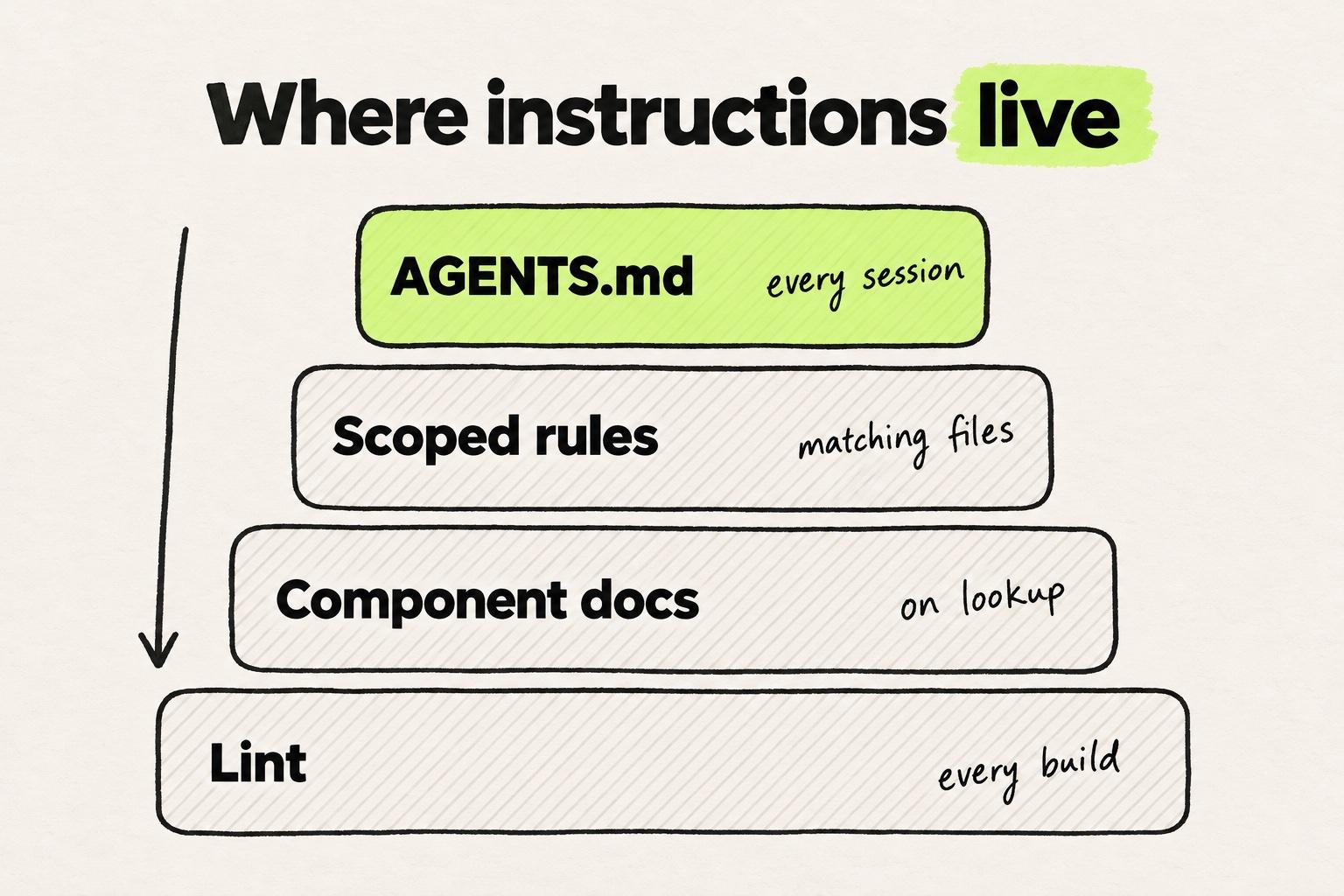
| Layer | Where | What goes in it |
|---|---|---|
| Index | Root AGENTS.md | Where the system lives, three to five non-negotiables, one line per component: name, path, use for |
| Scoped rules | A CLAUDE.md in the design-system folder, .claude/rules/*.md with paths:, or .cursor/rules/*.mdc with globs | Rules for UI files: tokens only, icons from one place, composition rules |
| Component docs | A doc comment on the export, or accordion.md beside accordion.tsx | When to use, when not to, composition, behavioral variants |
| Enforcement | Lint | Anything that keeps getting broken |
The agents.md site calls the file "a README for agents", and "the closest AGENTS.md to the edited file wins" (agents.md). Claude Code reads AGENTS.md only when no CLAUDE.md exists, so a repo with both imports it from CLAUDE.md with an @AGENTS.md line (Claude Code docs).
"When not to use" prevents more drift than pages of props. The GOV.UK Design System's component pages carry a "When not to use this component" section. Its accordion page says "Do not use an accordion for content that all users need to see" (GOV.UK Design System).
A good rule fits on one line, names the alternative and states the exceptions you allow. Without the exceptions, agents enforce a rule literally: a "tokens only" rule with no white token flags every bg-white.
# components/ui/CLAUDE.md

- Colors: semantic tokens only (bg-surface, text-foreground). white and black are fine for overlays.
- No dark: color utilities. If a color needs a dark value, add a semantic token.
- No raw <button> or <a> in app code: use <Button> or <Link>.
- Never put a Button inside a Button. For grouped actions use <ButtonGroup>.
Generated documentation stays one source as long as it is produced from the code side. On our calls with customers, one team generates a Markdown file per component from the Storybook MDX people read. Nobody edits the generated files by hand. Design system documentation built that way does not drift.
Step 6: theme in tokens, never in components
An agent that does not know a semantic token exists writes bg-white dark:bg-zinc-900 on each element. Every hand-built element needs its own pair, and some get forgotten.
A dark: pair on every element works until one is forgotten. A semantic token has nothing to forget.
Invoice 1042
Due in 14 days
bg-white dark:bg-zinc-900border-zinc-200text-zinc-900 dark:text-zinc-50text-zinc-500 dark:text-zinc-400bg-zinc-100 dark:text-zinc-200
Invoice 1042
Due in 14 days
bg-surfaceborder-bordertext-foregroundtext-mutedbg-subtle text-foreground
- The border has no dark: value. Light mode can't show it.
- The badge has a dark text color but no dark background. Light mode can't show that either.
Both cards render from the same zinc values. The left card carries its theme on each element, the right one uses semantic tokens that switch once, where the theme is defined. Switch to dark to see which card keeps up.
The fix takes three layers: a color scale that flips per theme, semantic tokens that point at steps of the scale, and components that use only the semantic tokens.
/* 1. Scale: flips per theme */
:root { --gray-12: #111; }
.dark { --gray-12: #eee; }

/* 2. Semantic: what components use */
@theme { --color-foreground: var(--gray-12); }
Theme the parts people forget, too: shadows, borders and overlays. Then give agents one rule, no dark: color utilities in components, and put it in lint. A token defined once with a dark value reads as one decision with two values.
Step 7: govern the usage, not the definition
Ask an agent to change one card and the shortest path is editing card.tsx, which changes every card. We hear the same worry on our calls with customers: after an agent edit, nobody can tell whether a card changed on one screen or on all.
Draw the line for the agent. Props, placement and composition are open. The component file belongs to the system's owners, and a missing variant is a request to them, not an edit.
Enforce the lines that matter. ESLint's no-restricted-imports rule exists to "disallow specified modules when loaded by import", and its custom message can name the replacement (ESLint). Anthropic's docs draw the same boundary: "If something has to happen every time, make it a hook, a deny rule, or a managed setting" (Claude Code docs).
Then measure corrections per component usage, not per diff. Tag each design-system review comment by type: hand-rolled where a component exists, wrong component, wrong props, off-system styling or wrong composition. Divide by the design-system components the pull request adds. Diff size punishes large components, and "zero violations per PR" punishes the pull requests that use the system most. That metric is the core of design system governance once agents write UI.
How to prompt an agent against your design system
Agents use what is in front of them, not what they could look up. Name the components to use and where they live, and point at an existing usage to copy. Anthropic's example prompt does the same: "follow the pattern in HotDogWidget.php" (Claude Code docs).
Ask for the change, not the result. "Header padding to 24, keep the rest" beats "make it look like this", because a target image hides which part moved.
MCP servers help with lookup: Storybook MCP lets agents "understand your components and documentation" (Storybook). Code an MCP returns is one more copy, so the import should still come from the repo.
Where Modeinspect fits
Modeinspect works on the design system in your codebase rather than a copy of it. It supports Next.js React codebases that use Tailwind. After setup, it finds the team's React components: designers drag them onto the canvas, mention them in chat and edit their props, and agents place them too. The design panel offers values from your Tailwind theme instead of raw numbers. The coding agent follows your repo's CLAUDE.md, AGENTS.md and rule files, each change is type-checked, and the work ends in a pull request engineers review.
Two limits matter for a design system. Tokens are offered, not enforced, so a value that matches no token becomes a one-off value. And when you paste a Figma frame, its component instances arrive as plain layers, not linked to your code components. The frame is a starting point for the build, not part of the system. See Modeinspect for design systems.
Frequently asked questions
What is a design system, in one sentence?
A design system is the set of design tokens, reusable components and usage guidelines a team builds its product interface from. Nielsen Norman Group calls it "a complete set of standards intended to manage design at scale using reusable components and patterns". In a codebase, the components and tokens live in the repo and the guidelines sit beside them.
What is the difference between a design system and a component library?
A component library is the set of reusable UI components. A design system adds the tokens those components use and the guidelines for when to use each one. The shadcn/ui docs describe their project as "how you build your component library", not a library you install.
Should a design system start in Figma or in code?
For a team that ships with coding agents, start in code. Agents read the repo, so the code is the copy they trust. A Figma library can mirror the code components for exploration, but every copy kept by hand drifts.
What makes a design system ready for AI agents?
Agents use a design system well when component names are generic and each design decision is one typed prop. Export every part of a compound component with a full example, and put "when not to use" guidance next to each component. Add a component index in AGENTS.md, scoped rules for UI files and lint for the rules that keep breaking.
Is a DESIGN.md file worth having?
Only for what the code cannot say: voice, tone, intent and when not to use a pattern. A design doc that restates tokens and components is a copy that drifts. Put component guidance in doc comments, and keep a short index in AGENTS.md that points at the code.
Do coding agents need an MCP server to use a design system?
No. An agent that works in the repo can read and import the components directly. Storybook's and shadcn's MCP servers help with lookup and installing components, but the code they return is another copy, so the import should still come from the repo.
How do you handle dark mode in a design system?
Put it in tokens. A color scale flips per theme, semantic tokens point at the scale, and components use only the semantic tokens. Ban dark: color utilities inside components with a lint rule, and review changes in both themes.
What is a behavioral variant?
A variant that looks identical at rest and only differs in use, such as an accordion that allows one or several open panels. Screenshots and static renders cannot show it, so give it one prop on the root, a named example and a line saying when to use it.