To create a software prototype, work through five steps:
- Write the one question the prototype has to answer.
- Decide how real it needs to look, behave and read.
- Build it, as a Figma click-through or in code.
- Test it with five people.
- Throw it away or merge it.
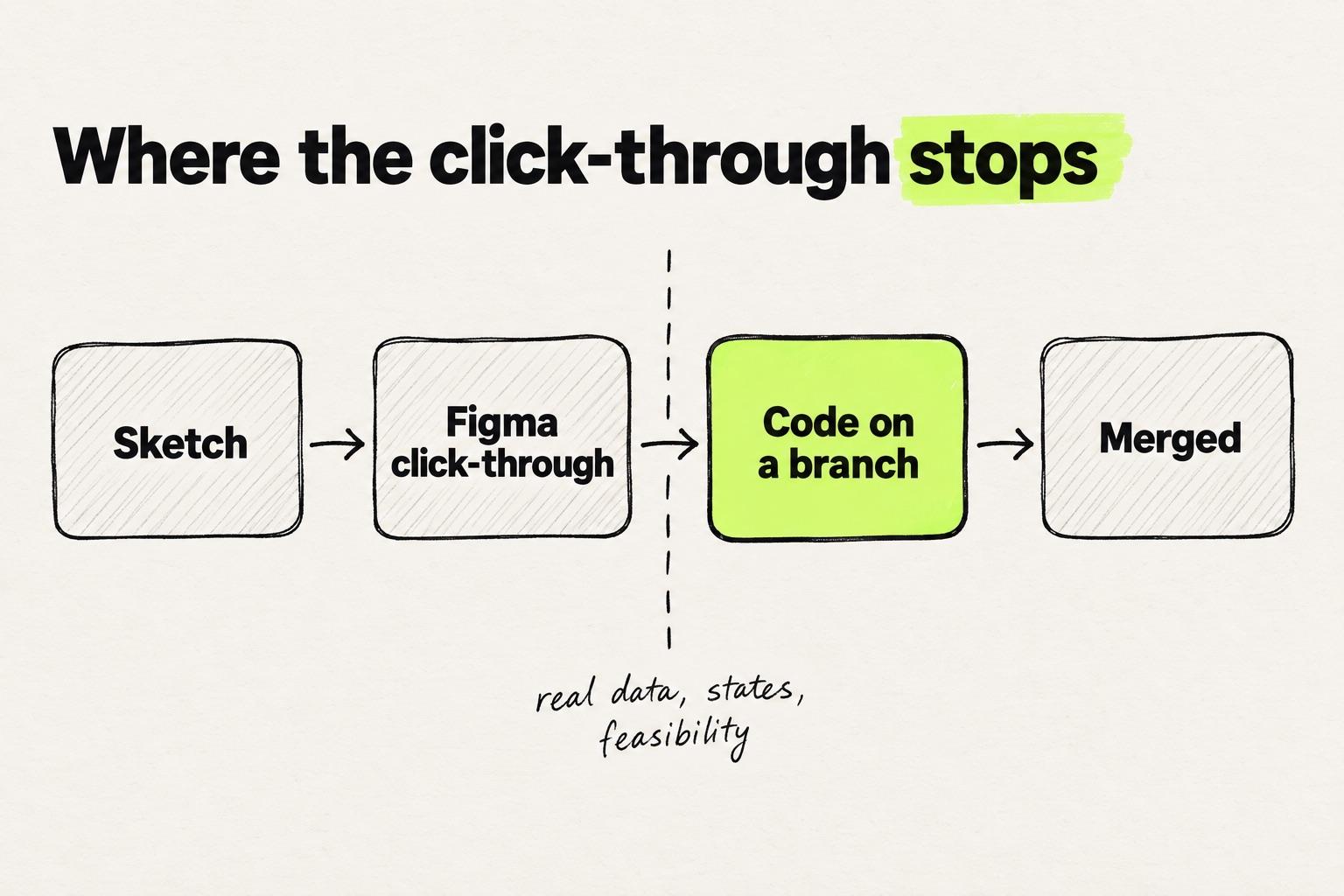
Step 3 is where the routes split. A click-through answers questions about flow and layout. Once the question needs real data, every state, or proof that the team can build it, the prototype has to be code.
For the tools on each route, see prototyping tools for product teams, from Figma to code.
Key takeaways
- Prototypes now often come before the brief. Many companies expect designers to show a working prototype, and many projects now start with one.
- Decide throwaway or evolutionary before you build. Ian Sommerville's Software Engineering warns against delivering a throwaway prototype as the final system.
- A Figma click-through works on any plan. Variables and conditionals need a paid plan, and Figma Make needs a Full seat on a paid plan (Figma Help Center).
- Test with five people in one day, on tasks written as goals rather than directions (Knapp and Zeratsky's design sprint, NN/g).
What a software prototype is, and the decision to make first
A software prototype is a model of a piece of software, built to answer a question before the team commits to building it. Kara Pernice of Nielsen Norman Group calls a prototype "a candidate design solution that you consider for a specific design problem" (NN/g).
Many designers now say their companies expect working prototypes (AI in Design Report 2026), and that projects start with a prototype rather than a brief (Foundation Capital).
Make one decision before the first frame or file: will this prototype be thrown away, or will it grow into the product? Ian Sommerville's textbook Software Engineering (6th edition) separates the two (chapter 8 slides):
- A throwaway prototype is produced "to help discover requirements problems and then discarded." It starts with the requirements the team understands least.
- An evolutionary prototype is "refined through a number of stages to the final system." It starts with the requirements the team understands best.
The route often makes the decision for you. For a change to an existing product, a Figma click-through, a Figma Make file and a Lovable app are throwaway by construction. None of them lives in your product's codebase. A branch in your real repo can go either way. Decide up front, because it changes how carefully you build.
Step 1: Write the question the prototype has to answer
Write one sentence the prototype must answer before you open any tool. Stephanie Houde and Charles Hill's paper "What do Prototypes Prototype?" sorts those questions into three kinds:
- Role: what the product does in someone's work, and whether it is useful at all.
- Look and feel: what it is like to see and use.
- Implementation: how it works underneath, and whether it can be built that way.
Take one feature through all three. Say your team wants to add saved filters to the orders table of a B2B app:
- Role: "Would account managers reuse a saved filter every week, or rebuild it each time?"
- Look and feel: "Can someone save a filter and reapply it later without help?"
- Implementation: "Can our table component and orders API load a saved filter on an account with 40,000 orders?"
Same feature, three prototypes: a sketch and a conversation, a clickable flow, and code running on real data.
Put the question at the top of the file or in the branch description. A prototype without one tends to turn into a demo, and a demo mostly answers "do you like it?"
Step 2: Pick the fidelity
Fidelity has three dimensions, not one. In the same NN/g article, Pernice splits it into interactivity, visuals, and content and navigation. Set each one to the level the question needs and leave the rest rough.
For saved filters:
- Look and feel needs realistic visuals and navigation, and a Save button that responds. The table rows can be sample data.
- Implementation can keep default styling, but the content has to be real orders and the filter has to actually filter.
Aim for enough fidelity to get an honest reaction, and no more. Jake Knapp and John Zeratsky call this "Goldilocks quality" in their design sprint guide: "just enough quality to evoke honest reactions from customers." IEEE's Guide to the Software Engineering Body of Knowledge (SWEBOK) names the risk when the balance is off. Cosmetic issues or quality problems in a prototype can pull users' attention away from the core functionality.
A quick rule: role and look-and-feel questions start in Figma. Implementation questions, and look-and-feel questions that depend on real data, start in code. The trade-offs at each level are in when a low fidelity prototype is enough.
Step 3a: How to make a Figma prototype
Figma is the prototype maker most product designers already have open (State of Prototyping). A Figma prototype works on every plan: anyone with edit access can build one, and anyone with view access can play it back in presentation view (Figma Help Center).
- Make one top-level frame per screen and per state. In most cases a connection's destination must be a top-level frame. The exception is Scroll to, which can target a layer inside the same frame (Connect your prototype).
- Connect the hotspots. Open the Prototype tab in the right sidebar. Select the layer people will interact with, and drag its connection to the destination frame.
- Set a trigger and an action. The trigger decides which interaction moves the prototype on, such as On click or After delay. The action decides what happens, such as Navigate to or Open overlay.
- Add a flow starting point. Each flow can be shared as its own link, so a tester starts on the first screen of the task.
- Add state with variables and conditionals. Variables store string, number, color or boolean values, and a Set variable action changes them (variables in prototypes). A conditional uses if/else logic to decide whether an action runs (conditionals). Both need a paid plan.
For saved filters, a number variable can count the filters someone has saved, and a conditional can show the empty state while the count is zero. One frame does the work of two, which is what Figma's prototyping page means by "detailed experiences with fewer frames."
Figma Make goes further. It is "an AI-driven, prompt-to-app tool" that turns ideas and existing Figma designs into interactive apps (Explore Figma Make). You can attach frames and components, publish to a URL and add a backend, with a Full seat on a paid plan. Make can push its code to GitHub, into a new repository that Make creates. Two ways to work in an existing codebase were closed betas in September 2026: Make in your local codebase, on Mac only, and Code Layers (Figma's Config 2026 notes).
Where a click-through prototype stops
A click-through stops where the question needs something frames cannot hold: real data, every state, or proof the team can build it. Variables push that line out a little. They do not remove it.
| Question about saved filters | Can a click-through answer it? |
|---|---|
| Would account managers reuse a saved filter? | Yes. A rough flow and a conversation are enough. |
| Can people find Save and reapply a filter? | Yes. This is what click-throughs do best. |
| Does the row hold a 60-character customer name? | Only if someone draws that row. |
| What does the table show with 0, 1 and 40,000 orders? | Partly. One frame, or one variable, per case. |
| Do results stay correct as filters combine? | No. That takes logic and data. |
| Can a customer try it on their own account? | No. Every tester sees the same sample rows. |
| Can we build it with our components and API? | No. Nothing in the file touches the codebase. |
We heard the same boundary at a designer event in Berlin. Designers there told us that in Figma they would design for only about 10% of cases, and that in code they could cover much more. A Figma prototype of a single dropdown, we heard, would take hours.
The click-through still wins in places. Our own product designer wanted to iterate on a multi-step upload flow. In the running app the upload finished in seconds, so there was no way to stop on the in-progress screen and work on it. A frame holds still.
Step 3b: How to prototype a web app in code
To prototype a web app in code, pick one of two routes. A prompt-to-app tool starts a new project from a description, which is faster to start. A branch in your real codebase changes the product itself, and can become the feature.
Route 1: a prompt-to-app tool
v0, Lovable, Bolt and Figma Make turn a description into a running app. They suit new products, role questions, and look-and-feel questions that need real interaction but not your real data.
- Write a long prompt. Nielsen Norman Group's tests of AI prototyping tools found that "longer prompts with clear, detailed design requirements consistently yield better results" (NN/g). Name the screens, the states, the shape of the data and what each click should do.
- Iterate one screen at a time, then publish the link and test it like any other prototype.
Know where the result lives. Lovable creates a new GitHub repository, and "you can only export from Lovable to GitHub, not the other way around" (Lovable docs). Because the app starts in a new repository, it does not start from your design system's table and button. Where AI prototyping helps a team is covered in AI prototyping and the problems it's actually solving.
v0 has a way across. Its Git Import builds against an existing GitHub repository: "The first code change creates a working branch and preview deployment," and the work is published through a pull request. That puts v0 on route 2.
Route 2: a branch in your real codebase
This route prototypes on the product itself, with your components, tokens and data. It suits implementation questions and most changes to a product that already exists. The coding agents and editors for it are compared in the tools a design engineer uses.
- Ask for access first. You need access to the repo and a staging API or seeded test data to run against. Ask an engineer before you start building.
- Create a branch. A branch is a separate line of work, kept apart from the main codebase until someone merges it. Name it after the question, such as
prototype/saved-filters. Claude Code can handle the git side: it "stages changes, writes commit messages, creates branches, and opens pull requests." - Build with the components that exist. Tell the agent to use the design system's table, filter and button components rather than new ones. An implementation question only gets a real answer if the prototype is built the way the product is built.
- Share the preview URL. On Vercel, pushing a commit to any branch other than production creates a preview deployment by default (Vercel docs). The branch-specific URL always points to the latest changes, so one link stays current while you iterate.
- Collect comments on the preview. Vercel Comments is on by default for preview deployments, free on all plans. Commenters need a Vercel account, and inviting people outside your team requires Pro or Enterprise.
- Optional: put it behind a feature flag. Pete Hodgson's article on feature toggles describes permissioning toggles, which limit a feature to a group of users. On a team that already runs flags, five customers can try saved filters on their own accounts.
A local prototype has no link to share. In our interviews and usability sessions with designers, sharing a code prototype kept coming up as a gap. One six-person design team builds prototypes locally with Claude Code and shares them by recording videos.
If git and the terminal are what stop you, Modeinspect runs this route from a design canvas on a connected Next.js React codebase that uses Tailwind. It shares live preview links and ends in a pull request that engineers review.
Step 4: Test it with five people
Test with five people in one day, on tasks written as goals rather than directions.
Marieke McCloskey's NN/g guidance on writing task scenarios comes down to three rules: make the task realistic, make it actionable, and avoid clues. Her example: "Poor task: Purchase a pair of orange Nike running shoes. Better task: Buy a pair of shoes for less than $40."
For saved filters:
- Poor: "Click Save filter in the toolbar and name it Overdue."
- Better: "You check overdue orders every Monday. Set things up so next Monday takes less work."
Then watch them do it. McCloskey again: "It's best to ask the users to do the action, rather than asking them how they would do it."
Run all five sessions on one day. Knapp and Zeratsky's sprint guide says that after five customer interviews, "big patterns will emerge," and advises: "Do all five interviews in one day."
Five assumes one kind of user. Jakob Nielsen's analysis of test sizes recommends three to four people per group when two distinct groups use the product, and three per group for three or more. If account managers and finance admins both use the orders table, plan six to eight sessions.
Step 5: Decide what happens to the prototype
When the test is done, either throw the prototype away or merge it. Make that call on purpose, because a prototype nobody decided about tends to ship by default.
If it was a throwaway, keep the decision and delete the prototype. Write down what the test answered and which states it exposed, and put that in the ticket. SWEBOK notes that a requirement defined after prototyping has "extremely low" volatility. The ticket is the part that lasts.
Do not ship the throwaway. Sommerville is direct about it: "Developers may be pressurised to deliver a throw-away prototype as a final system. This is not recommended." He wrote that in 2000. A generated app in its own repo is the same trap with nicer styling.
If it was evolutionary, open the pull request. Write the question and what the test showed in the pull request description, and ask for review. Engineers review it like any other change. If the prototype sits behind a flag, remove the flag once the decision is made. Hodgson describes toggles as "inventory which comes with a carrying cost." The other paths from a design to a merged change are compared in four routes from a design to a pull request.
Either way, the question from step 1 is what the prototype was for. A throwaway that settled it did its job. A branch that settled it is already the start of the feature.
Frequently asked questions
How long does it take to create a software prototype?
It depends on the question. In Jake Knapp and John Zeratsky's design sprint, the prototype gets one day and the test the next. A prototype on the real codebase takes longer the first time, mostly to arrange repo access and test data.
Can I create a software prototype without coding?
Yes. A Figma click-through involves no code, and prompt-to-app tools such as v0, Lovable and Figma Make write the code from your description. On a real codebase, an agent such as Claude Code writes the code and an engineer reviews it.
What is the difference between a throwaway and an evolutionary prototype?
A throwaway prototype is built to discover requirements and is then discarded. An evolutionary prototype is refined, stage by stage, into the product itself. Decide which one you are building before you start, because a throwaway that ships becomes the product by accident. Why prototyping belongs before the tickets is covered in why to prototype first, before tickets and specs.
Can a Figma prototype become code?
Not directly. A click-through is frames and connections, not code. An engineer, or a coding agent reading the file through Figma's MCP server, builds the code from it. Figma Make generates code and can push it to a new GitHub repository that Make creates, not into your product. Its ways into an existing codebase were closed betas in September 2026. For a change to an existing product, the prototype that can be merged is code on a branch of your real codebase.