The main benefit of prototyping is that it turns a vague request into something people can react to while changing it is still cheap. A stakeholder who cannot define "better onboarding" can still look at three versions of it and say which one is wrong. That reaction is the requirement nobody managed to write down.
Key takeaways
- Prototype first because the requirement often does not exist yet. A stakeholder who cannot define "better onboarding" can still look at three versions of it and say which one is wrong.
- Rough prototypes find the major usability problems. Use them to learn whether people can use a design, and higher fidelity to learn how fast it is and how it feels.
- Write the ticket after people react to the prototype. It gets shorter and sharper because the prototype carries the detail.
- A prototype built on the real codebase, with the real design system and data, can be reviewed and merged instead of rebuilt.
What are the benefits of prototyping?
Prototyping gives a team five things a written spec cannot. It turns interpretations into decisions, catches mistakes while they are cheap, gives everyone one shared reference and gets user feedback before the build. Built on the real product, it can also shorten the path to production.
1. It turns vague intent into decisions
A stakeholder notices that customers get stuck in onboarding. That is a valid concern. What reaches the team is an aspiration: "Make onboarding better." There is no shared definition of better, no metric and no agreement on where the problem sits.
Now show the same stakeholder three onboarding flows. One adds tooltips, one uses a guided checklist and one lets people explore the product before they sign up.
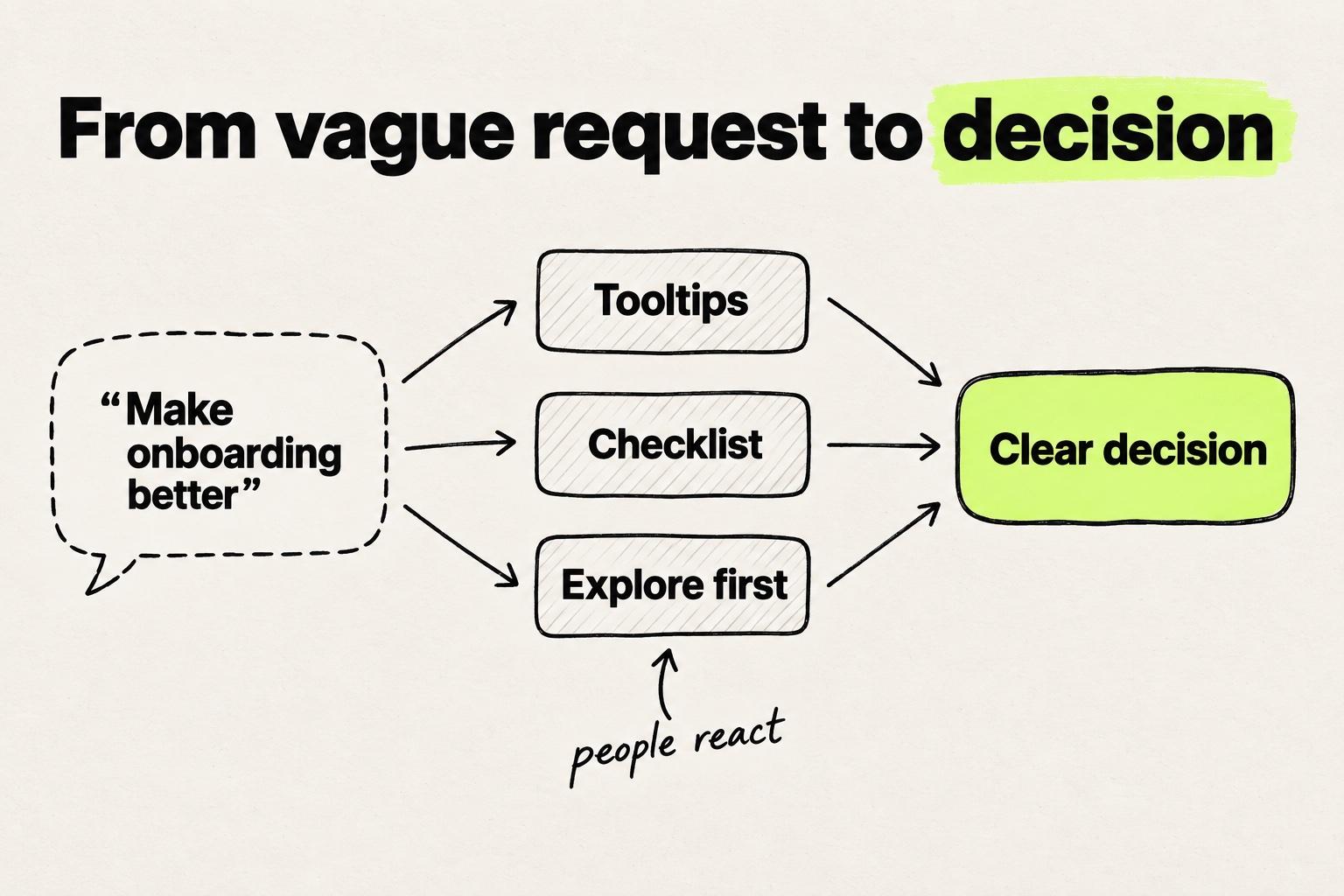
People suddenly have opinions. They point out edge cases, reject one flow for a reason nobody mentioned in the kickoff, and describe what they actually meant. The team stops guessing at intent and starts choosing between concrete options.
2. It finds problems while they are cheap to fix
A prototype exposes bad ideas before they reach a sprint. As Kara Pernice of Nielsen Norman Group put it: "Ripping up code is very expensive. Ripping up a prototype is not, especially if it's just a piece of paper" (NN/g).
The same applies to feasibility. Walk an engineer through a prototype and the "quick UI improvement" sometimes turns out to need backend work. Finding that out in a review of the prototype is far cheaper than finding it halfway through the build.
3. It gives the whole team one reference
Words are slippery. A ticket can describe a feature in two sentences, and everyone who reads it walks away with a different picture. Figma, which makes design and developer tools, found that the top challenge developers name when working with designers is "differences in assumptions" (Figma).
A prototype replaces those assumptions with one thing everyone can click through. Marty Cagan of SVPG quotes IDEO's Tom Kelley: "If a picture is worth a thousand words, then a prototype is worth a thousand meetings" (SVPG). We covered what happens when that shared picture is missing in why UX breaks after the design handoff.
4. It lets you test with users before anything is built
You do not need a polished prototype to learn from users. In two experiments, Robert Virzi, Jeffrey Sokolov and Demetrios Karis found "substantially the same sets of usability problems" in low- and high-fidelity conditions (ACM CHI).
There are limits. Jeff Sauro's review of fidelity studies at MeasuringU concludes that low-fidelity prototypes seem sufficient to find major issues but "aren't a perfect substitute." Ease-of-use ratings hold up across fidelity, while task times and ratings of visual appeal are less predictive (MeasuringU). Use rough prototypes for "can people use this?" and higher fidelity for "how fast, and how does it feel?"
5. It can shorten the path to production
Most prototypes are built to be thrown away, and the engineering team rebuilds the idea from scratch. A prototype built on the real codebase, with the real design system and data, can be reviewed and merged instead.
Prelude, a Modeinspect customer, has worked both ways. Its design team used to explore on mock data, in frames that showed the happy path rather than the messy states a fraud dashboard has to handle. Then the team moved prototyping onto its own codebase. For work that used to queue behind engineering, the time from idea to merged pull request fell from about 31 days on average to 13. Handoffs per feature went from five or more to one (Prelude customer story). Engineering review still gates every merge.
Why prototype first, before tickets and specs
Prototype first because the requirement often does not exist yet when the work starts. Modern product teams run on solid frameworks: OKRs, sprints, user stories and quarterly planning. Layered on an unclear problem, they organize the work without clarifying it. You can have perfectly groomed tickets and a beautiful roadmap, all pointing in the wrong direction.
Research on requirements engineering shows how often the requirement is missing. In the NaPiRE survey, the problem teams named most often was incomplete or hidden requirements. Half of the organizations that named "moving targets" said it led to project failure (Méndez Fernández et al.). The survey covers requirements work in general, not only UI.
Using a prototype to clarify requirements changes the order of work. Instead of spec, build, then discover, the order becomes prototype, react, then write the ticket from what people agreed on. The ticket gets shorter and sharper because the prototype carries the detail:
- Before the prototype: "Make onboarding better."
- After three prototypes and one review: "New admins see a three-item checklist after signup. Step 2 is inviting a teammate. Skip is always visible."
Large companies lose strategy in that same gap between an idea and something real, as we covered in how strategy dies in the handoff.
Prototyping for product managers and designers
Prototyping in product management and in design serves different purposes. Product managers prototype to make a request concrete. Designers prototype to test how a solution holds up.
Some PMs worry that prototyping is not their job. A PM who stays hands-off leaves someone else to interpret the problem. A paper sketch or a quick AI-generated prototype is enough to start the conversation, and a designer takes it from there.
For designers, the line between design and build is moving. In Figma's 2026 AI report, the share of designers taking part in development work nearly doubled in a year (Figma). We wrote about designers who now ship code in the new design ladder.
AI prototyping tools help most with the early, exploratory part of prototyping. Nielsen Norman Group tested them on a real redesign and found them "best suited for ideation, concept exploration, and early-phase prototype testing." The tools also lacked the sophistication to weigh design tradeoffs without extensive human guidance (NN/g). We covered where AI prototyping helps and where it does not in a separate post.
Engineers stay the reviewers in all of this. A prototype, however it was made, is an input to their judgment about what gets merged.
Which prototype answers which question
Pick the lowest fidelity that answers the question you have right now.
| Prototype | Best for | Blind spot |
|---|---|---|
| Paper sketch or whiteboard | Comparing directions in an hour, or asking "is this the right idea?" | Visual detail, real behavior, timing |
| Clickable Figma prototype | Flows and layout with users and stakeholders | Real data, edge states, technical feasibility |
| AI-generated prototype in a new project | Fast concept exploration with working interactions | Your design system, your conventions, design tradeoffs |
| Prototype on the real codebase | Real data, empty and error states, and a change that can become the pull request | Needs codebase access and is too heavy for choosing between broad directions |
A five-step prototyping playbook
- Write the outcome in one sentence. "New admins invite their team in the first session" is testable. "Better onboarding" is not.
- Sketch two or three directions. One option invites approval. Several invite comparison.
- Show them early. Ask stakeholders and a few users what is wrong, not whether they like it.
- Raise fidelity only when the question changes. Move from sketch to clickable to real data once the direction is settled and the open question is about behavior.
- Build the final prototype where it can become the feature. Then write the ticket, or open the pull request, from what people agreed on.
For the build itself, in Figma and in code, see a step-by-step guide to building the prototype.
Where prototyping goes wrong
- Treating a happy-path prototype as the spec. Mock data hides long names, empty tables and error states. Those are exactly the details that break after handoff and end up in design QA.
- Polishing too early. A polished prototype signals the decision is made. Nielsen Norman Group notes that rough prototypes put less pressure on test participants, and that designers feel less attached to them and more willing to redesign (NN/g).
- Mistaking an AI-generated prototype in a new project for production code. People call this vibe coding. Without your design system, tokens and conventions, the result is a new codebase rather than your product. We covered what that costs reviewers in how teams ship front-end changes faster with AI.
- Losing the prototype. When we spoke with designers, a recurring complaint was that code prototypes live in one person's local environment. Nobody else can build on them, and there is no easy way back to an earlier version. Keep prototypes where the team can open them, with versions you can return to.
Start with something people can react to
The next time someone asks for "a better experience" or "more engagement," do not reach for a spreadsheet or a roadmap tool. Build something small and concrete, and let people react to it before anyone writes a ticket. If you want that prototype on your real product, with your design system and live data, that is what Modeinspect's AI prototyping is built for.
Frequently asked questions
How does a prototype clarify requirements?
A prototype replaces a written description with options people can look at and click through. Stakeholders who cannot define what they want can still say what is wrong with a concrete version. Those reactions become the requirements, and the ticket is written after them.
Is prototyping worth it for small changes?
Not always. A copy fix or a spacing change is faster to make and review directly. Prototype when people disagree about what done looks like, when the change touches a flow, or when the request is still a goal rather than a decision.
What is the difference between a prototype and an MVP?
A prototype is built to learn something before committing to a build, and it is usually not released. A minimum viable product is released to real users to test whether they want it. A prototype built on the real product can grow into the first shipped version.
Do product managers need design skills to prototype?
No. A photo of three onboarding flows sketched on a whiteboard is enough to make a request concrete. Bring in a designer when the question moves from which direction to take to how the solution should work in detail.