
Every AI prototyping tool in this comparison has a SOC 2 Type II report: Bolt, Builder Code, Claude, Cursor, Figma Make, Lovable, Magic Patterns, Modeinspect, Replit and v0. What separates them for enterprise security is the plan, because SSO, SCIM, audit logs and the default on AI training all change with it.
SSO starts below Enterprise at Claude, Cursor, Figma and Lovable, and only on Enterprise at the other six. SCIM starts on Enterprise at six of the ten and on Organization at Figma, and the other three do not state it.
If you are the design lead who wants a team on Figma Make or Lovable, the questionnaire from IT is where it stalls. A Hacker News thread asking how companies that use Cursor handle compliance states the objection in one line: "our compliance team is flagging concerns about HIPAA/SOC2/audit trails" (Ask HN). We hear the same thing on our calls with customers: a new tool that touches the codebase is hard to bring in, because the engineers have to trust it first. You have probably already found the SOC 2 badge in the vendor's footer. The badge is not what the questionnaire asks about. Modeinspect is SOC 2 Type II compliant, with SSO, SAML and SCIM on its Enterprise plan, so that questionnaire has answers before a pilot starts (see the enterprise plan).
Key takeaways
- All ten AI prototyping and AI design tools here have a SOC 2 Type II report, so SOC 2 alone does not separate them.
- The plan decides the rest. SSO, SCIM, audit logs and the training default change with the plan, not with the product.
- Where vendors state them, SCIM and audit logs are almost always kept for Enterprise. Three vendors do not state SCIM at all.
- Many free plans, and some paid plans below Enterprise, train on your content by default. Run a pilot in a workspace on the plan your security team approves.
Which AI prototyping tools have SOC 2 and enterprise security?
Bolt, Builder Code, Claude, Cursor, Figma Make, Lovable, Magic Patterns, Modeinspect, Replit and v0 all have a SOC 2 Type II report, and all ten offer SSO on some plan. Enterprise security in the sense a questionnaire means it (SSO enforced for everyone, automatic deprovisioning, an audit trail, no training on your content) needs the plan named in each column.
| Tool | SOC 2 report | Plan with SSO (November 2026) | Plan with SCIM (November 2026) | Plan with audit logs (November 2026) | Training on your content, by plan (November 2026) |
|---|---|---|---|---|---|
| Bolt | Type II | Enterprise | Not named. Teams and Enterprise list "user provisioning" | Enterprise | Used outside the EEA, UK and Switzerland unless you opt out, on any plan. Teams and Enterprise under an MSA or DPA: excluded |
| Builder Code (Builder.io) | Type II, report under NDA | Enterprise (SAML or OIDC) | Not stated | Not stated | Free: may be used. Self-serve paid: on, can be switched off. Enterprise: not used |
| Claude (Claude Code, Claude Design) | Type I and Type II | Team, Enterprise | Enterprise. Team gets JIT provisioning | Enterprise | Team and Enterprise: not used by default. Free, Pro, Max, Ultra: opt out |
| Cursor | Type II | Teams, Enterprise | Enterprise | Enterprise | Teams, Enterprise: not used, Privacy Mode is on by default. Individual plans: not used with Privacy Mode, default not stated |
| Figma (Figma Make) | Type II | Organization, Enterprise | Organization, Enterprise. Seat assignment: Enterprise | Activity logs: Organization, Enterprise | Starter, Professional: on, admins can turn it off. Organization, Enterprise: off |
| Lovable | Type II | Business, Enterprise (SAML or OIDC) | Enterprise | Enterprise | Free, Pro: opt out per account. Business, Enterprise: excluded by default |
| Magic Patterns | Type II | Enterprise | Enterprise | Not stated | Enterprise page: not used. Other plans: not stated |
| Modeinspect | Type II | Enterprise, can be enforced across the organization | Enterprise | Enterprise, exportable | Your code: never used for training |
| Replit | Type II | Enterprise (SAML) | Enterprise | Enterprise | Pro: opt out. Enterprise: not used. Core: not stated |
| v0 (Vercel) | Type II, within Vercel's report | Enterprise (SAML) | Not stated | Enterprise | Business: off by default. Enterprise: never. Free, Plus: not stated |
Rows are alphabetical. "Not stated" means the vendor's own pages do not say, so the answer comes from its sales team, in writing. For how the same tools differ as prototyping tools, with free plans and prices, see the prototyping tools comparison.
Which AI coding tool integrates with SSO and SCIM?
Cursor and Claude Code both integrate with SSO on their team plans and with SCIM on Enterprise. Replit puts SAML SSO, SCIM and audit logs together on its Enterprise plan.
Cursor's docs say "SAML 2.0 SSO is available at no additional cost on Teams and Enterprise plans", and its SCIM page says SCIM is "Available on Enterprise plans with SSO enabled" (Cursor SSO docs, Cursor SCIM docs). Claude's help center splits it the same way. SSO and just-in-time provisioning are on Team and Enterprise, and SCIM directory sync is on Enterprise only (Claude SSO docs, Claude provisioning docs). Claude Code is included in every paid Claude plan (Claude pricing), so the identity controls follow the Claude plan, not a separate coding product.
SSO starts below Enterprise at four of the ten tools and on Enterprise at the other six. SCIM starts on Enterprise at six.
Plans in the order each vendor's pricing page lists them, November 2026. Modeinspect's top plan is Teams & enterprises on its pricing page. A tag marks the first plan that includes the control, and every plan after it includes it too.
The plans also differ in who you have to talk to. Cursor Teams, Claude Team and Lovable Business are bought from the pricing page, and so is Figma's Organization plan. Claude's Enterprise plan has a self-serve option on its pricing page, and Replit's docs say its Enterprise plan can be bought "directly from the pricing page" (Replit SAML docs). The Enterprise plans at Bolt, Builder Code, Magic Patterns, Modeinspect and v0 start with a sales call.
Charging more for SSO has a name in IT circles. sso.tax keeps a list of vendors that put SSO on a pricier plan, and Figma is on it. The newer version of the same complaint is SCIM. SSO sits below Enterprise at four of these vendors, while SCIM stays on Enterprise at most of them.
SSO and SCIM: what each one does when someone leaves
SSO decides who can sign in. SCIM decides who has an account. SAML is the standard most SSO setups use to pass a sign-in from your identity provider to the tool (OASIS SAML overview). SCIM is an HTTP protocol for creating, updating and removing those accounts from the same directory (IETF RFC 7644).
The difference shows on someone's last day. Without SCIM, Figma, Claude and Lovable create accounts just in time, at sign-in. Figma's docs describe JIT as changes that apply "when a user next logs into their account, not when an admin makes the changes" (Figma SCIM docs). With SCIM, the identity provider removes the account and frees the seat when IT unassigns the person.
With SSO alone, a leaver can no longer sign in, but the account stays in the tool until an admin removes it. SCIM removes it.
A designer leaves, and IT removes them in the identity provider. Without SCIM, accounts are created and updated just in time, at the next sign-in, so a removal waits for someone to do it in the tool.
A pilot of five designers can live with JIT and a manual offboarding step. A rollout across a design team and its engineers is where SCIM comes up.
Is your code or design used to train AI models?
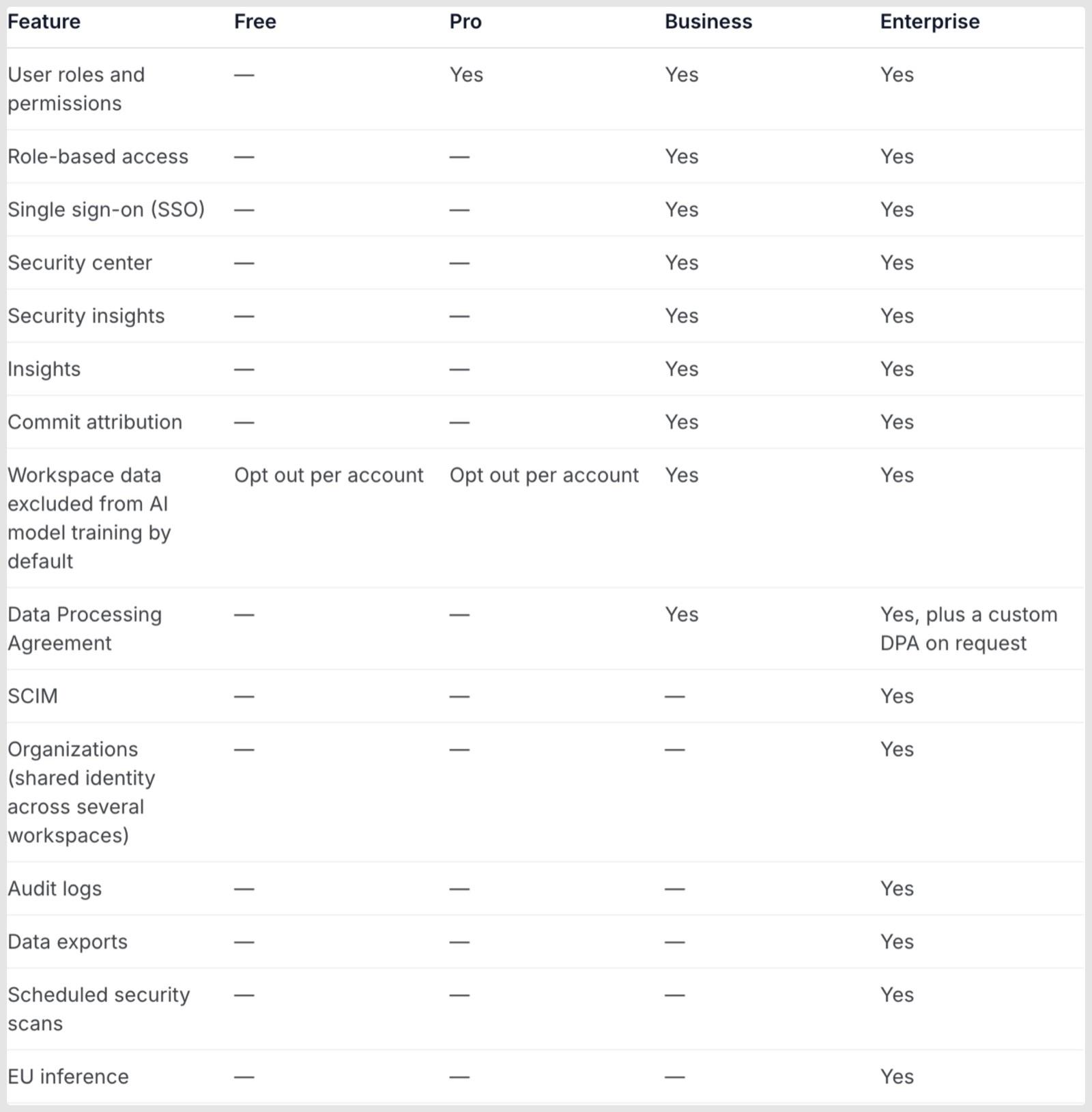
On Enterprise plans, all ten keep your content out of training, Bolt under an MSA or DPA. Below Enterprise it varies by plan, and free plans often train by default, which is the account a designer usually tries the tool on.
Figma's setting is the plainest example. "By default, content training is turned on for Professional teams", and admins can switch it off. On Organization and Enterprise, "Content training is currently disabled for Organization and Enterprise plans and can't be toggled on right now" (Figma AI settings). The setting covers Figma Make along with Figma's other AI tools.
The pattern repeats. Lovable's Free and Pro plans can opt out per account, while Business and Enterprise exclude workspace data by default (Lovable plans). Builder.io may train on Free plans, and its self-serve paid plans have training on until someone switches it off (Builder.io AI use). StackBlitz's privacy policy lets Bolt train on content from accounts outside the EEA, UK and Switzerland unless the user opts out, which any plan can do for free (StackBlitz privacy policy). Claude's consumer plans are opt out, and its commercial products are not used for training by default (Anthropic privacy center).
So the question for a pilot is not which tool trains. It is which workspace the work happens in. Before anyone pastes a screen from your product into a prompt, put the pilot in a workspace on the plan your security team approves, or have an admin turn training off and screenshot the setting for the questionnaire.
How to read a vendor's trust page
A trust page answers four questions, and the badge answers one. Read for the report type, the period it covers, what it covers, and how you get it.
A SOC 2 badge answers one question. The trust page has to answer four.
- Type II, and the period it covers. A Type II report tests controls over months. A Type I tests their design on one day.
- Whose controls. A parent company's report can cover the product. The listing should name it.
- Whose infrastructure. A cloud provider's SOC 2 covers its data centers, not the vendor.
- How you get it. The SOC 2 report comes on request, often after an NDA. The SOC 3 is public.
Example: a made-up vendor's trust page, with the four things to read before the badge.
- Type I or Type II. A Type I report checks that controls were designed properly on one date. A Type II report checks that they worked over an observation period, usually several months. Lovable's trust center gives its period: "February 1 to August 1, 2026" (Lovable trust center).
- Whose controls. v0 "is included in Vercel's SOC 2 Type 2 attestation" (v0 security docs), which is a parent company's report covering the product. UXPin's security page is a different case: "UXPin uses SOC 2 certified infrastructure hosted by AWS" (UXPin security). That is Amazon's report about Amazon's data centers, not a report on UXPin.
- How you get it. A SOC 2 report is shared on request, often under NDA. Builder.io says its report "is available to customers under NDA on request" (Builder.io security). A SOC 3 is the public summary, a "general use" report that "can be freely distributed" (AICPA). Figma lists both on its security page.
A SOC 2 report covers the vendor. It says nothing about the app a prototype turns into once it is published on the vendor's hosting with real data. Your security team will review that app separately.
The tools, one by one
Bolt
Bolt's security page says it runs your project "inside your browser, in an isolated WebContainer environment", and that Bolt is "SOC 2 Type 2 certified" (Bolt security). SSO and audit logs are on Enterprise (Bolt pricing). Its enterprise page offers deployment into your own AWS or Azure tenant (Bolt enterprise). Bolt names no SCIM, so ask what "user provisioning" means on Teams.
Builder Code (Builder.io)
Builder.io renamed its AI product from Fusion to Builder Code in September 2026 (Builder.io). SSO on Enterprise supports "OIDC (OpenID Connect) or SAML 2.0" (Builder.io SSO docs). Its docs say Builder "does not use customer data from Enterprise accounts for AI training" (Builder.io AI use). SCIM and audit logs are not stated.
Claude (Claude Code, Claude Design)
Anthropic lists "SOC 2 Type I & Type II", ISO 27001 and ISO/IEC 42001. A HIPAA-ready Enterprise plan has a BAA available (Anthropic certifications). Audit logs are "available for Enterprise organizations only" (Claude audit logs). Team gets SSO without SCIM, so leavers are removed by hand.
Cursor
Cursor holds SOC 2 Type II, ISO/IEC 27001 and ISO/IEC 42001, with reports "available on request at trust.cursor.com" (Cursor security). Privacy Mode is "enabled by default for all team members", and admins can enforce it organization-wide (Cursor privacy). Audit logs need Enterprise (Cursor compliance docs).
Figma Make
Figma Make sits inside Figma's plans, so it inherits Figma's SOC 2 Type 2 report, SOC 3 and ISO 42001 certification (Figma security). SSO and activity logs start on Organization, and SCIM seat assignment needs Enterprise (Figma plans and features). Data residency is Enterprise only. For Make against design-in-code tools, see Figma alternatives for product teams.
Lovable
Lovable's trust center says it "has completed its SOC 2 Type II audit" (Lovable trust center). Workspace SSO is on Business, with OIDC or SAML 2.0, and SCIM is "available on the Enterprise plan" (Lovable SCIM docs). Audit logs are Enterprise only (Lovable plans).
Magic Patterns
Magic Patterns' trust center lists SOC 2 Type II and ISO 27001:2022 (Magic Patterns trust center). Its docs put both SSO and SCIM on Enterprise (Magic Patterns workspaces). Its enterprise page says "Customer data is not used to train or improve any models" (Magic Patterns enterprise). Audit logs are not stated as a plan feature.
Modeinspect
Modeinspect is SOC 2 Type II compliant and independently audited, with the controls listed on its trust center. On the Enterprise plan, SSO and SAML can be enforced across the organization, SCIM handles provisioning and deprovisioning, access is role based, and audit logs give an exportable activity trail. Code generation uses Anthropic and OpenAI under their commercial and business terms, where data is not used for training. It works on Next.js React codebases that use Tailwind. The details are on the security page and the enterprise page.
Replit
Replit's docs say: "Only organizations with an Enterprise plan are able to use SAML SSO" (Replit SAML docs). SCIM and audit logs sit on the same plan, and audit logs are kept 30 days by default (Replit audit logs). Replit states SOC 2 Type 2 in its security overview.
v0
v0 runs under Vercel's SOC 2 Type 2 attestation. SAML SSO, role-based access and "Your data is never used for training" are on the Enterprise card (v0 pricing). Business is opted out of training by default. SCIM is not stated on v0's pricing, teams or security pages. For a team that already has a codebase, how v0 compares with tools that edit an existing app goes further.
Best prototyping software for enterprise projects: match the tool to the review
For SSO below Enterprise, the enterprise AI prototyping tools to look at are Claude Team, Cursor Teams, Figma Organization and Lovable Business. For SCIM and audit logs, look at Figma Organization or the Enterprise plans at Claude, Cursor, Lovable, Modeinspect and Replit. Match each requirement on your security team's list to the tools whose own pages state it.
| Your security team requires | Tools whose own pages state it, and the plan (November 2026) |
|---|---|
| SSO below Enterprise | Claude Team, Cursor Teams, Figma Organization, Lovable Business |
| SCIM provisioning | Figma Organization. Enterprise at Claude, Cursor, Lovable, Magic Patterns, Modeinspect, Replit |
| Audit logs | Figma Organization (activity logs). Enterprise at Bolt, Claude, Cursor, Lovable, Modeinspect, Replit, v0 |
| No training on your content by default | Lovable Business, v0 Business, Cursor Teams (Privacy Mode), Claude Team, Figma Organization, and every Enterprise plan that states it |
| Data in a chosen region | Figma Enterprise (data residency), Lovable Enterprise (EU inference). Bolt Enterprise deploys into your own AWS or Azure tenant |
Security is only half the choice. Where the prototype lives decides whether it becomes the feature or gets rebuilt, and what AI prototyping solves and breaks covers that trade-off. For which tool fits which job, see how these tools compare by job.
What to send your security team
Send the plan name with the product name, and the links behind each answer.
- The SOC 2 Type II report. Request it through the vendor's trust center, and note the observation period.
- The plan. Name the plan you will buy, since SSO, SCIM and audit logs depend on it.
- SSO. SAML or OIDC, and whether SSO can be enforced for every member.
- Provisioning. SCIM, or JIT plus a manual offboarding step.
- Audit logs. Which plan, and whether they export to your security team's log tool (a SIEM).
- Training. The default on your plan, with a screenshot of the admin setting.
- Data processing. The DPA, the subprocessor list and the data region.
- The prototype itself. Where it is hosted, and whether it calls production data.
Then run the pilot in that workspace, on that plan, from the first prompt.
Frequently asked questions
What are the best Figma alternatives for regulated industries?
It depends on the control your compliance team names. For HIPAA, Claude offers a HIPAA-ready Enterprise plan with a BAA. For your own cloud, Bolt Enterprise deploys into your AWS or Azure tenant. For EU processing, Lovable Enterprise lists EU inference. Staying on Figma, data residency needs Figma Enterprise. How the design tools compare on day-to-day work covers the rest.
Does Figma Make train AI on my designs?
It depends on the plan. Content training is on by default for Starter and Professional teams, and admins can switch it off. On Organization and Enterprise, Figma says content training is off and cannot be turned on. The setting covers Figma Make along with Figma's other AI tools.
Is Lovable SOC 2 Type II certified?
Yes. Lovable's trust center says it completed its SOC 2 Type II audit for the period from 1 February to 1 August 2026, with the report available on request. Its enterprise docs also list ISO 27001:2022.
Does v0 support SCIM?
v0's pricing, teams and security pages do not mention SCIM. SAML SSO, role-based access and audit logs are on the Enterprise plan. If your security team needs SCIM, ask Vercel's sales team to confirm it in writing.
Does Cursor support SCIM?
Yes, on the Enterprise plan, and SSO has to be set up first. Cursor's Teams plan includes SAML SSO at no extra cost but not SCIM, so leavers are removed by hand.
What is the difference between SOC 2 Type I and Type II?
A Type I report checks that a vendor's controls were designed properly on one date. A Type II report checks that the controls actually operated over a period, usually several months. Lovable's report, for example, covers February to August 2026.
Can I get an AI tool's SOC 2 report before we buy?
Usually, yes. Vendors share it through their trust center on request, often after an NDA. Cursor, Bolt, Lovable and Magic Patterns all point to a trust center for it. A SOC 3 is the public summary, if you need something to read today.