Design QA for designers who work in code means reviewing an engineer's pull request before it merges, on its preview deployment and in its diff. When you find drift, you fix it in that pull request, with a suggested change or a commit, instead of filing a ticket for a later sprint.
The ticket route is where the time goes. Eduardo Sonnino, a principal designer for AI at Atlassian, describes a cursor glow that was implemented at "about 80% of the design intent" in Designers' workflow for shipping code. The last 20% of polish, he writes, is "often where 80% of the time gets burned", in "Slack threads and handoff loops."
In chapter 6, you opened your first pull request and an engineer reviewed it. This chapter of the guide to becoming a design engineer reverses the roles, so you review theirs. Some teams call this a design implementation review. What to compare, group by group, is in the checklist in our design QA guide. Below is the designer's side of the design QA process, in five steps.
Step 1: Get added to every pull request that changes the UI
You can't review a pull request you never see. Ask the engineering lead to request your review on every pull request that changes what users see.
Reviewing needs little access. GitHub's docs on pull request reviews say "Anyone with read access can review and comment on proposed changes." Committing a fix to the branch, in step 4, needs the Write role from chapter 6.
Some teams write the rule down. GitLab's code review guidelines require a product designer's approval on user-facing changes. They define those as "visual changes (regardless of how minor), and changes to the rendered DOM which impact how a screen reader may announce the content."
On GitHub, a CODEOWNERS file can do it automatically. List yourself as an owner of the folders that hold components and styles. "Code owners are automatically requested for review when someone opens a pull request that modifies code that they own," GitHub's docs explain.
Code owners need Write access. If the repository also turns on "Require review from Code Owners", a code owner's approval becomes a merge requirement for those folders. Agree on that with the engineering lead before you add yourself.
What you have at the end: your name on the pull requests that change the UI.
Step 2: Open the preview before the code
Start with the running build, not the diff. Google's engineering guide on what to look for in a code review says a UI change is when checking behavior matters most. "It's hard to understand how some changes will impact a user when you're just reading the code."
Open the preview link in the pull request and run the checklist against it. Go group by group at every breakpoint, trigger every state, and use real content. Measure with the browser's dev tools, not by eye.
Pin what you find to the screen. On Vercel, Comments are "enabled by default on all preview deployments, for all account plans, free of charge". The pull request owner gets an email for each new one. Netlify's Deploy Previews have a similar feedback drawer.
A comment still only describes a fix. Use it to mark what you will fix in step 4, and for findings you can't trace to code.
What you have at the end: a list of findings, each with the value the design expects and the value the build shows.
Step 3: Read the diff for what the preview hides
Two builds can look identical and carry different values. The next change builds on those values, so check them in the Files changed tab.
The repository behind modeinspect.com has a real case. Three pull requests started from the same version of app/globals.css and changed the same line, the border of the navigation pill.
  Starting value:
- border: 1px solid rgba(17, 17, 16, 0.08);

  PR #7:
+ border: 1px solid rgba(255, 255, 255, 0.2);

  PR #8:
+ border: 0.5px solid #f4f4ed3b;

  PR #20:
+ border: 1px solid rgba(255, 255, 255, 0.18);
Two of the titles say the change matches the design. On the preview, all three read as the same faint light border. The diff shows three opacities, two color formats and one border half a pixel wide. At most one of them can match the value in the design file, and no side-by-side screenshot would tell you which.
The stylesheet has no token for that border, so each change set its own value, and the missing token is the finding to report. Ask for one, or add it yourself if your team lets designers edit the theme file. Tokens are one of the five concepts from chapter 4.
Chapter 6 lists what to catch in your own diff. On someone else's, look for three more patterns:
| In the diff | What it means |
|---|---|
| A new component that looks like an existing one | The design system now has a copy that will drift on its own |
A class with a breakpoint prefix (md:, lg:) | It changes the layout from that width up. Check the preview just below and just above it |
An arbitrary value in brackets, such as p-[13px] | A value picked outside the spacing scale |
A design lead we spoke with, at a startup with 16 engineers, described drift arriving in two layers. One comes from the design file. The other comes from engineers not using the components that exist. The preview catches the first layer, and the diff catches the second.
Tick "Viewed" on each file as you finish it, so you know what is left.
What you have at the end: each finding tied to a line in the diff, or marked as visible only in the preview.
Step 4: Fix it in the pull request
Pick the route by the size of the fix. Only drift that predates the pull request, or a deviation the team chose, goes to a ticket.
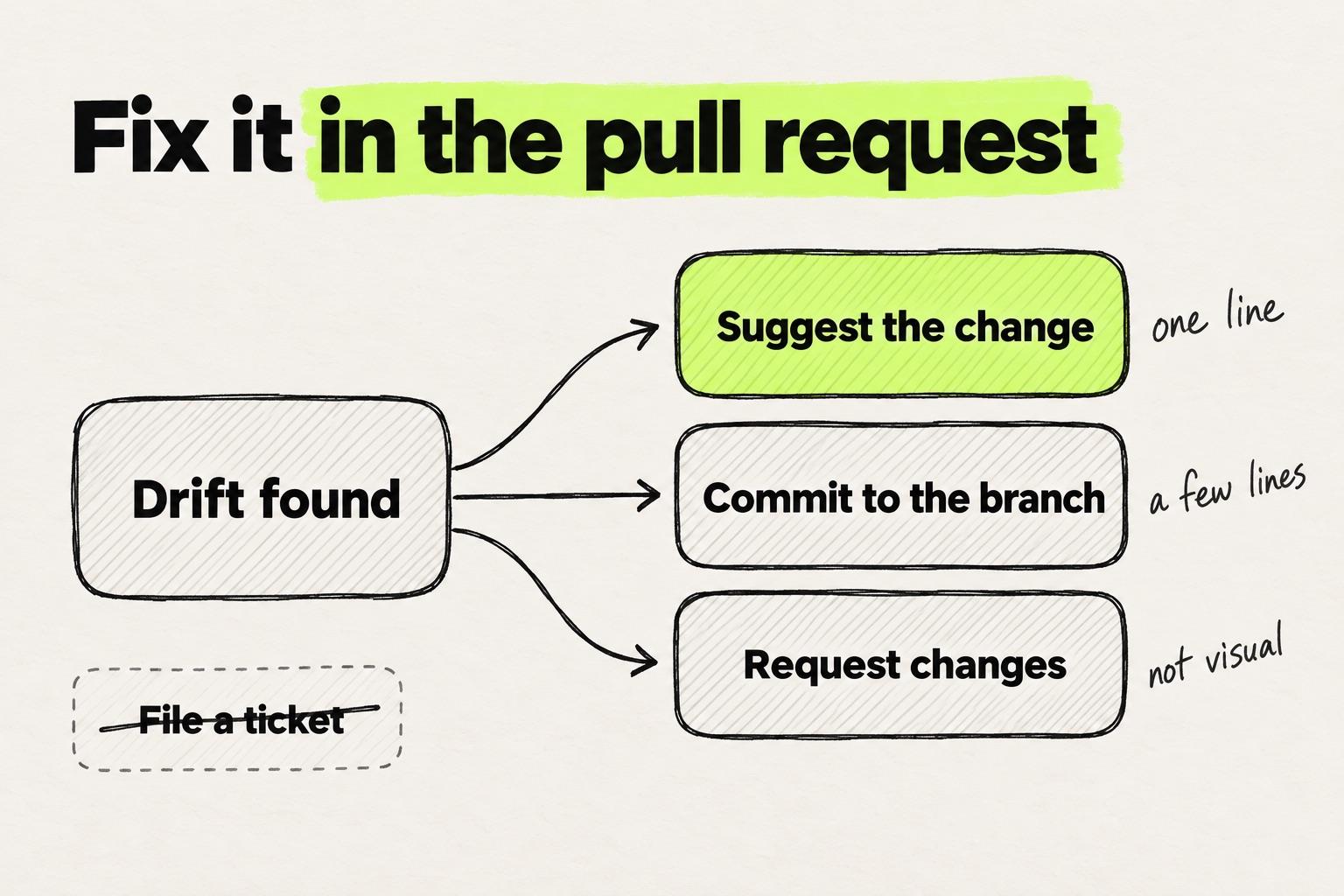
One line: suggest the change
For a wrong token, spacing value or color on a single line, leave a suggested change. In Files changed, click + on the line, then the suggestion icon in the comment box. Then, in the words of GitHub's guide to reviewing proposed changes, "edit the text within the suggestion block."
The engineer applies it by clicking "Commit suggestion". GitHub's docs on incorporating feedback add that "Each person who suggested a change included in the commit will be a co-author of the commit." Your fix lands in the pull request with you as co-author, and nobody retypes it.
A few lines: commit to the branch
A missing hover state or a layout that breaks at one width usually spans several lines or files. Ask the author before you push to their branch, then commit the fix there.
For a small edit, press . on the pull request page to open it in github.dev, GitHub's editor in the browser. For more, check out the branch with a coding agent, one of the routes in the design engineer tools chapter. Either way, leave a comment that says what you changed and why.
Not visual: request changes
When the fix for a finding touches logic, data or performance, leave the fix to the engineer. Choose "Request changes", which asks the author to address it before merging. Give the expected and found value for each finding, so the fix needs no second guess.
A separate pull request
Modeinspect opens an engineer's branch or pull request as a running build that you fix with design controls. The fix arrives as a second pull request for the engineer to review and merge, not as a commit on theirs. It works with Next.js React codebases that use Tailwind. On one team we worked with during a pilot, designers would "open a PR, review and fix component usage".
When a ticket is still right
Two kinds of finding do not belong in this pull request. The first is drift that was already in the product before it. Log that in your design debt backlog and fix it in a pull request of its own.
The second is a deviation the team chose on purpose. GitLab's contributor docs file "intentional deviations from the agreed-upon UX requirements due to time or feasibility challenges" as issues with a ~Deferred UX label. That keeps the decision visible without blocking the merge.
What you have at the end: every finding fixed, requested or deliberately deferred.
Step 5: Approve, then lock the screen with a visual test
Approve once the build matches the design, and say so in one line. Then make sure the next pull request can't quietly undo it.
Mehmet Baytaş, previously a design engineer on Attio's marketing team, explained why this matters more now, in his Hatch Conference 2026 keynote. As AI tools expanded how much code his team could produce, they kept reviewing every line. They also had to add new systems, including error logging and regression testing.
For the visual layer, that means visual regression tests. A visual test compares a new screenshot with a baseline, and a person decides what the baseline is.
In Playwright's visual comparisons, you replace a reference screenshot with the --update-snapshots flag. The docs tell you to commit the snapshot folder "and review any changes to it."
In Chromatic, "Baselines only update when changes are accepted by you or your team" (Chromatic docs). Its UI Review page says to "Invite other developers, designers, PMs, and stakeholders to help review changes."
Approving a baseline is a design decision, so it is the designer's job. After your pass, ask for a visual test on the screen you just fixed, at the breakpoints you checked. Its first baseline is the build you approved.
When a later pull request changes a committed Playwright screenshot, GitHub shows the old and new images in Files changed. Its image diff modes include swipe and onion skin. Approve it only if it matches the design.
What you have at the end: an approved pull request, and a baseline that flags the next drift on that screen.
What changes when designers fix instead of file
Whether your team calls it design QA or UI QA, the process stays the same: preview, checklist, diff. The output changes. A finding becomes a commit in the pull request, not a ticket that waits for a later sprint.
It can also change what engineers measure. One engineering lead we worked with proposed measuring a pilot by "any correction that dev needs to make" after the designer's pass. A component used wrongly, or not at all, counts as one. Each suggested change you leave is one fewer of those.
The next chapter looks at what this work adds up to: turning it into a design engineer career, with the title, the portfolio and the interviews.