Every product designer who wants to ship asks this question sooner or later. This chapter gives the answer, then the list of what to learn, the list of what to skip, and how long it takes.
The short answer
No. You do not need a computer science curriculum, and you do not need a bootcamp. You need five concepts, and you learn all five inside your own team's codebase rather than in a course.
That answer sounds too easy, so here is the fuller version. An AI agent writes most of the code that ships under a design engineer's name. What the design engineer supplies is the intent, the references, and the judgment: which component, which token, which file, and whether the result is right. Those references come from the codebase you already work next to every day.
This chapter is the practical middle of the guide to becoming a design engineer. What a design engineer does all day covers the role itself. The path from product designer to design engineer covers where you are on the ladder. This one covers what to learn, what to skip, in what order, and how long it takes.
Here is the split at a glance.
| Learn | Skip |
|---|---|
| How your codebase is organized | Git internals (rebase, reflog, merge strategies) |
| What your components are called, and what props they take | DevOps and deployment |
| How your design system is implemented in code: tokens and themes | Algorithms and data structures |
| What a pull request is | Build pipelines and bundler configuration |
| How to prompt an agent with those references | Backend logic, databases, APIs |
The five concepts a design engineer learns
Every one of these is specific to your team. That is the point. A generic course teaches you React in the abstract. Your codebase teaches you the twenty or so components you will actually use.
1. How the codebase is organized
The first concept is a map: where pages live, where components live, where styles live, and what the folder names mean.
Open the repository and read the top-level folders before you read a line of code. In a typical Next.js project you will find app/ for routes, components/ for the pieces pages are built from, and a theme folder for tokens. Your team's names will differ. Ask an engineer for a five-minute tour and write down what they say. That note is worth more than any tutorial.
Three folders answer most of the questions you will have.
- app/routes, one folder per page
- settings/
- page.tsxrenders /settings
- components/the pieces pages are built from
- ui/the design system
- button.tsx
- card.tsx
- settings/
- settings-panel.tsx
- theme/tokens: color, spacing, type
- tokens.ts
- Which file renders the screen I want to change? Start from the route.
- Where would a new component go? Next to the screen's other parts, or in ui/ if the design system should own it.
A typical Next.js layout. Your team's names will differ, which is what the five-minute tour is for.
You are done with this concept when you can answer two questions without help. Which file renders the screen I want to change? And where would a new component go?
2. What the components are called, and what props they take
The second concept is vocabulary: the real names of your components, and the options they accept.
Figma layer names and code names drift apart on every team. Your library has a "Primary CTA". The codebase has Button with a variant="primary" prop. An agent prompted with the Figma name will invent a new button. An agent prompted with the code name will reuse the existing one. That reuse is the whole difference between a prototype and a change engineers are willing to merge.
Four layers in the Figma library are one component in code, with props.
<Button variant="primary"><Button variant="primary" size="sm"><Button variant="primary" disabled><Button variant="secondary">Prompt with the code names. An agent asked for a "Primary CTA" builds a new button; one asked for Button with variant="primary" reuses the one engineers maintain.
Props are the inputs a component accepts, like size, variant, disabled or label. You need to know they exist, so you can ask for size="sm" instead of describing a smaller button in prose. How they are implemented is the agent's concern.
You also learn which components belong to the design system and which are one-off leftovers nobody should reuse. Every codebase has both, and engineers will tell you which is which if you ask.
3. How the design system is implemented in code: tokens and themes
The third concept is the design system as it exists in code, which is often not the design system as it exists in Figma.
In code, a design system is usually a set of tokens: named values for color, spacing, type and radius. A theme maps those tokens to light or dark mode. A spacing scale might be theme.spacing.4 through theme.spacing.12, or Tailwind classes like p-4 and gap-6. Colors are colors.fg and colors.line, never hex codes. When you know these names, you can ask an agent to use them, and you can spot when it has hardcoded a hex value instead.
In our interviews with product designers, this was the concept that most changed how engineers responded to a designer's work. A change that uses the team's tokens reads as part of the product. A change with hardcoded values reads as a prototype, however good it looks.
This is also where you protect the system. The person who cares most about the tokens is now the person asking for them by name.
4. What a pull request is
The fourth concept is the pull request, and it is smaller than its reputation. You need the shape of git rather than git itself. A branch is a private copy of the code where a mistake costs nothing. A commit is a checkpoint you can return to. A pull request is the request to bring your checkpoints into the product. That is all the git a design engineer needs.
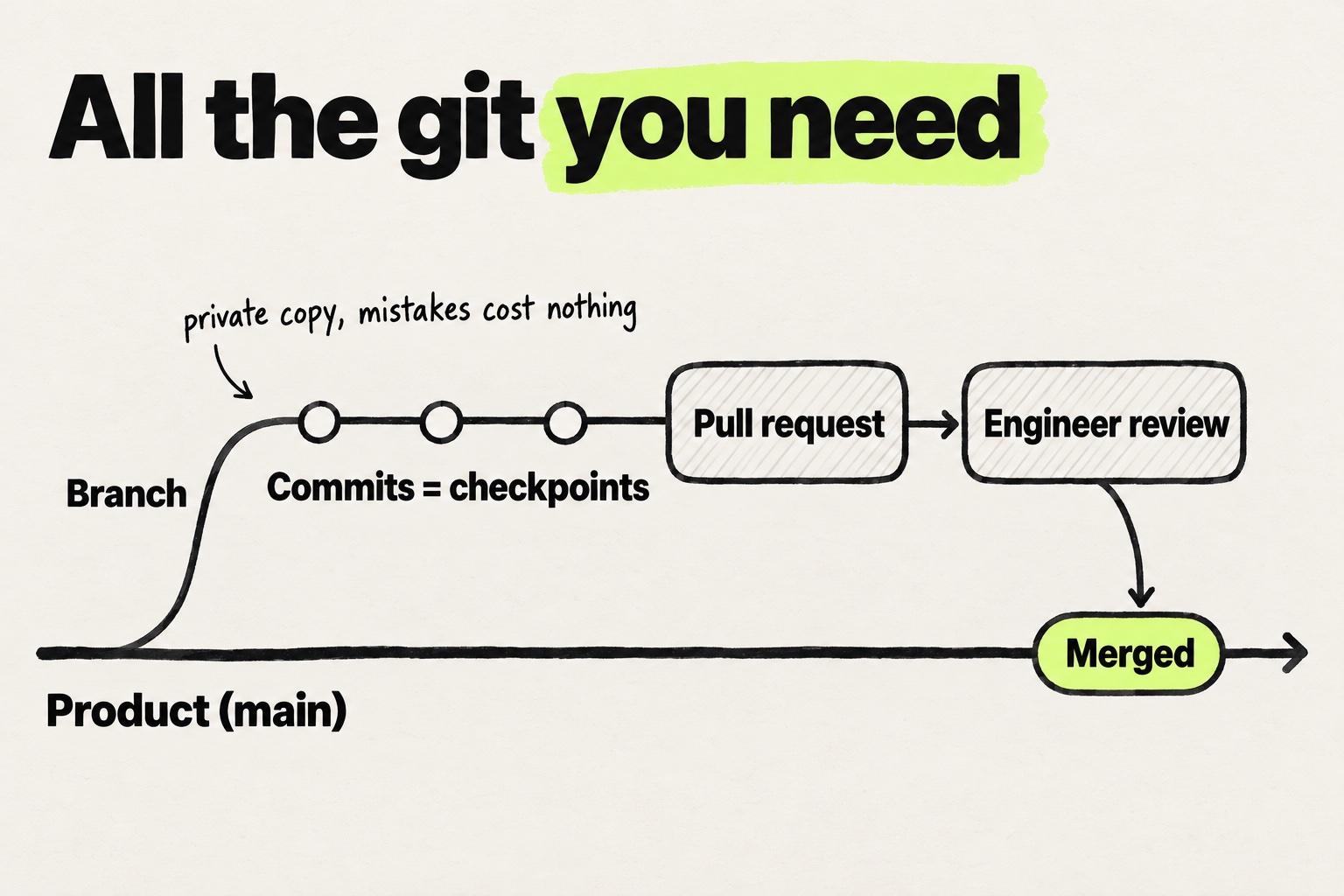
The pull request itself has three parts: the diff (what changed, line by line), a description (why), and a review. In the review, an engineer reads the change, comments, and approves or asks for changes. When it is approved and merged, it is in the product.
You need to know how to read your own diff, how to write a two-sentence description, and how to respond to a review comment. That is enough to get your own change reviewed and merged. If a merge conflict appears, ask an engineer. It takes them two minutes and would take you an afternoon. The review is where engineers stay in the loop, and the only thing removed from the process is the wait.
5. How to prompt an agent with those references
The fifth concept ties the other four together. It is the difference between describing a screen and pointing at the parts that make it.
An agent given a vague prompt fills the gaps with defaults: its own card, its own spacing, its own empty state. An agent given your references has nothing to invent. Here is the same request, before and after the four concepts above.
Make the settings page look like the design.
Update SettingsPanel to use Card from our design system, spacing tokens from theme.spacing,
and match the empty state in NotificationsPanel.
The intent is identical. The output will look nothing alike. The second prompt names one component to change, one to reuse, one token group, and one existing screen to match. Nothing in it is technical. Every item came from the first four concepts, and the second prompt works because it names things that already exist. The same habit carries a designer through a whole change in a coding agent, from reading a screen to the pull request, as Claude Code on a team codebase shows.
Two habits that keep the agent honest
The five concepts are what you know. Two habits are what you do with them, and both are worth practicing from your first prompt.
Break the work down
Ask for one layer at a time. Start with the layout, then add the states, then the validation, then the responsive behavior, and check each step against your design before you ask for the next. Give an agent a whole onboarding flow in one prompt and it will make a dozen decisions you never saw. You will spend longer undoing them than the steps would have taken.
Small steps also keep the pull request small, and a small pull request gets reviewed the same day.
Read what came back
Read the styling in every diff before you open the pull request. Skip the logic. Check three things instead. Is each color and spacing value a token name or a raw number? Are the components the ones from your design system, or new ones the agent invented? Is every state you asked for present?
Three things to check in every diff before you open the pull request.
import { Card } from "@/components/ui/card";+import { Toggle } from "./toggle";export function NotificationsPanel({ items }) {return (<Card className="p-6">+<div className="flex flex-col gap-[14px] text-[#6B6B6B]">+{items.map((item) => (+<Toggle key={item.id} label={item.label} />+))}+</div></Card>);}
- A new Toggle, while the design system already has a Switch.
- A raw number and a hex code. Ask for the tokens:
gap-4andtext-fg-muted. - No empty state: with no items, the card renders blank.
Leave the logic and the performance to the engineer's review. Tokens, components and states are yours.
Leave the logic and the performance to the engineer's review. Your review covers fidelity, which is the thing you care about most and the thing engineers are least likely to check. That judgment is built from concepts two and three, and it is the skill the 2026 debate below turns on.
What you can skip
Skip anything that is about running or scaling software rather than changing what it looks like and how it behaves. That covers most of what a computer science degree teaches.
Chapter 1 covers what the role is not. The short version is that, on the product track, a design engineer is not a developer and does not do DevOps.
Concretely, skip these:
- Git internals. Rebasing, cherry-picking, resolving a conflicted merge by hand, the reflog. Modern tools create the branch and open the pull request for you.
- DevOps and deployment. Servers, containers, CI configuration, environment variables. Your change ships through the same pipeline as everyone else's.
- Algorithms and data structures. Sorting, trees, big-O notation. Interface work does not touch them.
- Build pipelines. Bundlers, transpilers, tree shaking. You will see the names and never need to configure them.
- Backend logic. Databases, APIs, authentication. When a screen needs data, ask which hook already provides it.
- Low-level code. Writing components from scratch, typing every prop, managing state by hand. This is the agent's job, and your references constrain it.
As the manifesto puts it: "Git management, environment setups, low-level code. Design engineers shouldn't have to learn any of that. It's a distraction from shipping."
There are two honest caveats. Skipping the internals only works if engineers stay the reviewers. A design engineer who merges their own work without review has taken on everything on the skip list at once. Keep the review, and the list stays short.
The list is also scoped to the product track, where an engineering team owns production. A job that makes you the owner of a production website, which happens on the marketing track, moves DevOps and deployment from the skip list to the learn list. Chapter 2 covers that job and the practitioner who warns designers about it.
The debate in 2026
The question in this chapter's title is the most contested one in design engineering right now. Four public positions stake out the range, and one practitioner's working file shows what the answer looks like in practice.
Lisa Demchenko (Process to Pixels on Substack) argues that design engineers "no longer necessarily need to write code". They must, though, be able to judge what the AI produced. In her view, the skill moved from writing to evaluating.
Daniel Farrell of Onlook (State of design in 2026) goes further: "anyone can really be a design engineer, it just depends on your appetite for prompting." On this view the barrier is willingness rather than knowledge.
Carrie Webster at Smashing Magazine warns of a "competency gap". When production-ready output becomes a design deliverable, designers may ship code they cannot evaluate. The gap between what they can produce and what they can judge is a risk for the product.
Mehmet Baytaş, previously a design engineer on Attio's marketing team, took the question from the audience at his Hatch Conference 2026 keynote. Can someone who does not code, but uses AI tools well, become a design engineer? He thought so. Every technologist learns several languages over a career, and AI is "a higher level programming language", the next step after the text editor and the IDE. Earlier in the talk, his caveat was about volume rather than entry: "the individual tasks of engineering are getting easier, but also the scope of engineering is getting larger."
Emil Kowalski, a design engineer, publishes a design engineering skill file on GitHub (github.com/emilkowalski/skills). A skill file is a written set of instructions a coding agent reads before it works. Rather than a position on the question, his file is a concrete example of what "prompting like an engineer" looks like in practice. Conventions, references and a quality bar are written down once, so every prompt starts from them. We publish six design engineer skills built the same way, for the jobs in chapters 6 and 7: getting an unfamiliar repository running, before and after screenshots, and a pull request an engineer can review.
The numbers behind the debate come from the Designer Fund and Foundation Capital "AI in Design Report 2026" (stateofaidesign.com). Half of designers have shipped AI-generated code to production, but only one in five call themselves design engineers. Most designers who ship AI-generated code do not use the title.
Half of designers ship code. One in five uses the title.
- Taking on more product or engineering work65%
- Have shipped AI-generated code to production50%
- Say a working prototype is an expected deliverable43%
- Self-identify as design engineers20%
Source: Designer Fund and Foundation Capital, AI in Design Report 2026
This guide's position sits closest to Demchenko, and Webster's warning holds. Baytaş's yes matches ours, and his caveat is why the skip list is scoped to the product track, where the growing scope lands on the engineering team. Farrell is right that willingness is the entry ticket, and in our interviews nobody was stopped by aptitude. But "appetite for prompting" is exactly what the designers in those interviews lack, especially for small visual changes. Prompting gets easier when you have references to name, and the five concepts are how you get them. Webster's gap closes the same way: reading what came back is what lets you judge an agent's output, and the engineer's review catches what you missed. Kowalski's skill file is the senior version of the same idea, written down so the agent reads it every time.
Put plainly: you do not need to write code. You do need to read a diff, recognize your own components and tokens in it, and know when to ask.
A suggested order, and how long it takes
The designers we have talked to did not follow a course, and almost none had a computer science degree. They followed roughly this order, and the ones who got stuck had usually skipped a step. The time budgets on each step are suggestions, sized so the whole list fits alongside a normal design workload.
- Get read access to the repository and a preview running. Ask an engineer to set this up with you. This is the step designers most often delay, and the one that unblocks everything else. Budget an afternoon if an engineer helps, and more if you do it alone.
- Read the folder structure and find the screen you want to change. Budget an hour. Write down the file path.
- List the components on that screen and their props. Open each file, or the Storybook entry if your team has one. Note the names. Budget two to three hours, spread over a few days.
- Find the tokens. Locate the theme or tokens file. Note the spacing scale, the color names, and the type scale. Budget an hour.
- Pick a change you could describe in two sentences. A spacing fix, a missing state, a copy change with a layout tweak. Save new features for later.
- Prompt the agent with your references, in the "after" form above. Read the diff. Check every value against your token names.
- Open the pull request and ask for a review. Reply to the comments. Merge when approved.
- Repeat, without the checklist. Open the repository, find the component you have been redrawing in Figma for years, and name it in your next prompt. Most of the distance is in that habit.
For those designers, the distance from step one to a first merged pull request was two to eight weeks, alongside a normal design workload. The spread was set by two things: how fast the designer got access to the repository, and whether an engineer agreed early to review their work. Aptitude did not decide it. The second pull request took days. By the fifth, most of them had stopped thinking of it as a separate skill.
Two to eight weeks to a first merged pull request, alongside normal design work.
weeks since first access to the repository
First look at the repository
The second pull request
No longer a separate skill
Where a designer landed in the range came down to how fast they got repository access and whether an engineer agreed early to review. Aptitude did not decide it.
Two failure modes came up repeatedly. Starting with a new feature instead of a small change, and prompting from a Figma frame instead of from the codebase. Both produce a demo that has to be rebuilt, which is the rung-two problem described in the new design ladder.
What changes for you
If you have been waiting to "learn to code" before calling yourself a design engineer, the wait is over. The five concepts above are a few weeks of attention inside a codebase you already have access to, or can get access to this week. Nothing on the skip list stands between you and a merged pull request.
What changes is your deliverable. Instead of a frame that an engineer rebuilds, you open a change that an engineer reviews. Your taste is the same, and every design decision is still yours. And the handoff, the place where most of your work used to die, has nothing left to carry. Each merged pull request is also the first entry in a design engineer portfolio.
Modeinspect is built for this step: a canvas on the real codebase that turns the change into a pull request. Where a general coding tool fits for this kind of prompting is a separate question, covered in how Cursor compares for designers.
The next chapter compares design engineer tools, dated and side by side, including where each tool stops. Chapter 6 then walks through a first pull request in a real repository, with the change, the diff, the review and the merge.